
You paid for a professional website. The photos look sharp. The logo is clean. The service pages read well. But the calls aren't coming in, and the contact form might as well be unplugged.
That situation is common for contractors, law firms, medical practices, and service businesses around Fort Myers. The site looks finished on the surface, but the parts that help Google crawl, understand, and trust it never got built correctly. That's where Technical On-Page SEO comes in.
Think of your website like a work truck. Fresh paint helps. Lettering on the doors helps. But if the engine misfires, the alignment is off, and one tire is flat, it won't win jobs because it won't get to the jobsite reliably. Technical On-Page SEO is that engine work. It's what helps your pages load properly, get indexed, show the right signals, and compete for the spots people click.
Why Your Beautiful Website Is Still Invisible
A small business owner usually notices the same pattern first. Branded website. Decent copy. Maybe even a few blog posts. Yet when someone searches for the exact service in the exact city, competitors show up and your business doesn't.
That usually isn't a design problem. It's an infrastructure problem. Google can't rank what it can't crawl properly, interpret clearly, or load well on mobile. A good-looking site with poor technical setup is like a storefront with the lights on and the front door jammed shut.
The real cost of being almost visible
For local businesses, "close enough" in search results doesn't mean much. If your roofing page sits lower on the page, or your plumbing page never gets fully indexed, you don't just lose a little attention. You lose the clicks that turn into estimates, calls, and booked jobs.
Search position has a direct effect on traffic. Pages in Google position 1 get 27.6% CTR, position 2 gets 15.8% CTR, and the top result is about 10 times more likely to get a click than position 10, according to Lumar's search click-through analysis. That gap is why technical fundamentals matter so much. They help your site qualify for the positions where buyers click.
Practical rule: If Google struggles to render your page, choose the canonical version, access your images, or understand your structure, the page won't compete no matter how polished the design is.
What this looks like in the wild
A home services site often has one or more of these issues:
- Oversized hero images that make the page feel slow on phones
- Duplicate service pages targeting nearly the same keyword in nearby cities
- Weak title tags that don't match search intent
- Broken internal links leading to old URLs after a redesign
- No schema markup to clarify business details
- Navigation that buries important pages several clicks deep
None of these problems feels dramatic when you look at the homepage. Together, they can keep a business invisible.
Technical On-Page SEO fixes that hidden layer. It doesn't replace strong sales copy or reputation. It makes those things count.
Understanding the Foundation of Your Digital Presence
Technical On-Page SEO is the part of SEO that makes an individual page usable for both humans and search engines. It covers the structure, speed, accessibility, indexing signals, and machine-readable details that sit underneath the visible content.
The easiest way to understand it is to think about building a house. Your content is the furniture, paint colors, and fixtures. Off-page SEO is the neighborhood reputation and street visibility. Technical On-Page SEO is the slab, framing, wiring, plumbing, and address labels that make the house livable and easy to inspect.
What belongs in technical on page SEO
At the page level, this usually includes:
- Titles and descriptions that help search engines and users identify the page
- Heading structure that shows topic hierarchy
- Internal linking that connects related pages logically
- Canonical tags that point Google to the preferred version
- Image handling so pages load and render properly
- Schema markup that gives search systems clearer context
- Mobile usability so important content works on a phone
- Resource accessibility so bots can load page elements correctly
Google's own guidance repeatedly points site owners toward these practical signals. If titles are weak, canonicals are missing, or resources are blocked, Google gets an incomplete picture of the page.
Why small businesses should care
For a local business, this work isn't cosmetic. It's often one of the most efficient parts of the marketing stack because it improves the performance of pages you already have.
One industry source reports 117% ROI for technical SEO campaigns with a 6-month payback period, and notes that on-page SEO accounts for 41.80% of SEO services market revenue in the category data it cites. See the figures in GTM 80/20's technical SEO statistics summary. The exact takeaway for a small business is simple. Fixing infrastructure can outperform constant content churn or scattered ad spend.
If your service pages already exist, improving how they load, connect, and communicate with search engines is often cheaper than rebuilding your lead generation from scratch.
Where user experience fits
A lot of business owners split "SEO" and "website experience" into separate buckets. In practice, they overlap heavily. A page that loads awkwardly, shifts around on mobile, or hides key information behind poor structure frustrates visitors and makes search performance harder to sustain.
This is why user experience affects SEO in practical ways for local lead generation. Better technical setup supports both rankings and conversions. When those two work together, the site stops being an online brochure and starts acting like a sales asset.
The Core Components of Technical On-Page Health
The fastest way to assess Technical On-Page SEO is to stop thinking in abstract SEO terms and start looking at the page like a mechanic looks at a vehicle. Does it start quickly? Can someone steer through it easily? Are the signals clear? Is anything leaking?
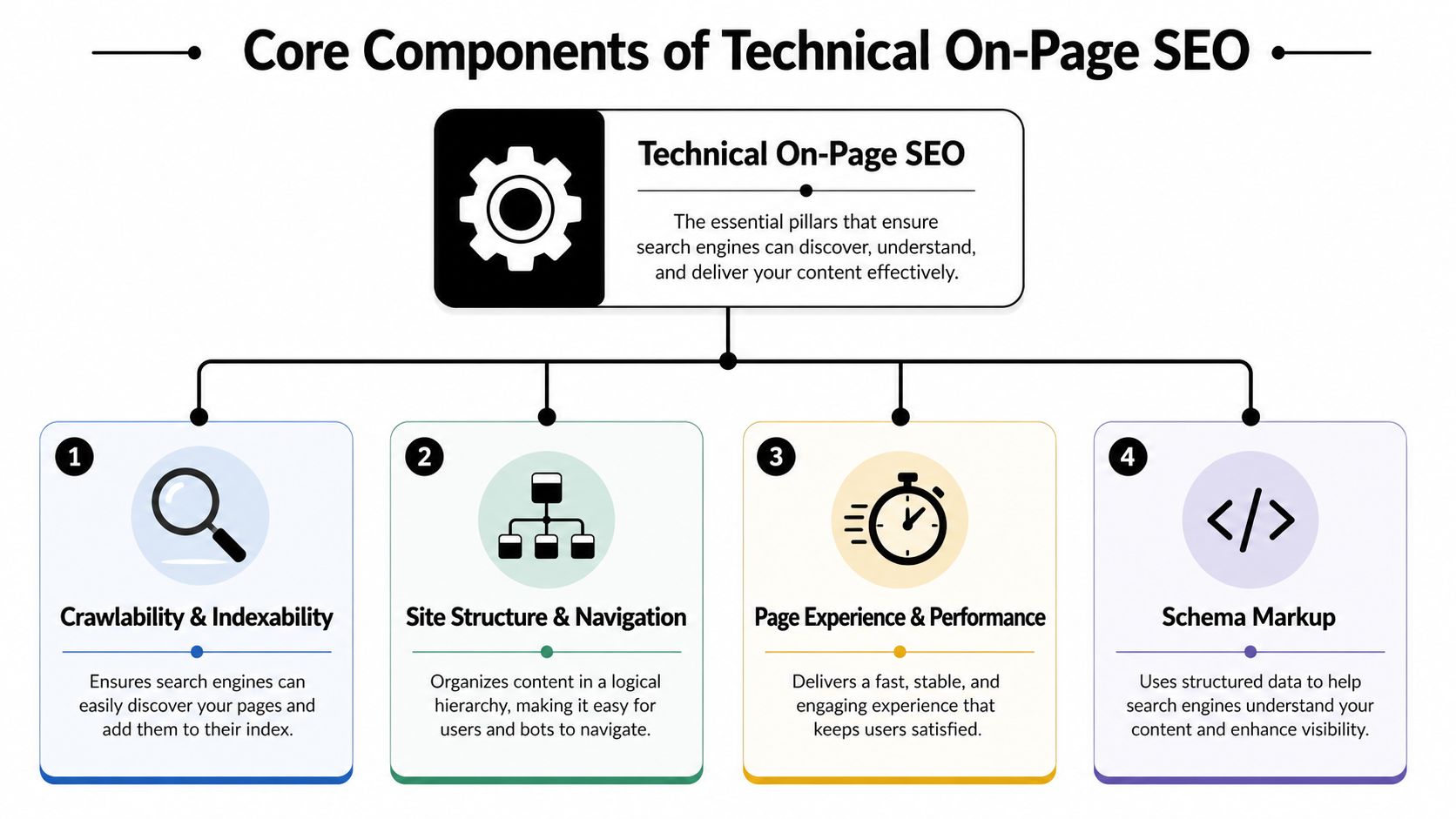
The four big pillars are below. This visual gives you the shape of the system before you audit the details.
Site structure and navigation
Site structure is how pages are organized and how users move between them. On a local business site, that means your homepage, service pages, location pages, about page, and contact page should connect in a way that makes sense.
Bad structure looks like this: a roofing company hides "roof repair" under a vague dropdown, links to two near-duplicate pages, and never links those pages from the homepage body content.
Good structure looks like this:
- Clear service clusters such as Roofing, Roof Repair, Roof Replacement, Emergency Tarping
- Logical location support where city pages support core service pages instead of competing with them
- Internal links with descriptive anchor text such as "roof repair in Fort Myers" instead of "click here"
Think of this like aisle signs in a hardware store. If customers and Google both get lost, the store won't sell much.
Crawlability and indexability
A page can't rank if search engines don't reliably discover it, load it, and choose the correct version to index.
Common problems include orphan pages, accidental noindex settings, duplicate versions of the same page, and important resources blocked from crawling. These issues often show up after a redesign, a platform migration, or a well-meaning plugin install.
What works:
- One preferred page per intent
- Canonical tags on pages that could otherwise duplicate each other
- Updated XML sitemap
- Internal links pointing to live, final URLs
- No dead-end service pages with zero links from the rest of the site
What doesn't work is publishing five thin pages about the same service in the same city and hoping Google will "figure it out."
Page experience and Core Web Vitals
Speed isn't just a vanity metric. It affects whether users stick around long enough to call, and it gives you a measurable quality target.
Google's Core Web Vitals thresholds for a good page experience are LCP at 2.5 seconds or less, INP at 200 milliseconds or less, and CLS at 0.1 or less, as summarized in Semrush's guide to technical SEO. In plain English, that means your main content should appear quickly, the page should respond promptly when someone taps or clicks, and the layout shouldn't jump around while loading.
A contractor's homepage often fails these tests for boring reasons:
- Hero images are too large
- Third-party scripts pile up
- Sliders and animations delay content rendering
- Buttons move as fonts or banners load
Later in the page, this video gives a straightforward overview of the mechanics involved.
Schema markup and machine-readable signals
Schema markup helps search engines interpret your page with more precision. For local businesses, this matters because search systems don't just read prose anymore. They also parse structured clues.
If your contact page plainly states your business name, address, phone number, hours, and service type, that's useful. If that same information is marked up in machine-readable form, it's easier for systems to process consistently.
A page written only for human eyes leaves some interpretation work to Google. A page with clean structure and schema reduces that guesswork.
Useful schema examples for local businesses include LocalBusiness, Service, FAQ, and Organization. The point isn't to stuff code onto every page. The point is to clarify your business, your services, and your geography.
Mobile usability, HTTPS, and URL quality
These are less glamorous than content strategy, but they break sites all the time.
- Mobile usability: Your call button, form, map, and service copy need to work cleanly on a phone. Local search often starts there.
- HTTPS: If the site throws security warnings or mixed-content issues, trust drops immediately.
- URL structure: Short, descriptive URLs beat messy strings and old duplicate paths.
A good local services URL looks like /roof-repair-fort-myers/. A poor one looks autogenerated, vague, or inconsistent with the rest of the site.
When these basics are right, everything else on the page performs better.
How to Find and Prioritize Technical SEO Issues
Most small business sites don't need a giant enterprise audit to uncover useful fixes. They need a practical inspection. Start with the pages that generate leads or should generate leads: homepage, primary service pages, location pages, and contact page.
Use free tools first. They won't catch every edge case, but they'll surface the issues that usually matter most.
Start with the obvious tools
Open Google Search Console and Google PageSpeed Insights. Then review your site manually on your own phone.
Look for three categories of problems:
- Visibility problems such as pages not indexed, duplicate pages, crawl issues
- Performance problems such as slow loading, layout shift, poor mobile rendering
- Structure problems such as weak titles, broken links, confusing navigation, missing internal links
If you want a benchmark for what a client-facing review often includes, this SEO audit sample reports page gives you a useful reference point.
Use an impact-versus-effort filter
Don't treat every issue equally. A broken internal link on your main service page matters more than a tiny image optimization on an old blog post. A duplicate Fort Myers service page competing against your main service page matters more than polishing meta descriptions on pages that never had a clear purpose.
A simple prioritization model works well:
High impact, low effort
Fix these first. Broken internal links, oversized images, missing title tags, accidental noindex tags, and obvious heading issues fit here.High impact, high effort
Plan these next. Rebuilding navigation, consolidating duplicate service pages, or repairing a weak location-page structure often takes more coordination.Low impact, low effort
Clean these up when convenient. Minor alt text gaps or small formatting inconsistencies are useful, but they won't rescue a weak site alone.Low impact, high effort
Delay these unless they support a larger project. Some highly technical cleanups look impressive in an audit and do very little for a local lead-generation site.
Field note: If a fix doesn't improve discoverability, clarity, speed, or conversion on an important page, it probably doesn't belong at the top of your list.
DIY Technical On-Page SEO Audit Checklist
| Check | Tool to Use | What to Look For (Good vs. Bad) | Priority |
|---|---|---|---|
| Homepage index status | Google Search Console | Good: page is indexed and eligible. Bad: excluded, duplicate, or blocked | High |
| Primary service page speed | Google PageSpeed Insights | Good: content appears quickly and page feels stable. Bad: slow hero section, delayed interaction, shifting layout | High |
| Mobile usability | Your phone plus browser review | Good: tap targets work, forms fit screen, text is readable. Bad: cramped layout, hidden buttons, popups blocking action | High |
| Internal links | Manual review or crawling tool | Good: links lead to live, relevant pages. Bad: 404s, redirects, vague anchor text | High |
| Title tags and meta descriptions | Browser tab, SEO plugin, or CMS fields | Good: unique and intent-matched. Bad: duplicates, missing tags, generic labels | Medium |
| Heading structure | Manual page review | Good: one clear H1 and logical subheadings. Bad: multiple H1s, skipped hierarchy, decorative headings only | High |
| Canonical setup | Page source or SEO plugin | Good: preferred URL is clear. Bad: duplicate pages without a canonical signal | High |
| Image handling | Manual page review plus PageSpeed Insights | Good: images fit layout and load cleanly. Bad: giant files, blurry mobile scaling, layout jumps | High |
| Schema presence | Rich result or schema testing tools | Good: business details are structured clearly. Bad: no local markup or broken markup | Medium |
| URL consistency | Manual review | Good: short, descriptive service URLs. Bad: cluttered parameters, mixed naming conventions | Medium |
This kind of audit works because it mirrors how a real buyer experiences the site. They search, click, scan, and decide quickly. Your priority list should match that path.
Winning Locally with Technical On-Page Signals
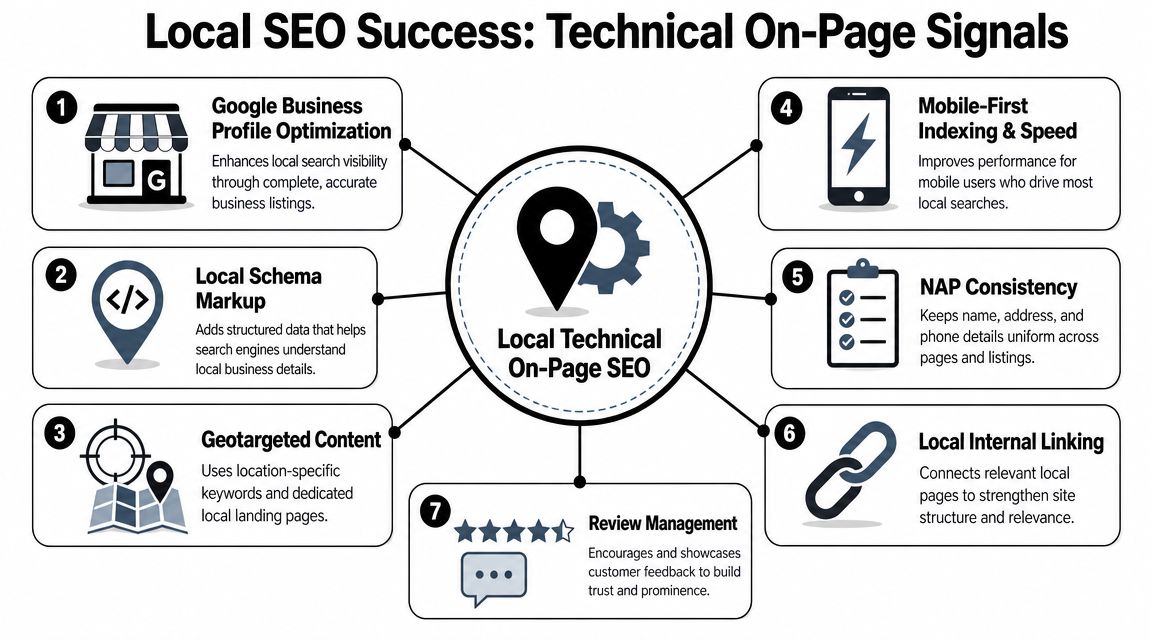
Local SEO gets framed as profiles, citations, and reviews. Those matter. But the website still acts as the confirmation layer. It tells Google whether your business details are consistent, whether your service coverage is clear, and whether your pages deserve to support local visibility.
For a Fort Myers contractor or professional service firm, technical signals on the site often decide whether local relevance is obvious or muddy.
What local businesses should tighten first
Start with the information a buyer and a search engine both need to confirm:
Consistent NAP details
Your business name, address, and phone number should be crawlable text on the site, not just embedded in an image.Service and location clarity
If you serve Fort Myers, Cape Coral, Estero, and Naples, your pages should explain that clearly without cloning the same page over and over.Machine-readable business context
Structured data helps systems connect your business type, location, and page purpose more reliably.
This matters even more now because Technical On-Page SEO overlaps with AI-driven search behavior. As Pathmonk's comparison of technical SEO and on-page SEO explains, improving machine-readable structure can matter more than adding more keywords when search systems need to parse and summarize a page.
A simple LocalBusiness schema example
For a Fort Myers roofing company, a basic JSON-LD implementation might include:
{
  "@context": "https://schema.org",
  "@type": "RoofingContractor",
  "name": "Example Roofing Company",
  "address": {
    "@type": "PostalAddress",
    "addressLocality": "Fort Myers",
    "addressRegion": "FL"
  },
  "telephone": "(239) 555-0000",
  "areaServed": ["Fort Myers", "Cape Coral", "Estero"],
  "url": "https://www.example.com/"
}
The exact fields can vary. The goal is clarity, not complexity. If your website says one thing, your schema says another, and your Google Business Profile says a third, you're creating friction.
Where local lead generation gets won
A "near me" search usually happens on a phone, often when the person is ready to call. That means local Technical On-Page SEO should support immediate action.
Good local pages usually have:
- Fast mobile loading
- Tap-friendly call buttons
- Service details above the fold
- Local proof points
- Matching business information across key pages
A local site doesn't need to be fancy. It needs to be clear, consistent, and easy for both humans and search systems to trust.
Quick Wins for Improving Your Site's Performance
You don't need a developer for every technical fix. Some of the highest-value improvements are simple enough to handle in your CMS, with an image tool, or inside Google Search Console.
Compress the image that's slowing down your page
The biggest image on the page is often the first culprit. On many small business sites, that's the hero banner.
Do this:
- Export the image at the actual display size you need.
- Compress it with a web image tool.
- Re-upload it in a modern format if your platform supports it.
- Check the page again on mobile.
If you want a practical walkthrough, this guide on how to optimize images for web covers the process in plain terms.
Fix heading structure before writing more content
A page with one clear H1 and properly nested H2 and H3 headings gives search engines a cleaner map of the topic. Guidance cited by Pipeline Road's on-page SEO expert article also notes that consolidating thin, conflicting pages into one stronger canonical page often resolves keyword cannibalization better than trying to prop up every weak page separately.
That gives you two immediate actions:
- Keep one primary page per service intent
- Use one H1 per page and organize subtopics underneath it
If you have three weak pages for the same service in the same city, combine them into one stronger page before you publish another blog post.
Clean up broken pages and wasted clicks
In Google Search Console, check for pages that return errors or pages users can't reach properly.
Then:
- Update internal links so they point to the final live page
- Redirect retired pages to the closest relevant replacement
- Remove links to junk pages left over from old campaigns or redesigns
Rewrite title tags for service intent
A local service title tag doesn't need to be clever. It needs to be clear.
A workable template is:
Primary service + city | business name
Examples:
- Roof Repair in Fort Myers | Example Roofing
- Family Lawyer in Cape Coral | Example Law Firm
- AC Repair in Estero | Example HVAC
Short, direct titles usually outperform vague branding when the goal is lead generation.
Know when to hand it off
If your issues involve schema errors, duplicate templates, JavaScript-heavy rendering problems, or widespread indexing confusion, it may be time to involve your web developer, SEO consultant, or one of the agencies that handles both website and SEO implementation, including Polaris Marketing Solutions.
Frequently Asked Questions About Technical On-Page SEO
What's the real difference between technical SEO and technical on-page SEO
Technical SEO is the broader category. It can include sitewide items like crawl directives, sitemaps, redirects, and platform-level issues. Technical On-Page SEO narrows that focus to what happens on or directly around individual pages, such as titles, headings, canonicals, schema, image delivery, internal links, and page experience.
How often should a small business conduct a technical SEO audit
Do a light review monthly and a more thorough audit after any redesign, platform change, major content expansion, or drop in lead volume from organic search. Small issues become big ones when they sit unnoticed for months.
Can I realistically do this myself, or when should I call an expert
You can handle the basics yourself if you're comfortable using Google Search Console, PageSpeed Insights, your CMS, and simple content edits. Call an expert when you see indexing problems you can't explain, duplicate page conflicts, broken schema, major speed issues, or a site structure that no longer matches how your services should rank.
If your website looks good but still isn't producing enough qualified local leads, Polaris Marketing Solutions can help you evaluate the technical issues that may be holding it back. The agency works with small and midsize businesses in Fort Myers and surrounding Southwest Florida markets on SEO, website design, hosting, and local search improvements, with a focus on practical fixes tied to visibility and lead generation.