
You’re probably dealing with this right now. A customer calls. A crew member texts. An estimate needs to go out. Meanwhile your Facebook page hasn’t been updated in weeks, your Instagram has three random photos from last year, and you know social media matters, but it keeps landing behind work that feels more urgent.
That’s the core problem with most advice about social made simple. It sounds easy until you’re the one trying to film videos between job sites in Fort Myers, answer comments after dinner, and somehow turn all of it into actual leads.
The fix isn’t posting everywhere. It isn’t chasing trends. It’s building a lean system that supports your sales process, your local visibility, and your follow-up. For a roofer in Cape Coral, a med spa in Naples, or a law firm in Fort Myers, social works best when it’s tied to real business actions. Reviews. Service-area content. Calls. Form fills. Booked appointments.
Putting Your Social Media on Autopilot Not Your To-Do List
Monday starts with a voicemail from a prospect in Fort Myers. By noon, you are chasing down a supplier, answering a text from the crew, and trying to get an estimate out before the day gets away from you. Social media slips again, then gets crammed into Friday afternoon, and the posts feel rushed because they are.
That pattern is common, and it usually leads to uneven results. The fix is a simple operating system for social, one that supports lead flow without asking you to become a full-time content creator.

Give social one clear job
For a local business, social should help sales in a specific way. In my experience, the best use is usually one of three jobs:
- Stay visible so past prospects, referral partners, and local customers keep seeing your name
- Build trust by showing real work, real people, and how you solve problems
- Create response paths through calls, messages, quote requests, or appointment bookings
A roofer in Cape Coral does not need a clever content strategy for the whole internet. That business needs a homeowner to see a recent project, recognize the service area, and feel comfortable making contact.
Keep the filter simple. If a post does not support visibility, trust, or inquiries, it probably does not belong on the schedule.
There is also a local search benefit to staying active. Your social profiles often show up when someone Googles your business name, and a neglected feed can weaken the first impression right when a prospect is comparing options.
Build a schedule you can keep
Small businesses usually do better with a repeatable routine than a big monthly plan that falls apart by week two.
Start here:
- Choose two posting days
- Batch photos, short videos, and captions once a week
- Reuse proven topics in more than one format
- Set 10 to 15 minutes a day for replies and DMs
That is enough to keep momentum without turning social into another jobsite problem.
For example, a Fort Myers med spa might batch one testimonial post, one treatment FAQ, and one before-and-after approval photo each week. A Cape Coral roofer might post one completed project, one insurance claim tip, and one short crew video. The point is consistency, not volume.
If you need scheduling help, this roundup of social media tools for 2026 gives you a practical comparison of options. For a more small-business-focused breakdown, review these social media management tools for small businesses before you commit to a platform.
The businesses that get results from simple social treat it like a recurring sales support task. They put a light system in place, protect a small block of time each week, and connect each post to a next step that can be tracked later.
Choose Your Platforms Wisely Not Every Channel Fits Your Business
The fastest way to waste time is to open accounts on five platforms because someone said you “should be everywhere.”
You shouldn’t.
A roofer in Cape Coral has a different buying cycle than a pediatric clinic in Fort Myers. A family law attorney has a different audience than a boutique in Naples. Platform choice should match how customers buy, not what’s trendy this month.
Use a simple decision filter
Pick platforms by answering three questions:
- Where does your customer already spend time?
- What kind of proof helps them trust you?
- What action do you want them to take next?
If your answer to the second question is “before-and-after photos, project updates, and reviews,” Facebook and Instagram usually make more sense than LinkedIn.
If your answer is “professional credibility, industry knowledge, and referral relationships,” LinkedIn deserves attention.
If your buyers need fast visual proof and local familiarity, Facebook is often still the workhorse for Southwest Florida service businesses.
What fits different local business types
Here’s the practical version.
For home services like HVAC, roofing, paving, cleaning, and pool service, Facebook usually earns its place first. Homeowners use it to check reviews, look at photos, and see whether your business appears active and legitimate. Instagram can help if you have visual work to show, but it should support the main platform, not create more work than it returns.
For healthcare practices, Facebook helps with community visibility, updates, and patient education. Instagram can work well for med spas, dental offices, and wellness brands that benefit from visual content. Keep it polished and compliant.
For legal and professional services, LinkedIn may matter more than Instagram. That doesn’t mean Facebook has no value. It means your content style changes. A local attorney may get more business mileage from community updates, FAQ-style posts, and referral credibility than from trying to act like a creator.
If your customers aren’t asking for you on a platform, don’t force it. Put your energy where buying intent is easier to capture.
A practical example
Take a roofer serving Fort Myers, Cape Coral, and North Fort Myers.
A good platform setup would look like this:
- Facebook as the primary channel: storm repair updates, project photos, reviews, financing reminders, seasonal maintenance posts
- Instagram as the secondary channel: before-and-after visuals, short jobsite reels, team spotlights
- No TikTok unless someone on the team can maintain it well: not because TikTok is bad, but because weak execution drains time
That business doesn’t need more channels. It needs better consistency on the right ones.
Don’t confuse presence with performance
Owners often say, “We have social media.” What they usually mean is, “We claimed the accounts.”
That’s not a strategy.
A half-dead page on three networks does less for trust than one active page with current photos, local proof, and a clear contact path. Social made simple starts with choosing fewer channels and running them well.
Build Your Simple Content Machine
A Fort Myers business owner usually does not run out of work to talk about. The problem is turning that work into posts without wasting an hour every time.
That is what a content machine fixes.
Instead of asking, “What should we post today?” build a repeatable system around the proof you already create on the job. For a roofer in Cape Coral, that means storm repair photos, inspection findings, customer reviews, and common homeowner questions. For a med spa in Fort Myers, it might be treatment FAQs, before-and-after results, staff expertise, and appointment prep tips.
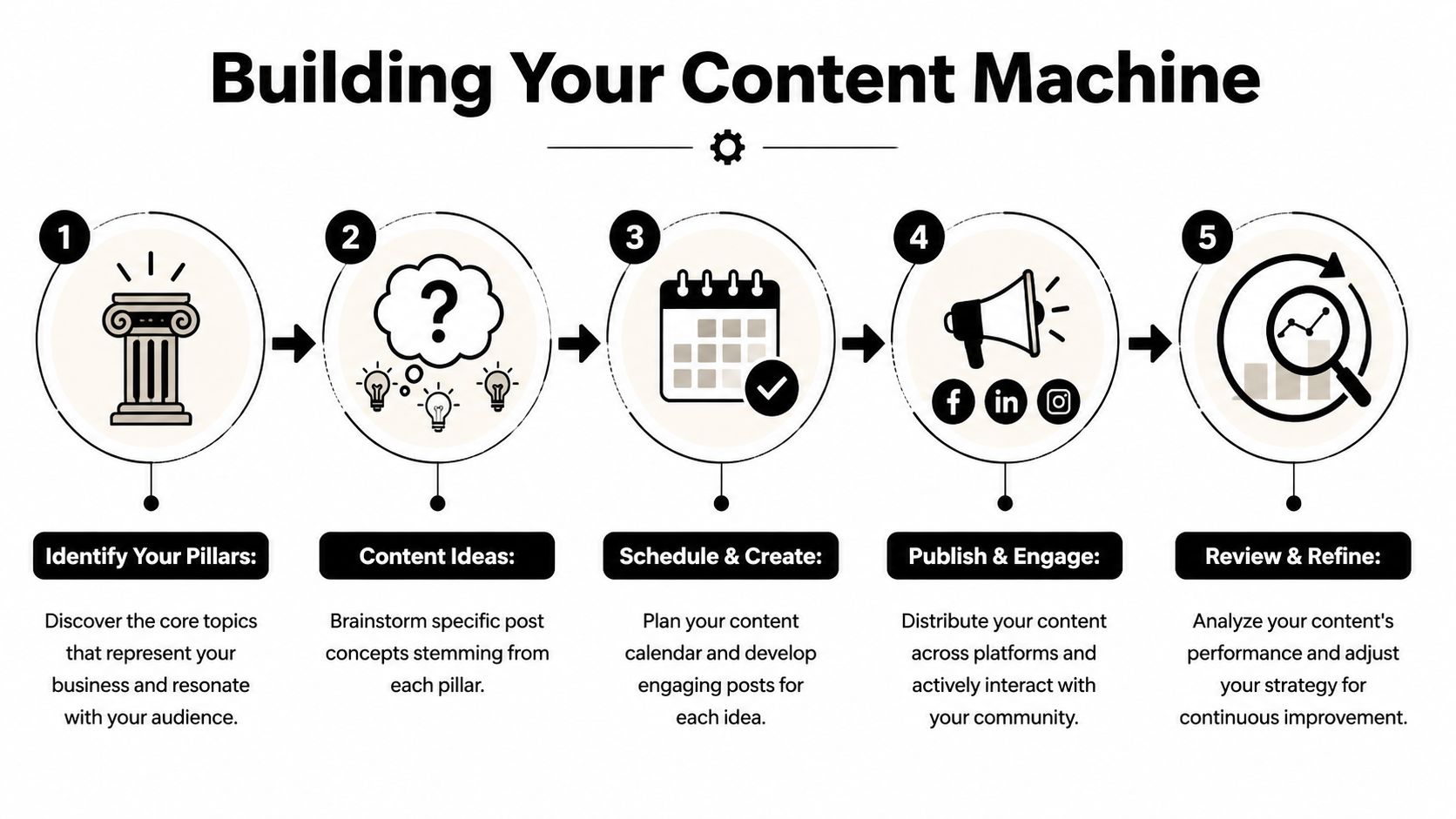
Pick three to four pillars your team can sustain
Keep the categories simple enough that someone on your team can gather material without a marketing degree.
For many local businesses, these four pillars are enough:
- Project spotlights
- Customer proof
- Helpful tips
- Team and process
That mix works because it supports both trust and lead generation. Project posts show the kind of jobs you want more of. Review posts reduce hesitation. Tip posts answer the questions people ask before they call. Team and process posts make the business feel legitimate, which matters when someone is comparing you to two other local options.
Sample content pillars for a home service business
| Content Pillar | Post Idea Example | Purpose |
|---|---|---|
| Project Spotlights | New paver driveway completed in Gateway with before-and-after photos | Shows work quality and local relevance |
| Customer Proof | Screenshot of a positive review with a short explanation of the job | Builds trust with prospects |
| Helpful Tips | “How to know your AC drain line needs attention before it causes damage” | Answers common questions and creates authority |
| Team and Process | Photo of the crew on-site with a note about inspection steps | Makes the business feel credible and human |
Build the weekly routine around collection first
Posting gets easier when collection becomes part of operations.
Use a simple workflow like this:
- Monday: gather photos, short videos, and review screenshots from last week’s jobs
- Tuesday: write captions and assign calls to action
- Wednesday: publish a project spotlight tied to a specific service area
- Thursday: publish a tip, FAQ, or mistake-to-avoid post
- Friday: publish a review, team update, or short behind-the-scenes clip
This works for one reason. It pulls content from real business activity instead of forcing someone to invent ideas at a desk.
Good local social content usually starts with three things. A real job, a real location, and a real customer question.
Write posts that can support SEO later
This section is about social, but smart social content also makes your local SEO work easier.
If your post says, “Another great job today,” it disappears into the feed and does nothing for search relevance. If it says, “Completed a roof repair in Cape Coral after wind damage near Del Prado Boulevard. We replaced lifted shingles, checked surrounding sections for hidden wear, and documented the repair for the homeowner’s insurance file,” that post does more. It gives prospects local context. It gives you wording you can reuse in Google Business Profile updates, service pages, and FAQs.
That is the trade-off. Generic posts are faster. Specific posts produce more business value.
Make every post pass a simple test
Before anything goes live, check for these three pieces:
- Location: city, neighborhood, or service area
- Proof: photo, result, review, or process detail
- Action: call, message, request an estimate, or visit the site
If one of those is missing, the post usually feels weak.
Use a calendar so the system survives busy weeks
Social falls apart when it depends on memory. A calendar fixes that. It also helps you line up posts with seasonality, promotions, and the questions people ask at predictable times of year, like storm prep in Southwest Florida or summer AC problems.
If you need a simple planning format, this guide on how to create a content calendar gives you a structure that is realistic for a small team.
The goal is not more content. The goal is a repeatable flow of local proof you can publish, reuse, and tie back to leads.
Connect Social Media to Your Local SEO
A fundamental flaw in most "simple social" advice becomes apparent. It treats social media and local SEO like two separate jobs.
They’re not.
If your Google Business Profile, reviews, service-area pages, and social posts don’t support each other, you lose momentum. That gap is common. 68% of small businesses in service-heavy regions like Florida struggle with siloed social and SEO efforts, according to the discussion summarized on SocialMadeSimple’s small business resource.
Use social to strengthen local relevance
A post about “another great project completed” is fine. A post about a completed project in Estero, including the service performed and the customer concern you solved, does more for local trust.
That kind of posting helps in three ways:
- Prospects see that you work in their area
- Your branding becomes tied to local communities
- Your content ideas align with the searches customers already make
A Fort Myers pest control company can post about common seasonal pest issues in specific neighborhoods. A Naples law firm can answer common local questions in short videos. An HVAC company can post service reminders tied to heat, humidity, and storm season.
Pair your posts with your Google Business Profile
Your social content should echo what you want your Google Business Profile to be known for.
Use this practical loop:
- Get a review on Google
- Turn that review into a Facebook or Instagram post
- Mention the service and location naturally
- Link back to the relevant page on your website when appropriate
- Use the same service themes in future GBP updates
That creates message consistency across channels.
Social media should support search intent. If someone sees your post today and searches your business name tomorrow, the trust signals should match.
What this looks like in the field
For a pool cage contractor serving Bonita Springs and Naples, don’t just post the finished enclosure. Add context:
- what area the project was in
- what problem the homeowner needed solved
- why the material or approach mattered
- how someone can request an estimate
For a med spa in Fort Myers, connect educational posts to real local searches. Questions about treatment downtime, consultation steps, or appointment prep don’t belong only on your website. They also belong in your social feed.
Keep your branding details aligned
This sounds basic, but it matters:
- Business name: use the same version everywhere
- Phone number: keep it consistent
- Service areas: match your website and profiles
- Visual branding: use recognizable logos, colors, and tone
If your Facebook page says one thing, your Instagram bio says another, and your Google Business Profile points to outdated services, prospects notice the mismatch.
For owners tightening up local visibility, this guide on how to optimize Google Business Profile is a solid reference for aligning those pieces.
Social made simple becomes much more effective when it isn’t working alone. The businesses that win locally usually make every channel reinforce the same story.
Amplify Your Reach with Low-Budget Ads
A lot of small business owners hear “paid social” and assume it means agency retainers, complicated dashboards, and money disappearing into Meta.
That’s not the best place to start.
The easiest entry point is to boost a post that already proved it can get attention.

Boost what already has traction
If a post is getting comments, reactions, shares, saves, or messages on its own, that’s useful signal. It means the content is connecting with people before you spend extra money on it.
Good candidates include:
- A review post that sparked replies
- A before-and-after project post
- A seasonal reminder with strong local relevance
- A short video explaining a common service issue
Bad candidates include generic holiday graphics, staff birthday posts, or anything that got weak engagement the first time.
Target the right local audience
When you boost, keep the targeting tight. If you serve Fort Myers, Cape Coral, Estero, and Bonita Springs, focus there. Don’t pay to reach users outside your service area who will never call.
You can also improve targeting with your own customer data. Using first-party data such as a customer list for targeted campaigns can boost ad revenue by as much as 15%, according to this Insurance Case Study PDF from SocialMadeSimple.
That doesn’t mean every boosted post needs a custom audience. It means your own contact data is often more valuable than broad targeting.
Start with the post that already worked. Paid reach should amplify proof, not rescue weak content.
Keep the offer simple
A boosted post should point to one next step:
- call now
- request a quote
- book an appointment
- send a message
If you ask the audience to do three things, they usually do none.
For a local roofer, a boosted storm inspection post might invite homeowners in Cape Coral to message for an inspection. For a dental office, a boosted educational post might lead to appointment requests. For a cleaning company, it may push users to request an estimate.
A quick explainer can help if you’re new to the platform side of this process:
Don’t scale before you learn
The mistake isn’t spending on ads. The mistake is spending before you know what message gets response.
Run small tests. Watch which posts drive messages, calls, or clicks. Then put more behind the winners. Social made simple works better when ads support proven content instead of replacing strategy.
Measure What Matters Not What's Vain
Likes feel good. Comments can be encouraging. Follower growth looks nice in a report.
None of those metrics tell you enough by themselves.
If you’re running a local business, the question is simple. Did social media create more qualified opportunities?
Track business actions first
The most useful metrics are usually these:
- Website clicks
- Contact form submissions
- Phone calls
- Direction requests
- Messages
- Booked consultations or estimate requests
These connect more directly to revenue than vanity metrics.
That matters because many simple social platforms still don’t give owners the benchmarks they need to judge performance properly, especially when every dollar has to justify itself. That gap is one reason SocialMadeSimple’s blog leaves many budget-conscious businesses still asking tougher ROI questions.
Use a basic reporting habit
You don’t need enterprise software to get clarity. Once a month, check:
- Top posts by clicks or messages
- Calls or form fills that came after social activity
- Website traffic from Facebook or Instagram
- Which content themes led to actual inquiries
Write the answers down in one place. A spreadsheet works.
If a Fort Myers chiropractor sees that educational back-pain posts generate site visits but review posts generate more appointment requests, that tells you where each content type belongs in the funnel.
A post can be popular and still be unhelpful. If it doesn’t move people closer to a call, a form, or an appointment, treat it carefully.
Separate awareness from conversion
Not every post needs to close a sale. But every business does need to know what role each post plays.
A useful way to sort content:
| Type of content | What it usually does |
|---|---|
| Review screenshots | Builds trust and helps conversion |
| Before-and-after photos | Creates proof and local credibility |
| FAQ videos | Educates and improves lead quality |
| Community or team posts | Supports familiarity and brand recognition |
That’s how you stop expecting one post to do everything.
If you want a practical framework for evaluating interaction quality instead of just raw numbers, these Spur insights for better engagement are a helpful companion to your own platform analytics.
Ask better questions each month
Most owners ask, “How many likes did we get?”
Ask these instead:
- Which post led to a call or message?
- Which service got the most interest?
- Which location-based posts brought the strongest response?
- What should we stop posting because it gets attention but not action?
Those questions create better decisions.
Social made simple doesn’t mean careless. It means focused. If your social activity isn’t giving you clearer patterns about what drives leads in Fort Myers, Cape Coral, Naples, or Estero, then it’s still too loose.
If you want help turning social media, local SEO, and reporting into one practical lead-generation system, Polaris Marketing Solutions works with Southwest Florida businesses that need more than likes. The team helps small and mid-sized companies build visibility, tighten up Google Business Profile performance, and track the results that matter so your marketing supports real growth.