

A homeowner in Fort Myers finds your roofing company on Google after a storm. They tap your site on their phone, the header appears, then the page hangs while a giant banner image and a pile of scripts fight to load. Before your phone number becomes usable, they back out and call the next contractor.
That's how page speed optimization shows up in real life for small businesses. Not as a lab score. As a missed call, a lost estimate, and one more lead handed to a competitor.
For local service companies, speed matters most when urgency is high. Plumbing, HVAC, electrical, legal help, med spa bookings, cleaning quotes. These visitors aren't browsing for fun. They want proof you're credible and a fast path to action.
Why Website Speed Is Money for Your Business
A slow website costs money even when traffic looks fine in Google Analytics. You can rank, get the click, and still lose the job because the experience feels broken. For a contractor in Fort Myers, Cape Coral, or Naples, that often means a prospect never reaches the tap-to-call button or contact form.
The business case for page speed optimization is direct. Every 100ms of load time costs approximately 1% in conversions, and a 1-second delay in page response can reduce conversions by 7%, according to aggregated A/B test data from Digital Applied's page speed revenue analysis. That same analysis notes that for a site generating $10 million annually, a 500ms improvement can recover roughly $500,000 in revenue.
A local service site usually isn't processing ecommerce checkouts, but the principle is the same. Replace “purchase” with “phone call,” “estimate request,” or “schedule appointment.” If your site slows down at the moment a prospect wants reassurance, they leave.
Slow pages hurt more than rankings
Search visibility matters, but speed has a second job. It shapes trust. A fast site feels maintained. A slow one feels neglected, even if your work in the field is excellent.
That's why speed work often overlaps with conversion work. Good page speed optimization removes friction. Good messaging removes hesitation. If you want to understand how those pieces connect, this overview of what a conversion rate optimisation agency improves is useful because it frames performance in business terms instead of developer jargon.
Practical rule: If a visitor can't quickly see what you do, where you work, and how to contact you, your website isn't supporting sales.
There's also an SEO angle that small businesses often underestimate. User experience and search performance feed each other. A cleaner, faster site usually supports better engagement, and that reinforces the broader relationship explained in this guide on how user experience affects SEO.
What this means for a local business owner
Think about your homepage like a front desk. If someone walks in and no one greets them, they don't stand there forever. They leave.
A fast website does three things immediately:
- Shows competence: Visitors see a business that looks current and responsive.
- Gets to the ask faster: Calls, quote forms, and service pages become usable sooner.
- Protects paid traffic: If you run Google Ads, every slow click wastes budget.
For small businesses, speed isn't a side project. It's part of sales operations.
How to Measure Your Website's Current Speed
Before fixing anything, determine what's slow. Guessing leads to wasted time. One business owner blames hosting when the problem is oversized images. Another removes plugins when the issue is a bloated hero section.
Start with Google PageSpeed Insights. It's free, and it gives you a practical view of where your site stands on mobile and desktop.
Use PageSpeed Insights the right way
Open the tool, paste in your homepage URL, and test the page on mobile first. That's where many local leads arrive. Then test your key money pages too, like “AC Repair,” “Emergency Plumbing,” “About,” and “Contact.”
A good PageSpeed Optimization Score is 90 or above, and the main performance targets are LCP under 2.5 seconds, INP under 200 milliseconds, and CLS under 0.1, as outlined in seoClarity's quick guide to PageSpeed success.
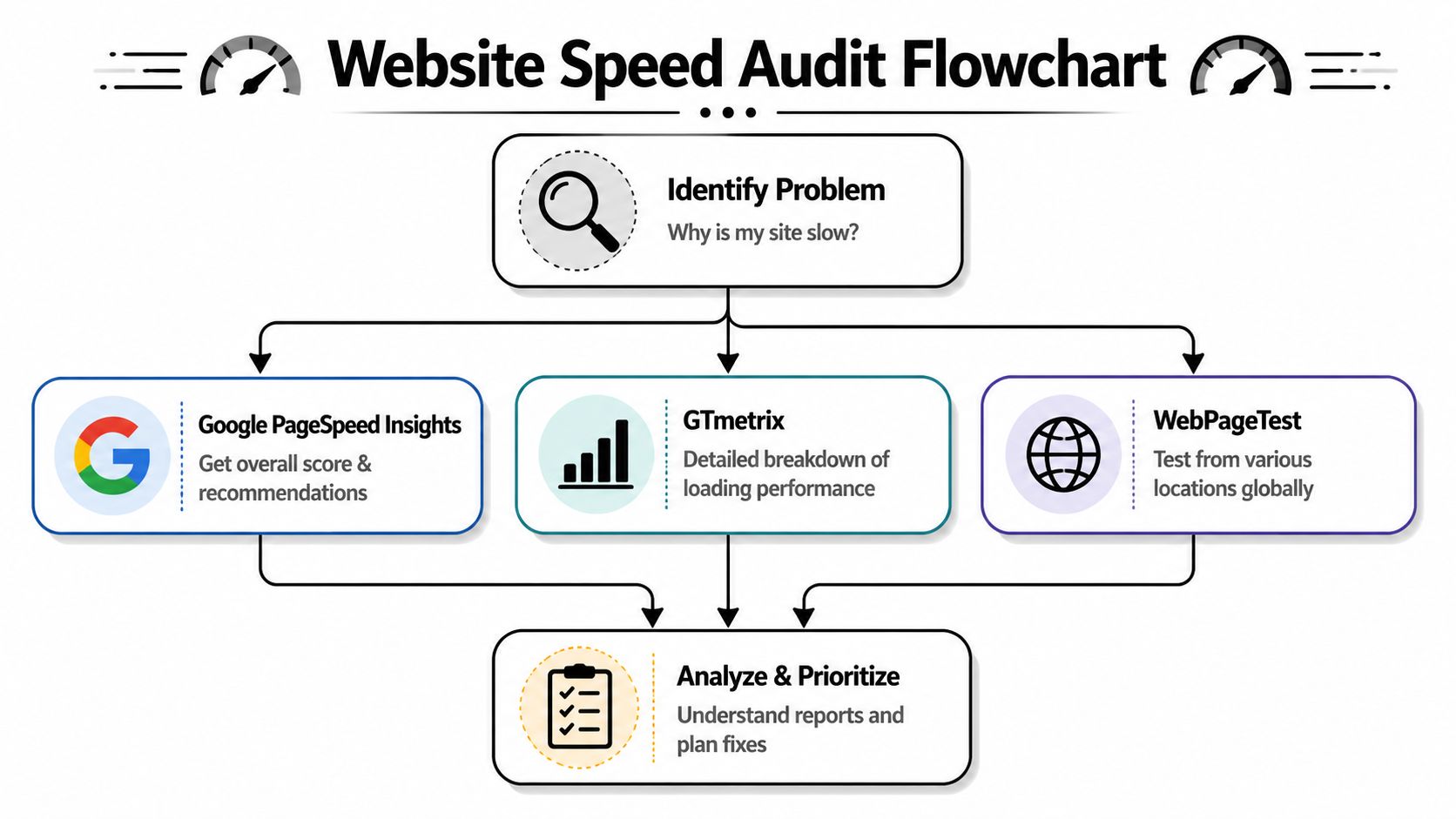
Those labels can sound technical, so translate them into customer experience:
| Metric | What it means in plain English | Why a local business should care |
|---|---|---|
| LCP | How fast the main visible content appears | Your visitor sees the headline, hero image, or top section quickly |
| INP | How responsive the page feels when someone taps or clicks | Tap-to-call buttons, menus, and forms need to react fast |
| CLS | How stable the layout is while loading | Buttons shouldn't jump around while someone tries to click |
Look at templates, not just one page
Many businesses only test the homepage. That misses where problems usually live. Service pages often carry heavier photos, testimonial widgets, maps, sliders, and form embeds.
Test pages in this order:
- Homepage: This is often the first impression from branded searches.
- Top service page: Example, “Water Heater Repair” or “Family Law Attorney.”
- Location page: These pages often pile on maps, area content, and review widgets.
- Contact page: If this is slow, you're putting friction right before conversion.
If you want the broader technical side behind those reports, this primer on technical on-page SEO helps connect performance issues to how search engines and users experience your site.
What to pay attention to in the report
Don't obsess over every recommendation at once. Focus on the items that affect what people see and use first.
Look for patterns like:
- Large image warnings: Usually tied to banners, team photos, or project galleries.
- Render-blocking resources: CSS or JavaScript that delays the visible page.
- Unused scripts: Chat tools, tracking tags, review widgets, and page builder leftovers.
- Layout shifts: A phone button or form jumping after the page starts loading.
If the top of the page feels slow, visitors don't wait around for the lower half to redeem it.
That's the point of measuring. You're not trying to win a score contest. You're identifying what blocks a real customer from seeing, trusting, and contacting your business.
Quick Wins for an Immediate Speed Boost
Most small businesses don't need a full rebuild to get meaningful gains. They need to stop doing the few things that make their site unnecessarily heavy.
Start with the fixes that usually produce visible improvement in an afternoon.
Fix your images first
This is the most common issue I see on local business websites. A contractor uploads photos straight from a phone or camera, then places them in a small website section where they display far smaller than the original file.
A common mistake is uploading an image that's 5000px wide when it only displays at 400px. A better approach is to resize it to its real display width, such as 600px for a 600px container, or double that for retina clarity, as noted in this practical web image sizing discussion on Reddit.
For a home service example, say your roofing homepage has a hero image behind the headline “Fast Roof Repair in Fort Myers.” If that section displays around 1200px wide on desktop, don't upload a giant original straight from the camera. Create a web-ready version sized for the layout.
Use this simple checklist:
- Resize before upload: Match the image to the largest likely display size.
- Choose efficient formats: WebP or AVIF usually works well for web delivery.
- Compress intelligently: Reduce file weight without making the photo look muddy.
- Be selective: You don't need twelve gallery photos above the fold.
A strong walkthrough on how to optimize images for web can help if your media library is already bloated.
Cut homepage extras that don't earn their place
Many small business sites slow themselves down with features that look impressive in a sales demo but add little value for a real visitor.
Here are common culprits:
- Auto-playing sliders: Most businesses would be better off with one clear headline, one image, and one call to action.
- Heavy video backgrounds: These often add weight before a user has even decided to stay.
- Too many badges and widgets: Review feeds, booking widgets, maps, popups, and live chat can stack up fast.
- Redundant plugins: If two tools do similar jobs, keep the lighter one.
Field note: The fastest homepage is usually the one that decides what matters most and removes the rest.
This video gives a useful visual overview of practical speed improvements.
Use caching and compression
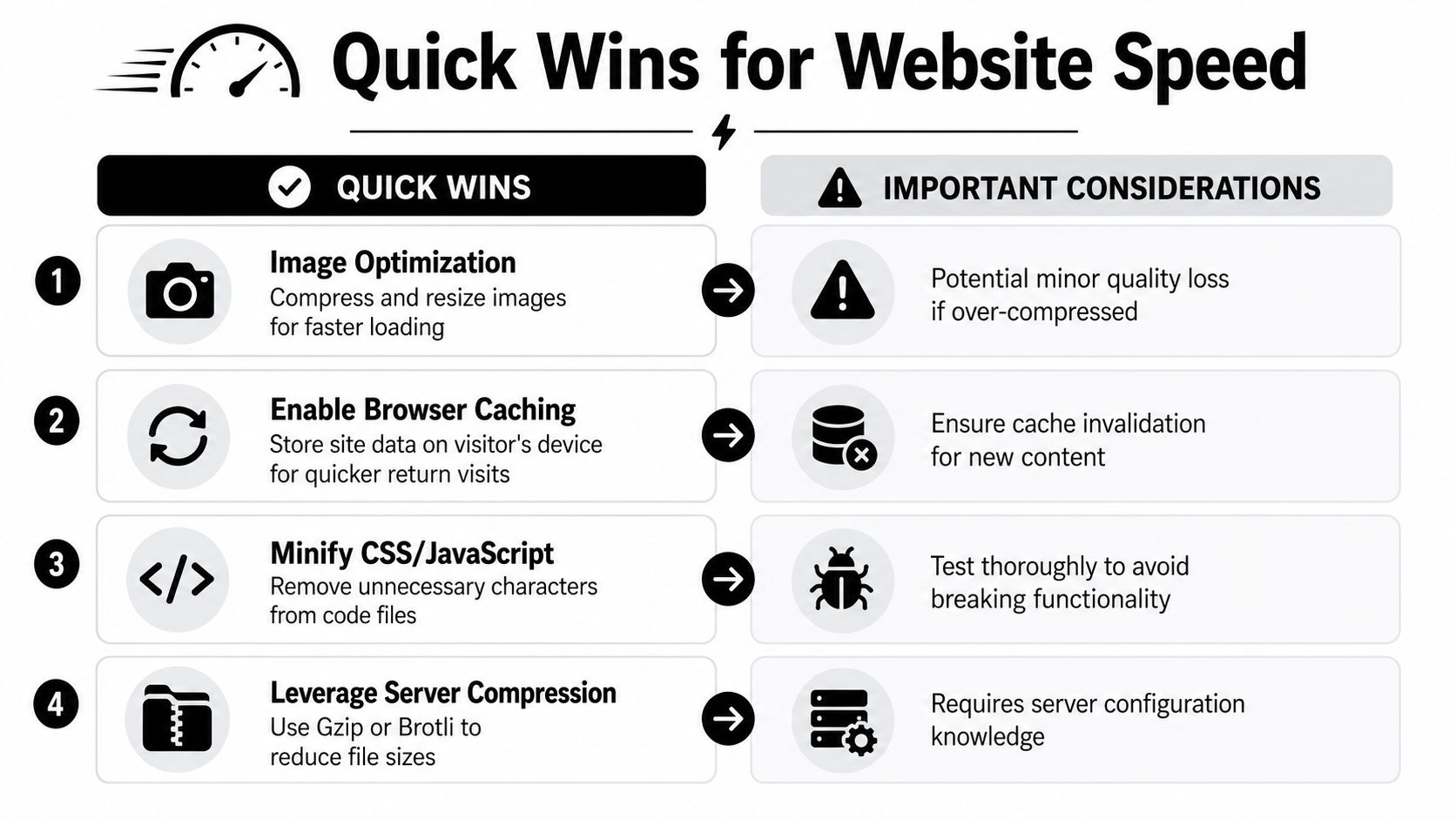
Some fixes sit behind the scenes but still matter. Browser caching helps returning visitors load your site faster because their device can reuse files instead of pulling everything fresh on every visit. Server compression reduces file sizes before they travel to the browser.
For a local law firm or HVAC site, that means repeat visitors checking service details, financing, or contact info get a smoother experience. If your site runs on WordPress, a caching plugin or managed host often makes this easier than trying to tune everything manually.
A quick decision guide:
| Quick win | Best for | Watch out for |
|---|---|---|
| Image resizing | Every site with staff photos, service photos, or hero banners | Uploading a new oversized image next week and undoing the gain |
| Browser caching | Sites with repeat visitors and local traffic | Old assets sticking around if cache rules aren't handled well |
| Minifying CSS and JS | Theme-heavy or plugin-heavy sites | Test carefully so forms and menus still work |
| Server compression | Almost any site serving text, code, and static assets | Usually needs host or developer access |
Quick wins won't solve every problem, but they often remove the obvious drag that's hurting leads right now.
Deeper Fixes for Lasting Performance
Once the easy wins are handled, performance work shifts from “what can I remove or compress” to “how does the page load?” That's where a developer or technically capable website manager becomes important.
These fixes matter because many slow sites don't fail from one giant mistake. They fail from dozens of small loading decisions that stack up.

Minify and defer what isn't needed first
Minifying CSS and JavaScript means removing unnecessary characters from code files so they're smaller to deliver. It's not glamorous, but smaller files usually help pages load more efficiently.
Deferring non-critical scripts is often even more important. Your page doesn't need every script to run before the visitor sees the headline, phone number, and primary call to action. A review widget, chat tool, or tracking script can often wait until after the main content appears.
For a plumber's homepage, the loading order should favor:
- Business name and service headline
- Main image or top content block
- Phone button and quote form
- Supporting elements like reviews, maps, and secondary widgets
That sequence makes the site feel fast even before every background process finishes.
Don't lazy-load the wrong image
This is one of the most common technical mistakes on modern websites. Developers or plugin settings sometimes lazy-load every image by default. That sounds efficient, but it breaks the experience when the page delays the most important image at the top.
A critical but common mistake is lazy-loading the Largest Contentful Paint image, and Google explicitly states the LCP image should never be lazy-loaded. Doing so can increase its load time by 300 to 800 milliseconds on mobile, according to SpeedCurve's analysis of neglected page speed optimizations.
For a contractor site, the LCP image is often the homepage banner, a service hero photo, or a large top-of-page image on a service page. If that image loads late, the page feels stalled even if other assets are technically loading in the background.
Ask your developer one direct question: “Is the main above-the-fold image being prioritized, or is it being lazy-loaded by a plugin?”
If the answer isn't clear, that's worth checking immediately.
Reduce layout instability and code clutter
A site can load quickly and still feel bad if parts jump around while the visitor tries to use it. That usually comes from layout instability. Common causes include missing image dimensions, dynamic banners inserted after load, and scripts that expand sections without reserving space.
Watch for these real-world problems:
- Phone buttons shifting downward after the header finishes loading
- Forms jumping when a calendar or field script appears
- Coupon bars or announcement strips pushing content down after first paint
- Embedded reviews or maps resizing themselves late
A developer should also look at the page structure itself. Bloated page builders, layered sections, and unnecessary containers can create more work for the browser. If your service pages are built with lots of decorative blocks, cards, nested rows, and hidden mobile elements, the page may be doing far more than the visitor ever sees.
Clean up third-party scripts with a hard eye
Third-party tools are often where good intentions turn into bad performance. A local business adds analytics, call tracking, chat, review widgets, social feeds, ad pixels, scheduling tools, and accessibility overlays. Each one may sound justified. Together, they can choke responsiveness.
A practical review process works better than blanket removal:
| Script type | Keep when it clearly supports revenue | Reconsider when it adds little value |
|---|---|---|
| Call tracking | You actively use the reporting to improve campaigns | No one checks it and it duplicates other tools |
| Chat widget | Staff answer quickly during business hours | It sits idle and covers the call button on mobile |
| Review widget | It strengthens trust on a key service page | It pulls heavy styling and duplicates testimonials already on site |
| Social feed | Rarely essential for lead generation sites | Often more decorative than useful |
The goal isn't a sterile website. It's a website that loads the right things first and leaves the rest until later, or removes them entirely.
Your Website's Foundation Hosting and CDNs
Some websites are slow before the homepage even begins rendering. The problem isn't the image. It isn't the form. It's the server taking too long to respond.
That's why hosting should be treated like business infrastructure, not a commodity purchase. If your website runs on the cheapest shared plan available, you're often accepting delays before a visitor even gets the first piece of your page.

Why Time to First Byte matters
Time to First Byte, or TTFB, measures how long it takes the server to start responding. A strong target is under 200ms for 90%+ of users, and upgrading hosting, improving server-side caching, and reducing DOM size can improve FCP and LCP by 20% to 40%, according to Tangence's page speed optimization guidance.
In plain terms, TTFB answers this question: after someone clicks your site, how long does your server hesitate before saying anything back?
That hesitation matters. If the foundation is slow, every other optimization has to work harder.
Cheap hosting usually costs more later
A bargain shared host is like sending your crews out in an overloaded van that struggles to start every morning. It may be inexpensive on paper, but it slows everything that depends on it.
A better hosting setup usually gives you:
- More consistent response times: Useful during traffic spikes from ads or storms
- Server-side caching: Pages can be served faster without rebuilding everything on each visit
- Better resource allocation: Your site isn't as affected by noisy neighbors on the same server
- Easier support for modern performance features: Brotli, HTTP/2 or HTTP/3, and stronger caching controls
For local businesses, this is often the difference between a site that feels immediate and one that always feels a step behind.
Where a CDN fits in
A Content Delivery Network works like a distributed set of delivery points for your site's static assets. Instead of every visitor pulling files from one origin location, many assets can be served from a point closer to them.
For a Southwest Florida business, that helps keep performance steadier across different devices and locations. It also reduces strain on the main server.
Here's a simple decision view:
| Foundation choice | What it usually means for a small business |
|---|---|
| Basic shared hosting | Low upfront cost, higher chance of sluggish response |
| Managed hosting | Better baseline performance, easier maintenance, usually worth it for lead-gen sites |
| CDN added to good hosting | Stronger delivery of static assets and more resilience |
| Good hosting plus bad page design | Better than cheap hosting, but still limited by bloated pages |
A fast host won't fix a messy website. But a slow host can bottleneck even a well-optimized one.
If your site already has optimized images and cleaned-up code but still drags at the start, hosting is one of the first things worth reevaluating.
Making Speed a Sustainable Part of Your Strategy
Page speed optimization isn't a one-time cleanup. It's a maintenance habit. Sites slow down gradually because businesses keep adding things. New gallery photos. A new tracking script. A new plugin. A popup for promotions. A chat tool no one fully tested on mobile.
The businesses that keep their sites fast usually follow a simple cycle: measure, prioritize, fix, and monitor. They don't chase every minor score fluctuation. They watch the pages that generate leads and protect those first.
A practical workflow that holds up
Use a lightweight routine:
- Measure monthly: Check key pages in PageSpeed Insights, especially on mobile.
- Prioritize visible friction: Fix what affects above-the-fold content, calls, forms, and responsiveness first.
- Review every new add-on: Ask whether a plugin, script, or widget earns its place.
- Monitor after changes: Test again after redesigns, theme updates, and major content additions.
This matters for local businesses because lead generation websites rarely break all at once. They get slower in layers. A disciplined review process catches the drift before it starts costing calls.
Treat speed as part of customer service
A fast site helps a prospect trust you before you ever speak to them. It feels organized. It feels current. It feels like someone is paying attention.
If you want a practical example of how ongoing maintenance supports speed and stability, this piece on how to enhance your website's performance is useful because it ties performance to regular upkeep rather than one-off fixes.
Fast websites don't stay fast by accident. Someone keeps them that way.
For a contractor, law firm, med spa, or local service provider, that consistency becomes a competitive advantage. You don't need the most complex website in your market. You need one that loads quickly, communicates clearly, and makes contacting you easy.
If you want help turning a slow, frustrating website into one that supports rankings, calls, and form submissions, Polaris Marketing Solutions can help. Their team works with small and mid-sized businesses in Fort Myers and across Southwest Florida to improve website performance, SEO, and lead generation with practical strategies built around ROI.