
You get a quote for a new website, look at the number, and wonder whether you’re buying a sales tool or someone else’s idea of what your business should spend.
We see this a lot in Southwest Florida. A Fort Myers service business might be balancing truck payments, insurance, payroll, and rising ad costs. A Naples firm may need a stronger brand presentation because each lead is worth more. A Cape Coral shop may need to stay lean and get online fast. The right website budget depends on those business realities, not on a generic national package.
Affordable web design for small business means making smart trade-offs. Spend where the site can produce calls, quote requests, appointments, and revenue. Cut the extras that pad a proposal but do little for lead flow. That decision matters more in a market like SWFL, where competition is local, seasonality affects demand, and every marketing dollar has to pull its weight.
You’re probably here for one of two reasons. Your current site looks dated and no longer supports the business you’ve built, or you’ve delayed the project because the quotes you’ve seen feel detached from cash flow and return.
Both are reasonable concerns.
Your website now plays a direct role in how people judge your business before they ever call. In Fort Myers and nearby markets, that often means a homeowner comparing three contractors on a phone, a seasonal resident looking up services before arriving, or a local prospect deciding in under a minute whether you seem credible. At Polaris, we approach web design the same way we’d approach any other business expense. Start with return, set priorities, and avoid paying for features that do not help you win work.
First Steps Define Your Website Needs and Budget
A website is a business tool first. If you treat it like a design purchase, you’ll overspend on visuals and underspend on function.
For most small businesses, the first question is simple: what is the one job this website must do well? If you run an HVAC company in Cape Coral, that job may be generating phone calls. If you own a remodeling company in Naples, it may be proving credibility with project photos and service pages. If you’re opening a boutique in Fort Myers, it may be getting people to browse products and contact you.
Start with one primary outcome
Write down one primary goal and one secondary goal. Keep it tight.
- Primary goal: Get estimate requests
- Secondary goal: Show recent work and build trust
Or:
- Primary goal: Get consultation calls
- Secondary goal: Answer common questions before someone contacts you
When owners skip this step, they usually ask for everything at once. That’s when budgets drift. A practical low-cost process starts by defining a clear business goal, choosing a template or CMS, adding only essential pages and plugins, and testing navigation, mobile responsiveness, load time, and broken links before launch, as outlined in EuroDNS’s affordable web design guidance.
Practical rule: If a feature doesn’t help a stranger trust you, contact you, or buy from you, it probably belongs in phase two.
Build a simple good better best brief
A one-page brief will save you money before you even request a quote. Use three buckets.
| Priority level | What goes in it | Example |
|---|---|---|
| Good | Must-have launch items | Home, services, about, contact, mobile-friendly layout, basic forms |
| Better | Useful additions | Gallery, testimonials page, blog setup, FAQ section |
| Best | Later-stage upgrades | Advanced booking flows, custom calculators, membership features |
This exercise does two things. First, it helps a freelancer or agency scope your site accurately. Second, it shows you where to trim without hurting results.
Set a budget around business stage
A new solo operator in Bonita Springs doesn’t need the same build as an established multi-location practice. Match the spend to the stage.
Use questions like these:
- How quickly do you need leads? If the website has to start working soon, prioritize launch speed and core pages.
- Who will update it later? If nobody on your team wants to touch the site, choose a setup with ongoing support.
- Do you need custom functionality right now? If not, skip it.
A realistic budget isn’t just what you can pay. It’s what you can support. A cheap build that no one maintains usually turns into a second project six months later.
Comparing Your Four Main Web Design Options
A Fort Myers owner can spend $300 on a builder, $2,500 with a freelancer, or far more with an agency and still make the wrong call. The question is which option gives you the best return for your stage of business, your available time, and the amount of hand-holding you need.
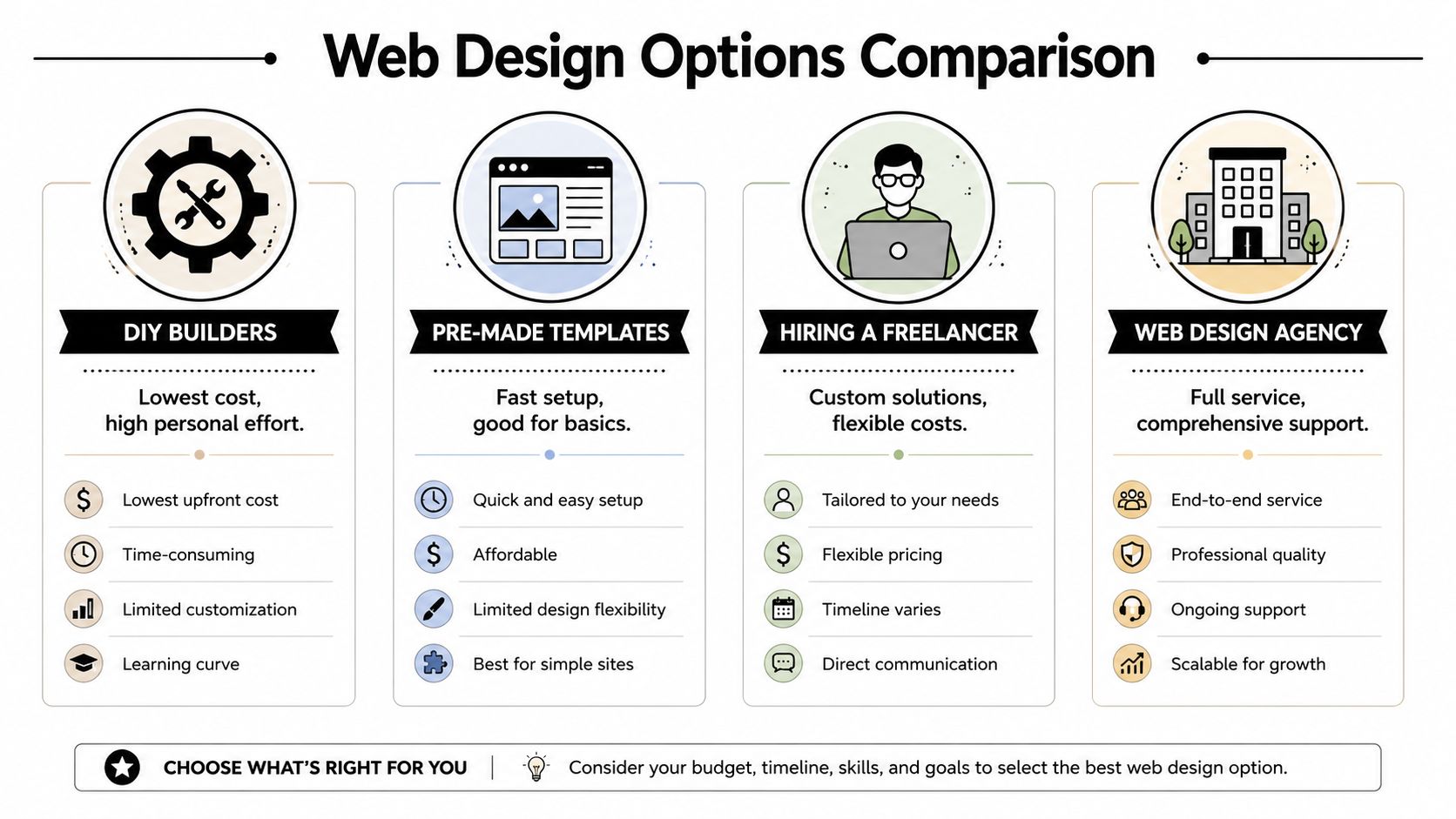
Web Design Options At a Glance
| Approach | Typical Cost (Upfront) | Best For | Key Trade-Off |
|---|---|---|---|
| DIY builders | Lowest upfront spend | Brand-new businesses with time to build and maintain the site themselves | You save cash, but you pay in owner time |
| Pre-made templates | Usually a low one-time design cost | Simple brochure-style sites with a clear offer | Fast launch, limited flexibility |
| Hiring a freelancer | Mid-range investment | Businesses that need some customization without full agency pricing | Quality varies, and you still manage part of the process |
| Web design agency | Higher upfront commitment | Businesses that want strategy, design, launch, and support under one roof | Higher cost, less day-to-day burden on the owner |
If you are still comparing software before deciding who should build the site, our guide to the best website builders for small business will help you sort out where DIY platforms fit and where they start to fall short.
A quick walkthrough helps if you want a broader look at the choices and how they differ in practice.
DIY builders
DIY works for a narrow slice of businesses. If you are testing a new offer, operating solo, and can tolerate spending nights and weekends learning the platform, it can be the right financial move.
The hidden cost is time. Owners often count the monthly subscription and ignore the hours spent writing copy, choosing images, fixing mobile spacing, setting up forms, and trying to make the site look credible. For a Southwest Florida business, that trade-off matters. If a gardening contractor in Cape Coral gives up two Saturdays to build a site, that is time not spent quoting jobs or following up on referrals.
DIY usually works best when the site only needs to do three things well: explain what you do, prove you are legitimate, and make it easy to call or submit a form.
Pre-made templates
Templates are a practical middle ground if you need a clean launch and your business model is straightforward. They work well for pressure washing companies, cleaning services, consultants, and other local businesses that do not need custom tools or advanced integrations on day one.
The risk is fit.
A template can look polished in the demo and still be wrong for your business once your real content goes in. I have seen owners buy a stylish theme built for restaurants or photographers, then force it onto a contractor or law firm site where the layout hides service details and buries the contact form. That is how a cheap template turns into expensive rework.
Use a template if your offer is simple and your pages are standard. Skip it if your sales process needs custom quoting, location-specific pages, or a more strategic conversion flow.
Hiring a freelancer
Freelancers are often the best value if you need more than a template but are not ready for an agency engagement. A good freelancer can give you a custom look, better structure, and a cleaner build without the overhead of a larger team.
You still need to manage the project. In practice, that means gathering photos, answering questions quickly, reviewing drafts, and keeping the scope from expanding every week. If you are decisive, that can work well. If your team is busy, disorganized, or slow to approve content, the project can stall and the cost can creep up.
This option tends to work best for established small businesses that already know their services, service area, and main calls to action.
Working with an agency
An agency makes financial sense when the website is tied to growth, not just online presence. That is common for contractors adding service areas, medical practices competing for higher-value cases, or multi-service businesses across Fort Myers, Naples, and Bonita Springs that need the site to support SEO, ads, and lead handling.
What you are buying is not just design. You are buying process, accountability, and a lower chance that the site has to be rebuilt six months later. That matters if your time is expensive or your business depends on a steady flow of qualified leads.
Polaris Marketing Solutions is one option in that category for businesses that need website design and hosting as part of a broader digital marketing setup.
For many owners, the best choice is not the cheapest line item. It is the option that keeps your total cost lower over the next 12 to 24 months, including revisions, maintenance, missed leads, and your own time.
Prioritize Website Features That Actually Drive Leads
Small businesses waste money on the same things over and over. Fancy motion. Overbuilt pages. Features copied from larger brands that don’t help a local customer take the next step.
If your budget is limited, spend it where it removes hesitation and makes contacting you easy.
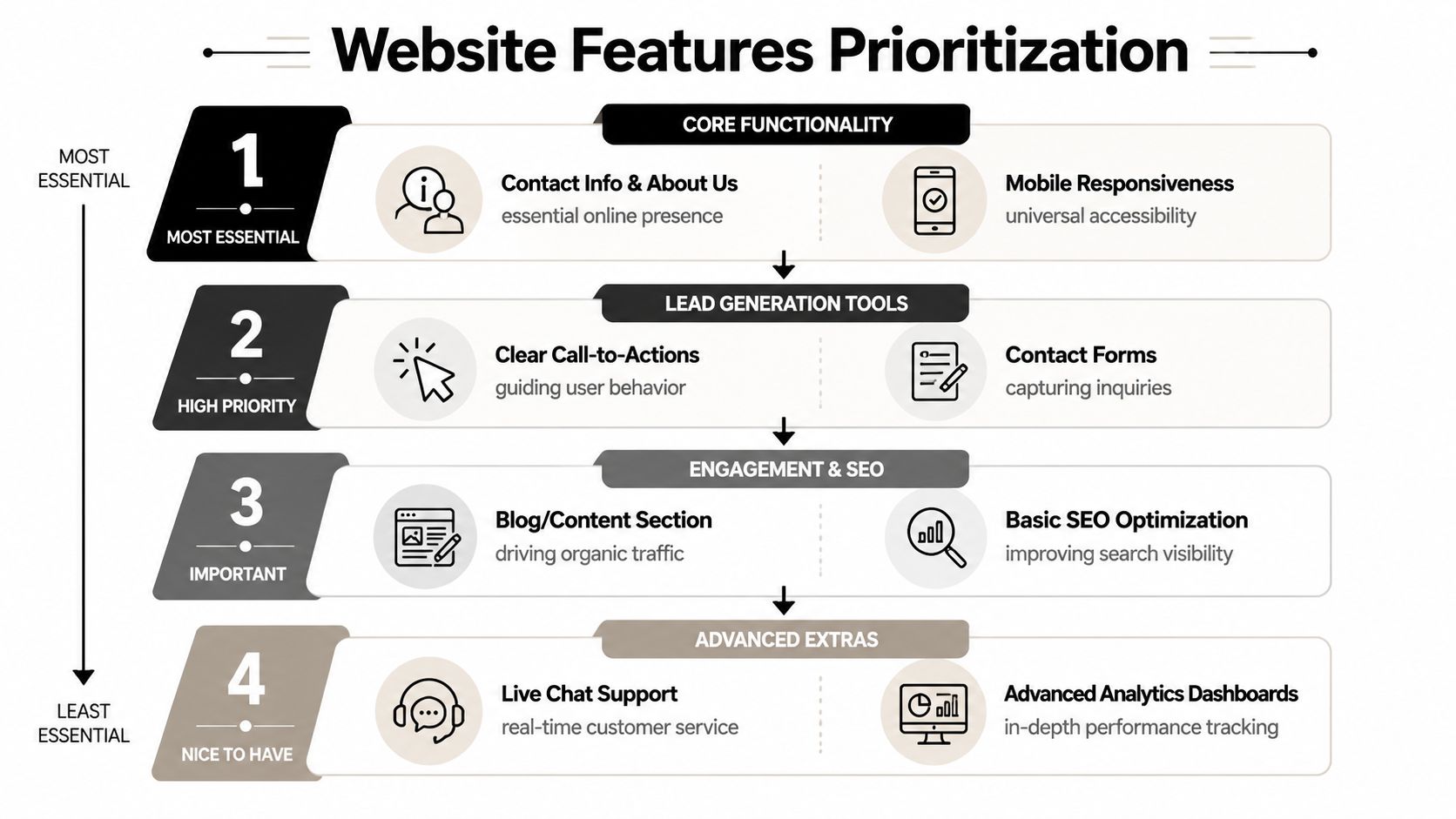
The four features worth protecting
Industry guidance consistently points to the same conversion levers: mobile responsiveness, fast loading times, clear calls to action, and above-the-fold contact details. It also notes that usability reduces “friction” and that visual hierarchy should guide visitors toward the next step, according to Thrive Agency’s small-business web design guide.
That lines up with what works in local markets.
- Mobile responsiveness: Your customer is often on a phone, not a desktop. A homeowner looking for an emergency plumber in Fort Myers isn’t studying your animations. They’re trying to tap your phone number.
- Fast load times: Slow sites lose impatient buyers. This is especially true for service businesses where urgency matters.
- Clear calls to action: “Request an estimate,” “Call now,” and “Book a consultation” beat vague buttons every time.
- Above-the-fold contact details: Don’t make people hunt for your number or contact form.
What to cut first
If money is tight, cut these before you cut the essentials:
- Complex visual effects: Most don’t help conversion and often make mobile performance worse.
- Too many pages at launch: A focused five-page site is often stronger than a thin twelve-page site.
- Social media clutter: Embedded feeds often distract from the main action.
- Long brand storytelling sections: Buyers usually care more about whether you solve their problem.
A simple site with obvious next steps will usually outperform a prettier site that makes visitors think too hard.
A local example
Say you run a Naples landscaping business. You have enough budget to either add custom homepage animation or tighten the service-page layout, improve mobile spacing, and place a visible quote request button at the top of every page.
Choose the second option.
That’s the kind of trade-off owners need to make. Good affordable web design for small business doesn’t try to impress other designers. It tries to convert local traffic into real conversations.
How to Find and Vet Your Web Design Partner in SWFL
The wrong partner usually reveals themselves early. They talk about colors before they ask about customers. They give a price before they understand scope. They promise everything and define nothing.
In Southwest Florida, local knowledge matters. A designer who understands seasonal swings, service-area businesses, snowbird-driven demand, and neighborhood-based search behavior will usually scope a more practical site than someone working from a generic national template.
Questions worth asking in the first call
Ask these directly and listen for clear answers.
- How do you define scope before pricing? If they can’t explain this, expect scope creep later.
- Who writes or organizes the content? Content delays are one of the biggest reasons launches drag.
- How do you handle mobile layout decisions? You want someone who thinks about phone users early, not as a cleanup task.
- What happens after launch? Make them explain updates, hosting, support, and who owns what.
- Can you show work for businesses like mine? Not just pretty screenshots. Look for relevance.
If you want a broader framework for interviews, this guide on how to choose a digital marketing agency gives a practical set of evaluation criteria.
How to review a portfolio like an owner
Don’t review a portfolio like a designer. Review it like a buyer.
Look for signs that each website makes the next step obvious. Can you immediately tell what the business does? Is the phone number easy to find? Does the service page feel built for a real customer question, or is it just filler copy under a large hero image?
A strong portfolio shows strategic clarity. A weak portfolio shows visual variety with no clear business purpose.
Red flags in the Fort Myers market
Some warning signs come up all the time.
- Rock-bottom pricing with no discovery: Cheap isn’t affordable if the site misses the mark and has to be rebuilt.
- No discussion of your service area: For local businesses, geography shapes structure.
- Confusing ownership terms: You should understand who controls the website, hosting, and logins.
- No process for revisions: Without a revision process, projects drift and relationships sour.
If a provider can’t explain how your website will help generate inquiries, you’re shopping for decoration, not a business asset.
Actionable Tactics for Saving Money Without Sacrificing Quality
A Fort Myers owner usually feels the squeeze in the same places. Rent is up, payroll is up, insurance is up, and the website still needs to do its job. The answer is not buying the cheapest site you can find. It is controlling scope so you spend on the parts that help bring in calls, quote requests, and booked jobs.
The cleanest way to do that is phased development. A local roofer, plumber, or med spa rarely needs every feature at launch. They need a credible homepage, focused service pages, a clear contact path, and a site that works well on mobile. Gallery pages, long-form resources, extra location pages, and advanced automations can wait until the site is already producing.
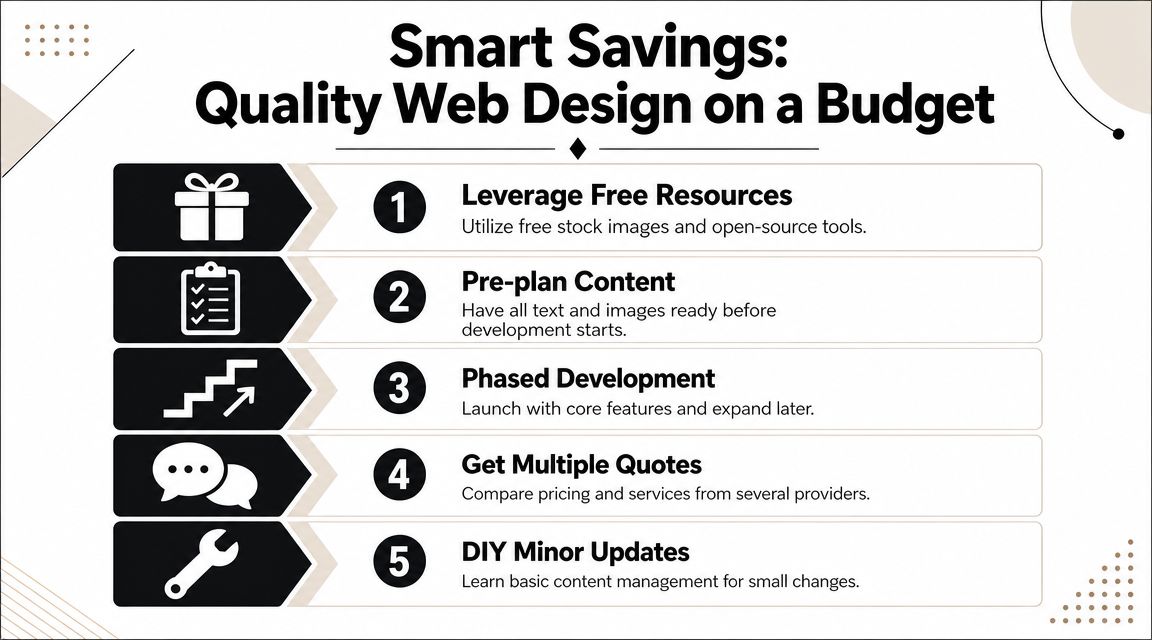
Use phased development instead of bloated launch scope
A smart first phase keeps the build tight and useful.
- Phase 1: Home, services, about, contact, lead form, trust signals
- Phase 2: Gallery, FAQs, location pages, blog setup
- Phase 3: Advanced tracking, automation, specialty landing pages
That approach lowers the upfront bill and reduces revision cycles. It also gives you a live asset sooner, which matters when every month without a working site is a month of missed inquiries.
Bring your content together before design starts
This is one of the easiest places to save money.
Projects get expensive when the owner sends content a little at a time. Missing service descriptions, old logo files, no team photos, or a half-finished service area list all create delays. Delays turn into extra edits, extra meetings, and added cost.
Get these items organized before design begins:
- Approved service list: Final page names and short descriptions
- Brand basics: Logo files, colors, font preferences if you already use them
- Image folder: Team photos, job photos, product shots, or approved stock images
- Business details: Phone, email, address, hours, and service areas
In Southwest Florida, this trade-off comes up all the time. A new Estero restaurant or Cape Coral home service company can launch with strong stock photography and replace it later with custom images after cash flow improves. That is often a better financial decision than waiting weeks for a full photo shoot.
Pick a pricing model that matches your cash flow
A lower upfront price is not always the better deal. Monthly plans can help if cash is tight and speed matters. A one-time project fee can cost less over the life of the site if you plan to keep it for years and manage it properly.
The right question is simple. Are you trying to reduce startup cost, or total long-term cost?
For some Southwest Florida businesses, spreading the cost over monthly payments makes sense during a slow season or right after opening. For others, especially established companies with steady lead volume, paying for a lean custom build upfront avoids years of recurring fees for features they barely use. We often help clients run that comparison before they commit.
Keep post-launch tasks in-house where it makes sense
You do not need to outsource every small update.
If your platform is set up correctly, your team should be able to change a headline, swap a staff photo, update hours, or post a short announcement without opening a support ticket. That saves money and keeps simple updates from piling up.
Image management is a good example. Large photo files slow the site and create avoidable cleanup work later. Our guide on how to optimize images for web gives you a process your team can use.
Cost-saving move: Ask your provider which updates your staff can safely handle, then get training on those tasks only.
Your Website Is an Investment Not an Expense
Cheap websites are expensive when they don’t produce anything. That’s the core issue.
A profitable small-business site doesn’t need to be oversized, flashy, or built with every advanced feature available. It needs to be aligned with the job you need it to do. For a local business in Fort Myers, Cape Coral, Estero, Bonita Springs, or Naples, that usually means helping the right visitor understand your offer fast and contact you without friction.
The strongest decisions are usually simple. Define the primary goal. Pick the build path that matches your stage. Protect the features that drive inquiries. Vet the partner carefully. Launch what matters first, then improve from a stable base.
That’s what affordable web design for small business should mean. Not the lowest possible price. The best financial trade-off for where your business is right now.
If you want a website that’s built around lead generation, clear ROI, and the realities of running a small business in Southwest Florida, talk to Polaris Marketing Solutions. We can help you sort through the options, narrow the scope, and choose a website plan that fits your market, your budget, and your growth goals.