
If you run a restaurant in Fort Myers, social media usually lands on the same mental shelf as payroll issues, last-minute callouts, and the fryer that decides to act up on Friday night. You know it matters. You also know it can swallow hours without clearly filling more seats.
That's why most restaurant owners don't need more “post three Reels a day” advice. They need a system. A real one. Something a manager can follow, a host can help support, and ownership can judge by whether it drives reservations, orders, and repeat visits.
From Full House to Full Funnel An Introduction
A lot of restaurants still treat social as a digital flyer board. Post a few food photos. Announce live music. Share a holiday special. Then hope people show up. That approach misses how diners choose where to eat now.
Recent industry summaries show that 74% of diners use social media to decide where to eat, and 40% visit a restaurant after seeing food photos online according to restaurant social media statistics compiled by Cropink. That means your Instagram or Facebook page isn't a side project anymore. It's part of the customer path from “Where should we go tonight?” to “Book the table.”
The practical issue is that most independent restaurants don't have a dedicated content team. They have a GM, a few trusted shift leaders, and maybe someone who's “good at Instagram.” So the answer isn't doing more random content. The answer is building a repeatable operating rhythm.
A good social system does three things:
- Gets discovered by local diners who've never heard of you
- Builds trust with people comparing you to two or three nearby options
- Creates action through reservation links, online ordering, calls, and direct messages
If you haven't built the broader marketing side yet, it helps to start with a framework for crafting a powerful marketing plan so your social activity supports the same business goals as your offers, events, and local visibility efforts.
Social media for restaurants works best when it behaves like front-of-house. It welcomes people, answers questions, and makes the next step easy.
Building Your Restaurant Social Media Foundation
The restaurants that struggle on social usually don't have a content problem first. They have a setup problem. They're trying to post before they've decided who they're talking to, what they want the page to do, and which platform deserves real attention.
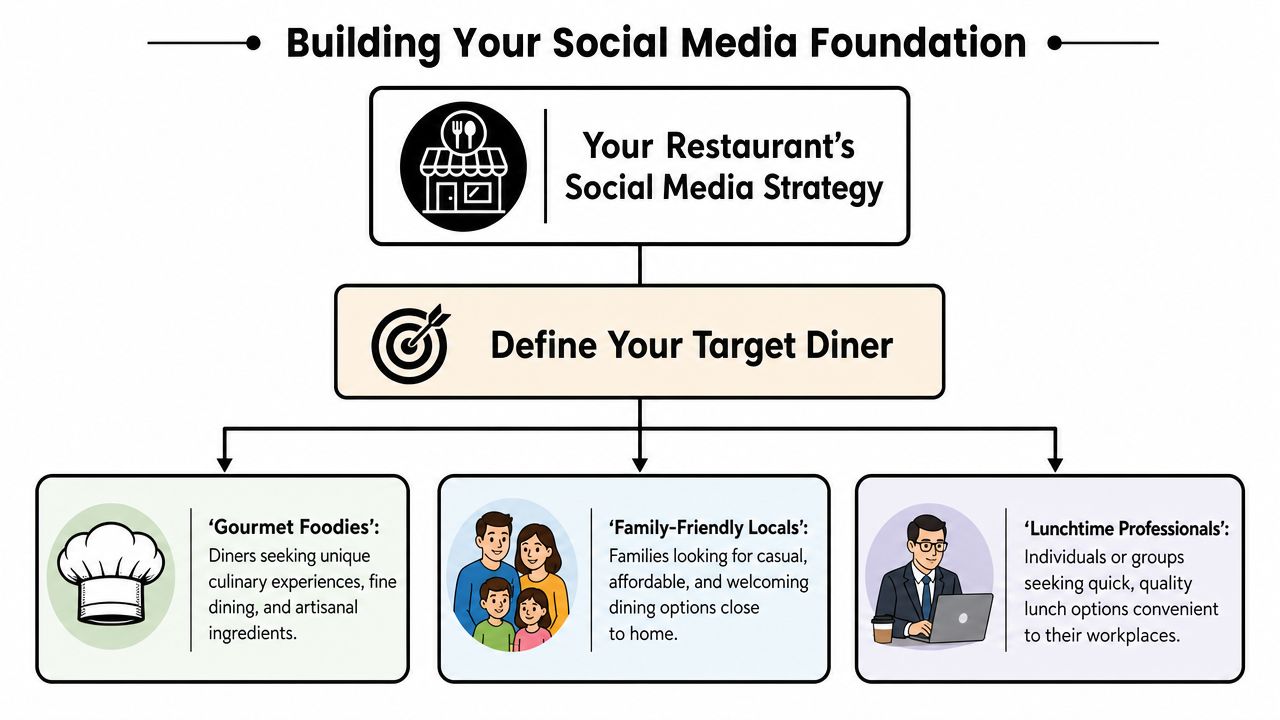
Define the diner you actually want
“Everyone” isn't a usable audience. A waterfront seafood spot in Fort Myers doesn't speak the same way as a fast casual lunch concept near office traffic. A family restaurant in Cape Coral needs different offers, photos, and tone than a cocktail-forward place chasing date-night traffic.
Start with one primary diner profile. Use plain language.
| Diner type | What they care about | What your social should emphasize |
|---|---|---|
| Families nearby | Value, ease, kid-friendly experience | Portions, atmosphere, parking, weeknight specials |
| Lunch crowd | Speed, convenience, consistency | Lunch combos, service timing, online ordering |
| Experience seekers | Visual appeal, signature items, vibe | Plated dishes, bar program, events, ambiance |
If your team can't answer “Who is this post for?” in one sentence, the post is probably too generic.
Pick one main platform first
One restaurant-focused guide recommends starting with a single channel, such as Instagram for visuals or Facebook for local reach, because each additional platform adds time and complexity. It also notes that sporadic posting across many channels is less effective than consistent activity on one or two, as outlined in Craver's restaurant social media guidance.
That trade-off matters. A decent Instagram page with regular updates beats abandoned accounts on Instagram, Facebook, TikTok, and X every time.
Use this simple decision filter:
- Choose Instagram if your food presentation, drinks, and dining room experience are visually strong.
- Choose Facebook if your business depends on local community updates, recurring events, and neighborhood engagement.
- Hold off on adding more channels until someone on staff can maintain the first one without last-minute scrambling.
Tighten your profile before you post
Before creating content, clean up the basics.
- Use one brand voice: If your dining room feels warm and casual, your captions shouldn't sound corporate.
- Add action links: Reservation, order online, call, catering inquiry. Don't make people hunt.
- Keep photos current: Old menu items and outdated interiors create confusion fast.
- Match your business details: Hours, phone number, address, and category should align across platforms and your Google Business Profile.
Operational rule: If a hungry customer lands on your profile, they should know what you serve, where you are, whether you're open, and how to act in under a minute.
Build a small content capture habit
You don't need a shoot day every week. You need a capture habit during normal service.
Assign one person per shift to grab:
- One plated dish
- One short kitchen clip
- One room or bar atmosphere shot
- One customer-safe moment, only when appropriate and permitted
Store everything in a shared folder by date. That simple discipline removes the daily “what do we post today?” panic.
Crafting a Content Menu That Sells
A good restaurant feed should work like a strong menu. It should guide attention, highlight profitable favorites, and make the next decision easy. Random posting creates visual noise. A content menu creates buying intent.
I like to break restaurant content into four buckets. Not because every restaurant needs a rigid formula, but because staff can remember it.
The entrées that stop the scroll
These are your hero posts. Signature dishes. Best-looking cocktails. A dessert with movement. A sandwich pull. A sizzling plate leaving the pass.
Quality matters most. Cropink's summary noted earlier makes that obvious. Food visuals directly influence visits. If the hero content looks rushed, people assume the operation is rushed too.
A few practical examples:
- A close-up of your top-selling grouper sandwich with a caption that ends in “Available for lunch and dinner today. Tap to call.”
- A short Reel of espresso martinis being poured before happy hour
- A plated brunch spread posted on Friday afternoon with a reservation prompt
Don't over-style these. Diners want food that looks real and worth the drive.
The appetizers that build personality
Food gets attention. People create preference.
Behind-the-scenes content helps a restaurant feel local, human, and credible. For instance, you can show your chef finishing a dish, a bartender walking through a seasonal drink, or a quick clip of prep before service.
That same logic applies to menu strategy. If you're refining what should be featured and what should be positioned as a profit driver, this Allied Drinks Systems menu guide is useful because it shows how presentation and profitability should work together instead of separately.
Use this category for content like:
- Staff spotlights
- Daily prep moments
- “What's new this week” kitchen clips
- Short videos explaining an ingredient or pairing
The desserts that create social proof
User-generated content does something your branded posts can't. It shows that real people chose your restaurant and enjoyed the experience enough to share it.
Reshare tagged Stories. Ask permission before reposting feed content. Thank the guest in the caption. Keep it simple.
A repost can work like this:
“Thanks to Sarah for stopping in and sharing dinner with us. That snapper special looked too good not to repost. We'll have it again tonight while it lasts.”
That kind of post feels less polished. It often feels more believable.
The specials that drive action
Underperformance is common among restaurants. They post announcements without a clear next step.
If you're promoting trivia night, brunch, holiday reservations, catering, or live music, every post should answer one question. What should the customer do now?
Use direct calls to action:
- Reserve your table
- Order online
- Call for catering availability
- DM us for private dining details
Many owners stay organized by planning these promotions in advance. A simple restaurant content calendar workflow makes that much easier when multiple people touch the account.
A simple weekly content mix
Here's a practical schedule for a restaurant that only has time to post a few times per week:
| Day | Post type | Example |
|---|---|---|
| Monday | Behind the scenes | Chef prepping a weekly feature |
| Wednesday | Hero food post | Signature entrée with reservation link |
| Friday | Promotion | Weekend special, live music, brunch, or happy hour |
| Saturday or Sunday | UGC or atmosphere | Guest repost or dining room energy |
That's enough to stay visible without creating staff burnout.
A complete example post
Visual: Bartender finishing two smoked old fashioneds at the bar
Caption:
Smoke, citrus, and a little drama at the bar tonight. If you're heading downtown and want a slower dinner with better cocktails, this is the move. Reservations are open for tonight and tomorrow. Tap the link in our profile.
It works because it does four jobs at once. It shows the product, signals the vibe, qualifies the audience, and asks for action.
Engaging Your Community and Managing Reputation
A restaurant can post strong content and still lose business if nobody answers comments, direct messages, or reviews. Silence reads like indifference. Diners notice it.
One industry guide reports that 73% of diners will choose a competitor if a restaurant doesn't respond online, and 71% of customers are more likely to recommend a company that responds quickly on social media, according to Emplifi's restaurant social strategy article. For restaurants, that puts community management in the same category as answering the phone. It's not optional admin work. It affects revenue.
Response speed matters more than perfect wording
Owners often overthink replies. They want the ideal response, so the comment sits there for two days. A fast, professional reply beats a polished one that arrives too late.
Use short templates your team can follow.
For a positive review
- Thank them by name if available
- Mention something specific
- Invite them back
Example:
“Thanks for coming in, Maria. We're glad you enjoyed the shrimp tacos and patio service. Hope to see you again soon.”
For a service complaint
- Acknowledge the issue
- Don't argue in public
- Move the fix to private conversation
Example:
“Thanks for letting us know. That's not the experience we want guests to have. Please send us a direct message with your visit details so we can look into it.”
For a question in comments
- Answer publicly when useful to others
- Keep it plain
Example:
“Yes, we do take reservations for parties that size. Call us or send a DM and we'll help you set it up.”
For a broader framework on handling reviews and brand trust, this guide to online reputation management tips is a practical reference.
A visible response to one guest often answers the concerns of ten silent prospects.
Build conversation into the post itself
A lot of restaurant captions die because they read like menu labels. If you want engagement, give people something easy to answer.
Good low-friction prompts include:
- Choice questions: “Wine or cocktail with this?”
- Local preference prompts: “Lunch on the patio or inside by the bar?”
- Event interest checks: “Should we bring back Sunday brunch flights?”
These aren't gimmicks. They give the algorithm a reason to keep showing your content, and they give your staff clues about what customers actually want.
Work with local creators without overcomplicating it
You don't need celebrity influencers. Most independent restaurants do better with local food creators, neighborhood personalities, or community pages that reach people in your trade area.
Look for three things:
| What to check | What good looks like | What to avoid |
|---|---|---|
| Geography | Followers appear local | Audience looks broad and unrelated |
| Content style | Restaurant visits, local lifestyle, real commentary | Generic promo posts with no local context |
| Interaction | Real comments and conversation | Inflated likes with little discussion |
A practical outreach message can be simple:
“Hi [Name], we've followed your local food content and think your audience overlaps with our crowd. If you're open to visiting, we'd be happy to host you for dinner and let you share your honest experience.”
That keeps it clean. No hard script. No forced praise. No awkward brand language.
Boosting Reach with Paid Social and Local Targeting
Organic social helps. Paid social gives you control. If you've ever had a strong special, great photo, or profitable event disappear into the feed with little traction, this is the fix.
The mistake most restaurants make is boosting random posts without a business objective. They spend a little money, get some likes, and can't tell whether it did anything useful. A better approach treats paid social as direct response.
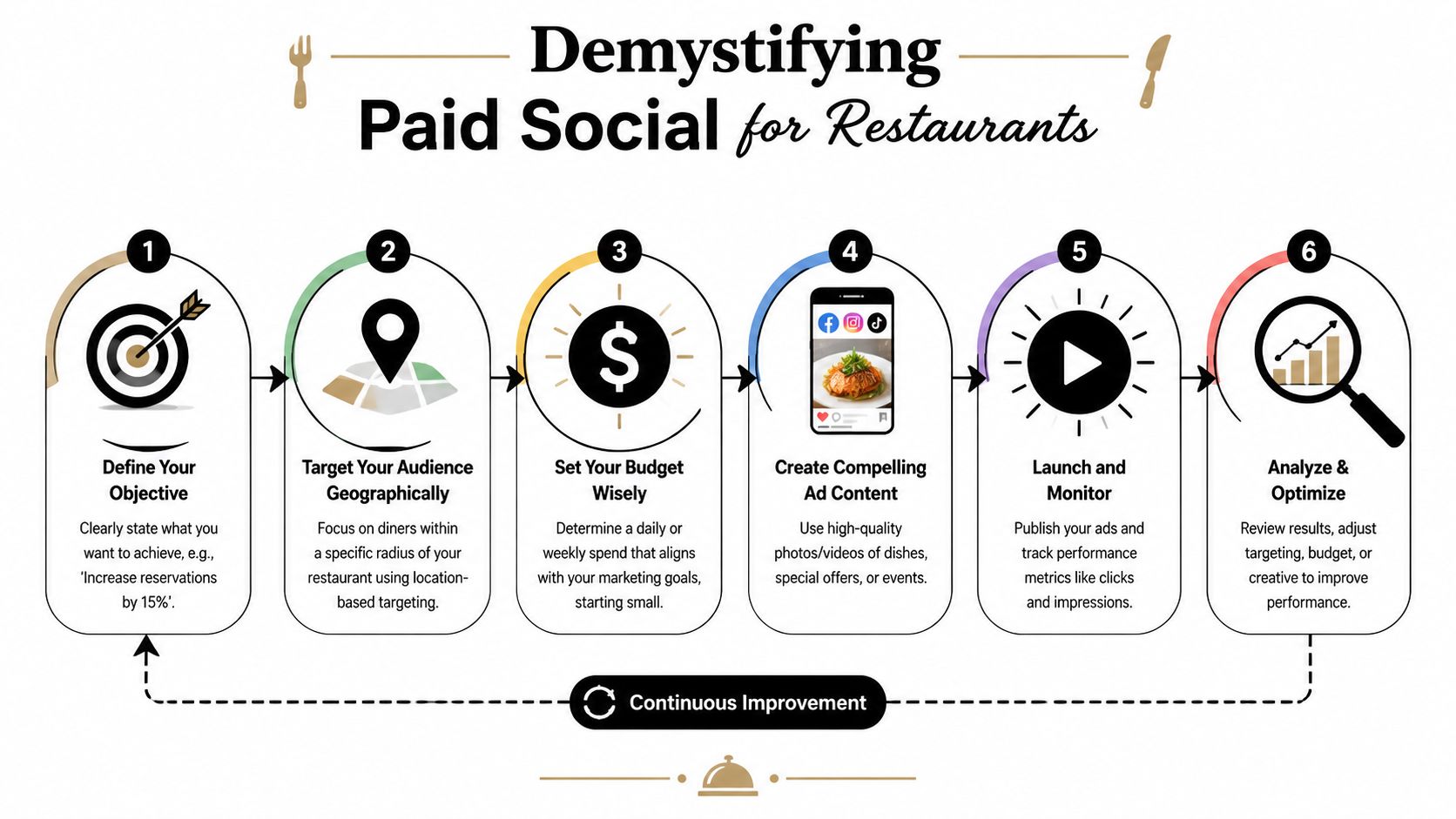
One restaurant marketing guide puts it plainly. Many social media guides explain what to post but not how to drive revenue. It argues that the strongest restaurant strategies treat social as a conversion tool, using clear calls to action and paid targeting for reservations or online orders, as described in Awakened Films' restaurant social media marketing article.
One paid campaign that small restaurants can actually run
Start with a single use case. Promote a weekend offer that already performs well in-house.
Examples:
- Sunday brunch
- Taco Tuesday
- Live music night
- Seasonal menu launch
- Catering inquiry push before holidays
Your ad needs four parts:
A clear offer
“Weekend brunch served Saturday and Sunday.”A strong visual
Use your best dish or a short video with movement.A local audience
Target people close enough to act on the offer.One action
Reserve, order online, call, or send a message
Don't ask the ad to do five jobs.
A short walkthrough helps before you launch:
Keep the targeting local and practical
For a neighborhood restaurant, wide targeting wastes money. Most restaurants should focus on the immediate trade area first.
Think in terms like:
- People near your restaurant
- Nearby cities you already pull from
- Demographics that fit the offer
- Interests that support the concept
A brunch ad and a late-night cocktail ad shouldn't use the same audience logic.
If you're running campaigns in Meta, review a few Facebook ads best practices for local businesses before spending money. It helps prevent the common problems, such as weak creative, vague buttons, and audience settings that are too broad.
What works and what doesn't
Usually works
- Ads tied to a specific offer
- Clear local targeting
- Strong food or drink visuals
- One obvious call to action
Usually doesn't
- Generic “come visit us” ads
- Dark or cluttered images
- Sending ad traffic to a homepage with no next step
- Promoting something staff can't support operationally
Practical benchmark: If a paid post gets attention but doesn't create calls, clicks, bookings, or messages, it probably wasn't aimed tightly enough or the offer wasn't strong enough.
Measuring What Matters and Building a Simple Workflow
Restaurant owners get buried when social reporting turns into a pile of vanity metrics. Likes don't pay rent. Reach by itself doesn't tell you much either. What matters is whether social activity creates actions that can lead to revenue.
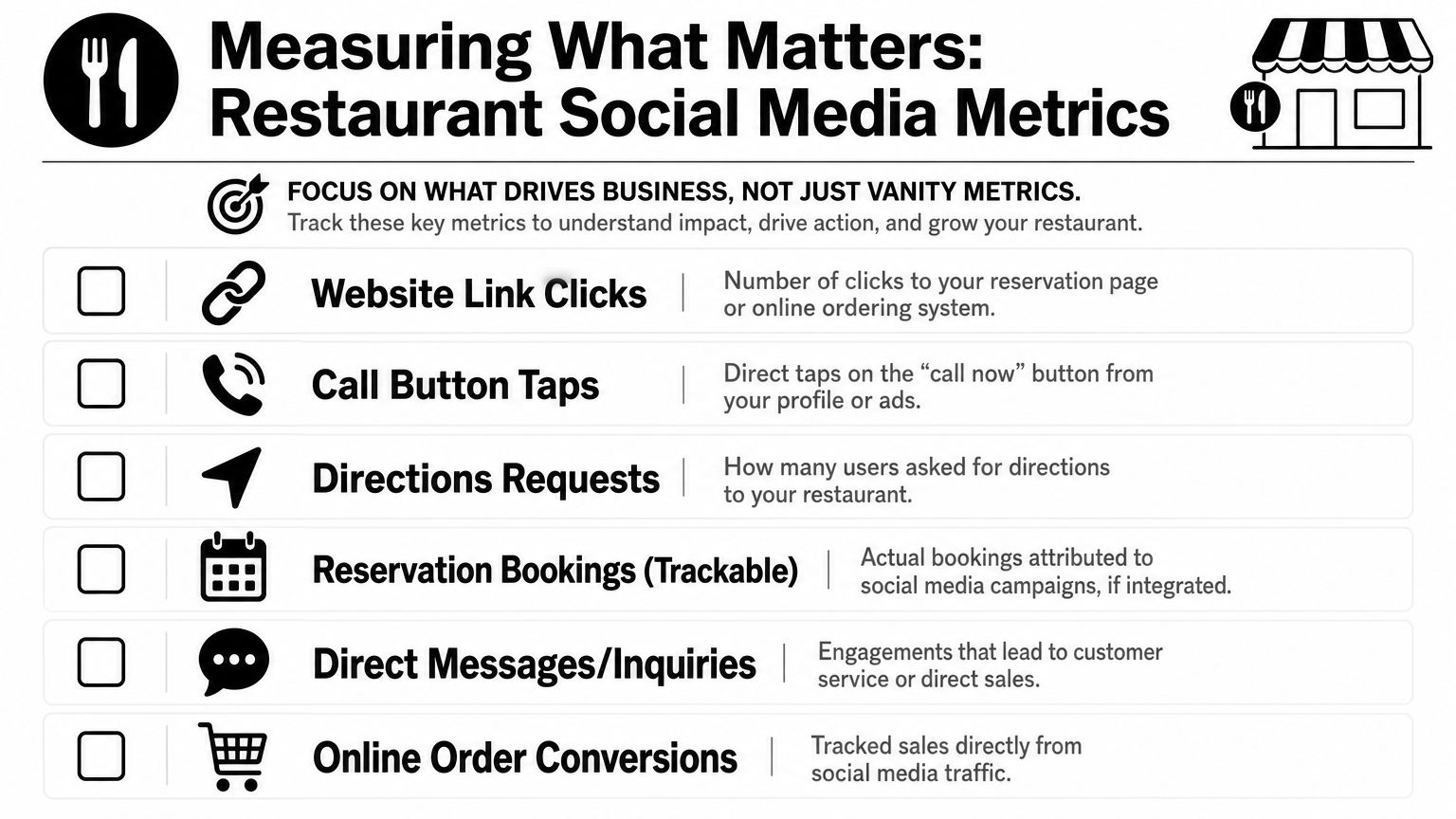
Track actions, not applause
For most restaurants, the useful monthly scorecard is short.
| Metric | Why it matters |
|---|---|
| Website link clicks | Shows interest in reservations, menus, or ordering |
| Call button taps | Signals high intent |
| Directions requests | Indicates visit intent from local prospects |
| Reservation inquiries | Ties social activity to covers |
| Direct messages | Captures catering, event, and service questions |
| Online order clicks | Points to direct sales behavior |
If you use reservation software, ordering tools, or forms, make sure links point to the exact action page, not a generic homepage. That makes performance easier to judge.
Use a lightweight reporting routine
A restaurant doesn't need enterprise analytics to be disciplined. It needs one person to review the same numbers at the same time every month.
A practical monthly review looks like this:
- Top posts by business action: Which posts caused clicks, calls, or messages?
- Weak posts: Which posts looked good but generated nothing useful?
- Offer performance: Which promotions created actual demand?
- Operational issues: Did DMs or comments reveal recurring questions, complaints, or confusion?
That last one matters more than people realize. Social often surfaces menu confusion, parking questions, event interest, and service friction before management hears it elsewhere.
Assign ownership clearly
Many social media strategy for restaurants plans break down. Everyone is “kind of” responsible, so no one really owns it.
A workable structure is simple:
- Owner or GM: approves offers, reviews results monthly
- Manager or lead staff member: posts, replies, gathers content
- Front-of-house team: flags good guest moments, tags, and questions
- Kitchen or bar lead: helps capture hero items and specials
If you want outside support, use one provider as part of the system, not as a replacement for internal communication. For example, Polaris Marketing Solutions offers social media management alongside local SEO and paid advertising, which can fit restaurants that need help with scheduling, campaign support, and reporting but still want the in-house team to provide real-time content.
A 15-minute daily checklist
Here's the simplest routine I recommend to restaurants with limited bandwidth:
- Check comments and messages
- Respond to new reviews or guest questions
- Confirm today's hours, offers, or specials are accurate
- Post or schedule one piece of content in Meta Business Suite
- Save any new customer tags or usable UGC
- Flag anything operational that ownership should know
That's manageable. It doesn't require a full-time marketer. It requires consistency.
The best workflow is the one your team can still follow during a slammed week.
Your 30/90-Day Restaurant Social Media Kickstart Plan
Most restaurant owners don't need a twelve-month strategy deck. They need to know what to do next, what to ignore for now, and how to tell if the effort is starting to work.
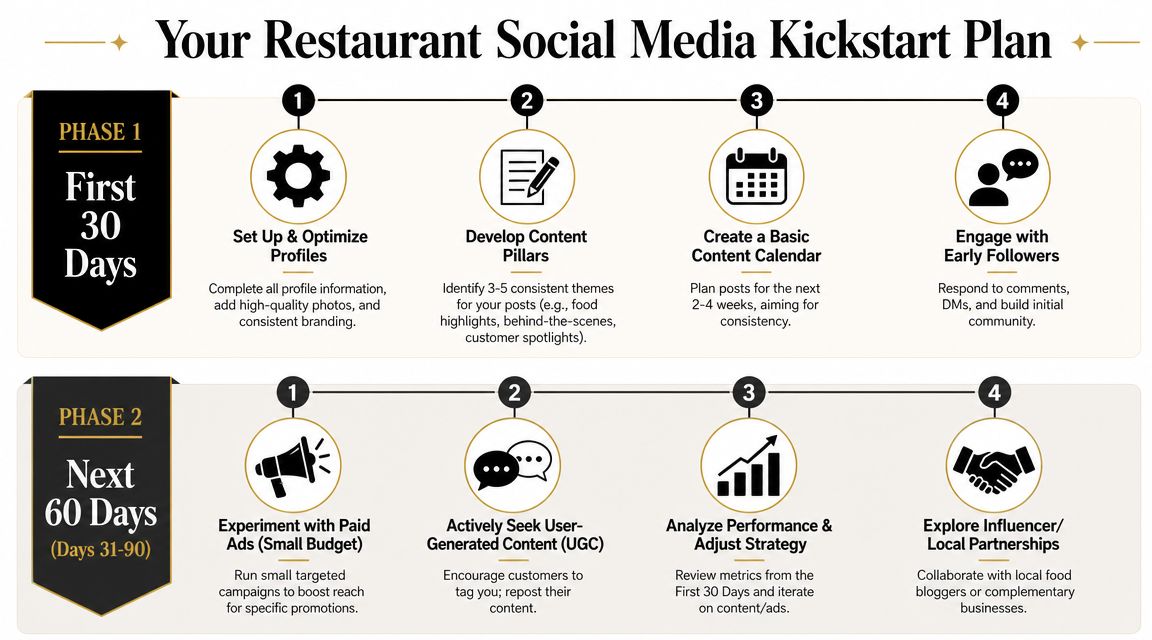
First 30 days
Use the first month to build control.
- Clean up your profiles so every core detail is accurate and every action link works
- Choose one primary platform and commit to it
- Set three content pillars such as hero dishes, behind the scenes, and promotions
- Create a basic calendar for the next few weeks
- Assign ownership so one person is posting and one person is reviewing
Also run one small paid campaign tied to a real offer. Don't test branding. Test an action you can measure, like a brunch push, event RSVP, or direct message inquiry.
Days 31 through 90
At this point, the system starts to become useful.
Keep the posting rhythm steady. Review which posts create clicks, messages, or reservations. Tighten weak captions. Improve your visuals. Ask your staff what guests mention in person after seeing online content.
Add one new lever during this period:
- Reshare more customer content
- Build one local creator partnership
- Improve your ad targeting
- Create a better landing page for reservations or ordering
If you want to get cleaner about attribution, this guide to attributing social campaign ROI is worth reading because it explains how to connect campaign activity back to business outcomes instead of stopping at engagement.
What success looks like by day 90
By that point, you should have:
| Area | What should be true |
|---|---|
| Posting | Consistent and manageable |
| Messaging | Clear offers and calls to action |
| Engagement | Reviews, comments, and DMs are getting responses |
| Reporting | You know which content drives useful actions |
| Workflow | Staff know who captures, posts, and replies |
That's enough to move social from “we should probably do more with this” to “this is part of how we bring people in.”
If you want help turning your restaurant's social presence into a workable system, Polaris Marketing Solutions works with Southwest Florida businesses on social media, local visibility, paid ads, and reporting that connects marketing activity to real business goals.