
A small-business website can often become a stronger SEO asset without adding a single new page. The opportunity is already sitting in the pages you own, but weak connections can leave service pages, location pages, and helpful articles difficult for customers and search engines to reach. A 2022 Zyppy study of 23 million internal links across 1,800 websites and roughly 520,000 URLs found that pages with 40–44 internal links received about four times more Google traffic than pages with only 0–4 internal links, while traffic began to decline after roughly 45–50 internal links (Zyppy's internal linking study).
That doesn't mean every page needs dozens of links. It means links should be placed deliberately, especially around the pages that generate calls, form submissions, bookings, and sales. The best internal linking practices connect search intent with the next sensible customer action.
This playbook covers eight practical techniques, from descriptive anchor text and hub structures to breadcrumbs, deep content, contextual links, and highlighted content boxes. Each recommendation includes actionable examples for businesses such as roofing contractors, cleaning companies, healthcare providers, HVAC firms, and law practices, along with trade-offs and common mistakes. For more ideas about turning existing marketing assets into business growth opportunities, explore this journal of ideas.
1. Use Descriptive Anchor Text That Matches User Intent
Anchor text is the clickable wording that tells visitors and search engines what the destination page contains. It should make the next step obvious. Generic phrases such as “click here,” “learn more,” and “contact us” waste that opportunity because they provide little context before the click.
A Fort Myers roofing contractor could link the words storm damage roof repair in Cape Coral to a location-specific service page. A healthcare provider could use complete our online patient registration form instead of “register here.” A legal firm might link schedule a divorce consultation in Naples, while an HVAC company could use view our AC maintenance plans.
The wording should describe the destination accurately, not force a keyword into an unrelated sentence. Local businesses can include a location when the destination page serves that area, but a location modifier shouldn't appear on every link for optimization. Natural keyword placement supports clarity for readers as well as search engines, a point also covered in this guide to keyword placement for SEO.
Make every linked phrase earn its place
Use concise wording, often a short phrase of a few words, but don't treat a word-count range as a rigid rule. Read the sentence aloud. If the anchor sounds awkward, overly promotional, or stuffed with locations, revise it.
- Match the destination: Link “roof leak detection services” to a page that explains or sells that service.
- Reflect intent: Use “compare AC maintenance options” when the destination helps visitors evaluate plans.
- Vary naturally: Link to the same important page with relevant variations rather than repeating one exact phrase everywhere.
- Avoid vague buttons: Replace “read more” with a useful description such as “see our residential cleaning services.”
The trade-off is simple. Exact-match wording can clarify relevance, but excessive repetition makes content feel mechanical. Write for the customer first, then confirm that the wording accurately describes the page.
2. Organize Content With Silos and Hub-and-Spoke Structures
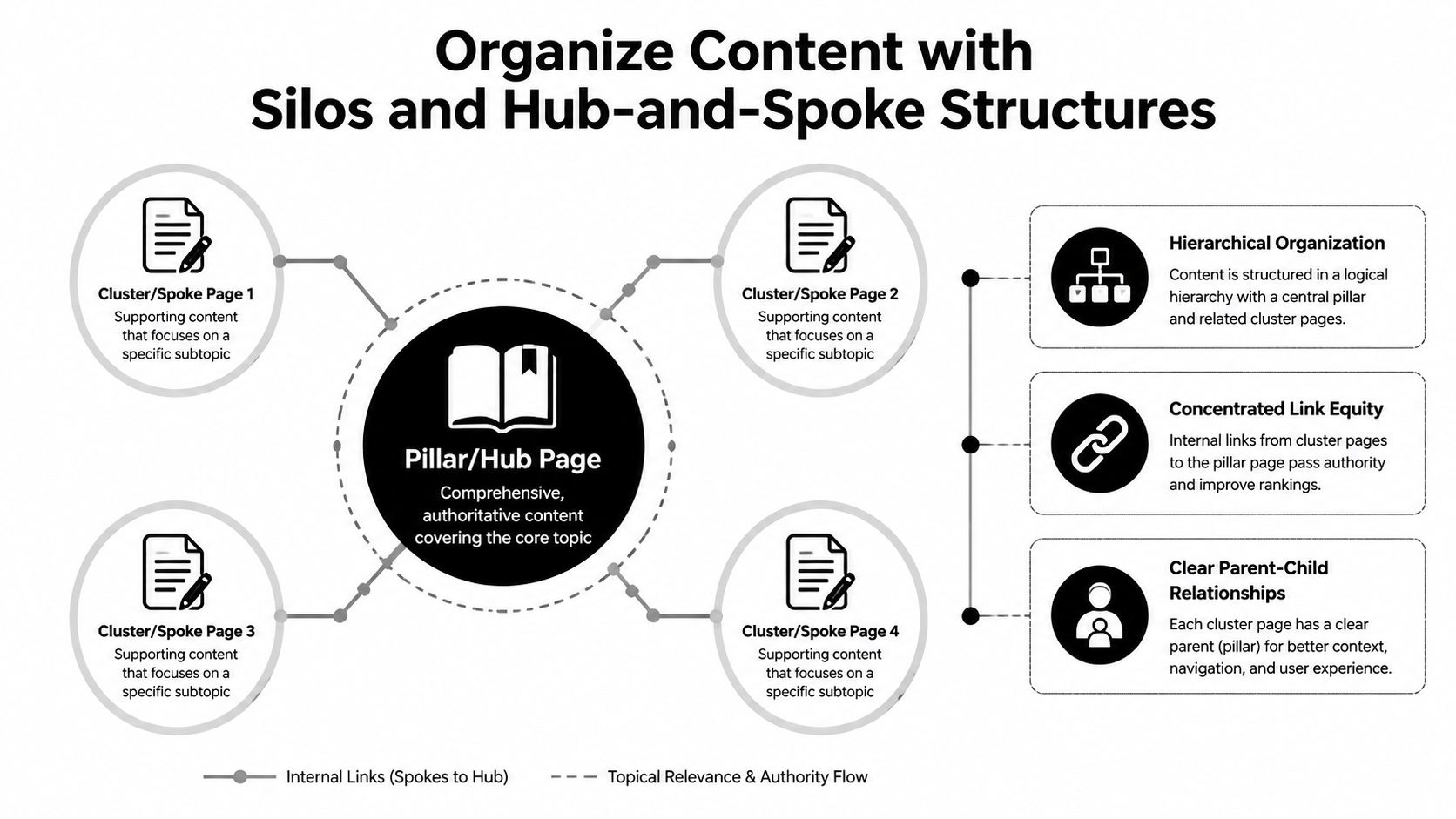
A website becomes easier to understand when related pages form a recognizable topic group. A hub-and-spoke structure uses one broad page as the central resource, with focused supporting pages linking back to it and, where useful, to one another. A silo takes a similar approach through a service or category hierarchy.
A cleaning company might create a hub called The Complete Home Cleaning Guide, supported by pages about kitchen deep cleaning, bathroom cleaning, carpet stain removal, and eco-friendly cleaning products. A roofing business could build a roof repair group containing leak repair, shingle replacement, gutter repair, and roof maintenance content. These relationships help customers move from a general question to a specific service.
Small businesses don't need an elaborate enterprise taxonomy. Start by mapping your offerings into 3–7 main topic groups based on how customers search and buy. Each group should have a clear commercial destination, such as a service page or local landing page.
Build a structure your team can maintain
Create a broad hub page for each major group, then add supporting pages that answer narrower questions. The planning notes for a full hub may call for a long guide and multiple supporting articles, but quality matters more than filling a quota. Don't publish thin pages merely to create more spokes.
Useful implementation steps include:
- Name the hub clearly: Use a title and H1 that match the subject customers expect.
- Connect both directions: The hub should link to relevant spokes, and spokes should link back when the relationship is genuine.
- Use breadcrumbs: Reinforce the hierarchy through consistent navigation.
- Limit unrelated jumps: A roofing article doesn't need to link to every blog category on the site.
- Review the group periodically: Update outdated services, locations, and recommendations when the business changes.
A local business may also benefit from content marketing for local businesses when it needs a sustainable way to create supporting pages around revenue-generating services.
Media can help a hub page guide visitors visually:
The structure works when it mirrors the customer journey. It fails when pages are grouped only because they share a keyword.
3. Link to Cornerstone Content From Every Relevant Page
Cornerstone content is one of the most thorough pages covering a subject that matters commercially. For a Fort Myers roofing company, that might be roof repair services in Fort Myers. For a clinic, it could be a page about online physical therapy evaluations. For a law firm, it may be a detailed DUI defense service page.
Once you identify these pages, create a consistent rule: every relevant article, service page, and location page should link to the appropriate cornerstone. A post about storm damage should connect to the main roof repair page. A guide to DUI consequences should point readers toward the firm's DUI defense service. An article about furnace problems should give visitors a clear path to the heating service page.
This approach concentrates attention on pages that support leads and revenue, rather than distributing links evenly across every URL.
Create a cornerstone map
Begin with 5–10 priority pages connected to your primary services, without assuming every business needs the same number. Record each cornerstone, its supporting topics, preferred anchor variations, and the pages that should link to it. A simple spreadsheet is enough.
The cornerstone page should also link back to useful supporting content. A service page can point to preparation guides, process explanations, service-area pages, or answers to common objections. That two-way relationship helps users choose the depth they need.
- Use varied anchors: “Fort Myers roof repair,” “repair options for damaged roofs,” and “professional roof repair” may all be appropriate when they accurately describe the destination.
- Link from strong pages: Existing pages with visibility and relevant context are useful starting points for new links.
- Review commercially important pages regularly: Service details, coverage areas, forms, and calls to action can become outdated.
- Avoid forcing every article to the same destination: Relevance still controls the decision.
A broader small-business SEO checklist can help place cornerstone linking alongside other foundational work.
Practical rule: If a page discusses a service, problem, or location that supports a revenue page, give the reader a relevant path to that page.
4. Implement Breadcrumb Navigation to Clarify Site Structure
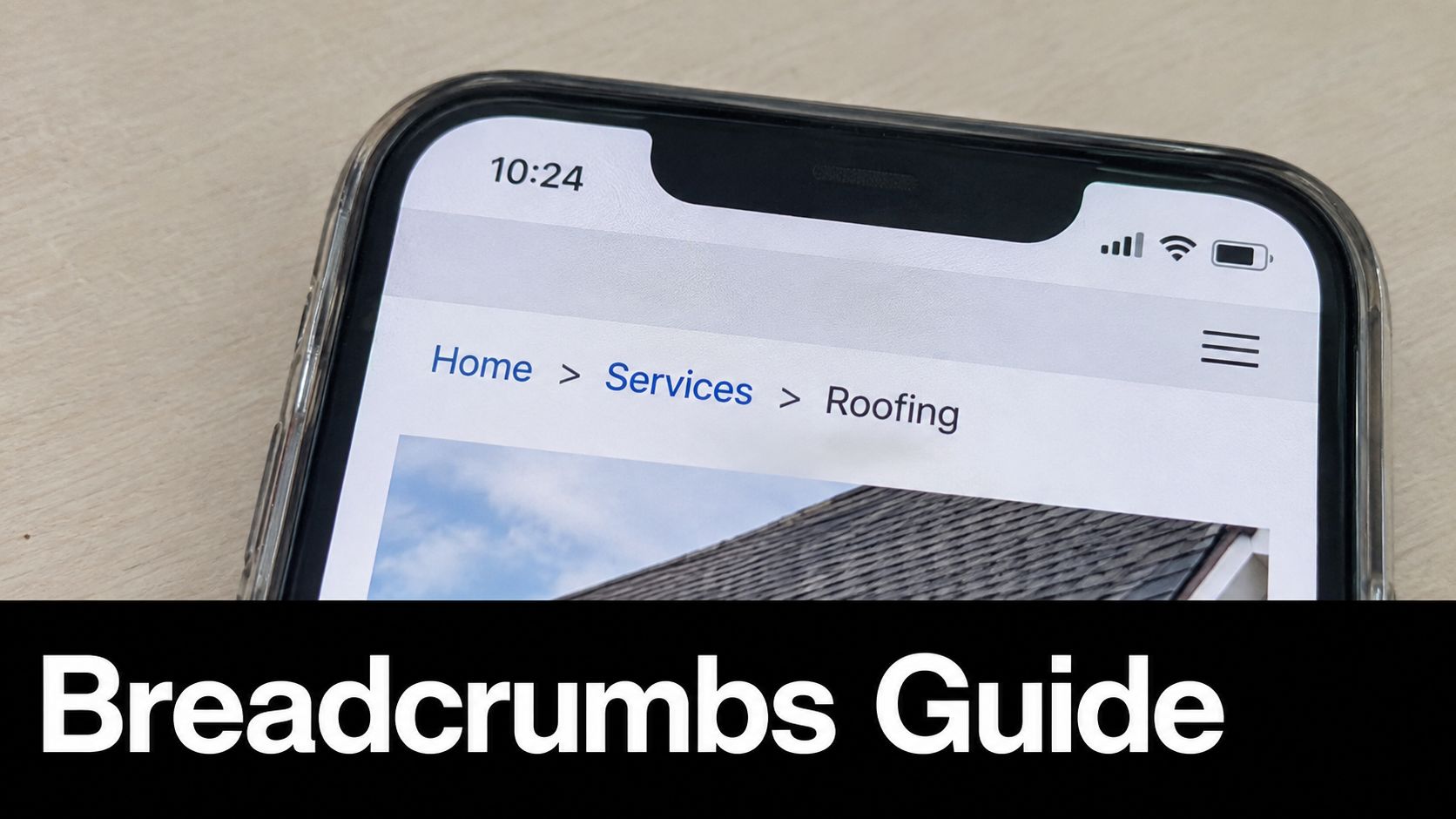
Breadcrumbs show visitors where they are within a website, such as Home > Services > Roofing > Roof Repair. They're especially useful when someone lands directly on a deep service or location page from search and needs to understand how that page fits into the broader business.
For a cleaning company, the trail might read Home > Residential Services > Move-In and Move-Out Cleaning. A healthcare site could use Home > Specialties > Orthopedics > Knee Surgery. A Southwest Florida roofing site might add a location where it reflects the page structure, such as Home > Services > Roofing > Fort Myers.
Breadcrumbs create additional internal links, but their main value is structural clarity. They should reflect the actual relationship between pages, not a marketing story invented solely for search engines.
Keep the trail accurate
Start with “Home,” then move through actual parent categories before reaching the current page. Don't place a location in the trail if the page isn't part of a location-based section. Don't make the breadcrumb wording different from the navigation labels and page titles without a clear reason.
A practical implementation process looks like this:
- Match the hierarchy: Make sure every breadcrumb level exists in the site's real architecture.
- Use consistent separators: Choose “>” or “/” and apply it across the site.
- Keep the styling subtle: Breadcrumbs should support navigation without competing with the page's primary call to action.
- Add BreadcrumbList structured data: Implement it carefully, then test the markup with Google's Rich Results Test.
- Check mobile presentation: Long service and location names shouldn't become difficult to scan or tap.
Good navigation supports search performance because it also supports users. This relationship is explored in guidance about how user experience affects SEO.
For additional navigation terminology and examples, see this guide to master breadcrumbs navigation. Breadcrumbs won't fix a confused site hierarchy by themselves, but they can make a sound structure much easier to use.
5. Strategically Cross-Link Between Related Service Pages
Customers rarely think in isolated URLs. Someone searching for roof repair may also need an inspection, replacement estimate, or gutter repair. A homeowner booking AC repair may ask about maintenance plans or indoor air quality. A patient researching knee pain may want to compare physical therapy, injections, and surgery.
Peer-level internal links reflect those real customer journeys. They connect sibling service pages without forcing every visitor back through the homepage or a broad category page. The result can be a clearer decision path and more opportunities for a visitor to find the service that fits.
Build a customer-journey map
Create a simple “also relevant” map for your main services. For each page, list the questions a customer is likely to ask next. Then link only to the most useful destinations, usually a small group of related services.
A roofing page could include:
- Roof inspection: Useful before repair or replacement decisions.
- Roof replacement: Relevant when damage is extensive or the roof is near the end of its life.
- Gutter repair: Appropriate when drainage contributes to roof problems.
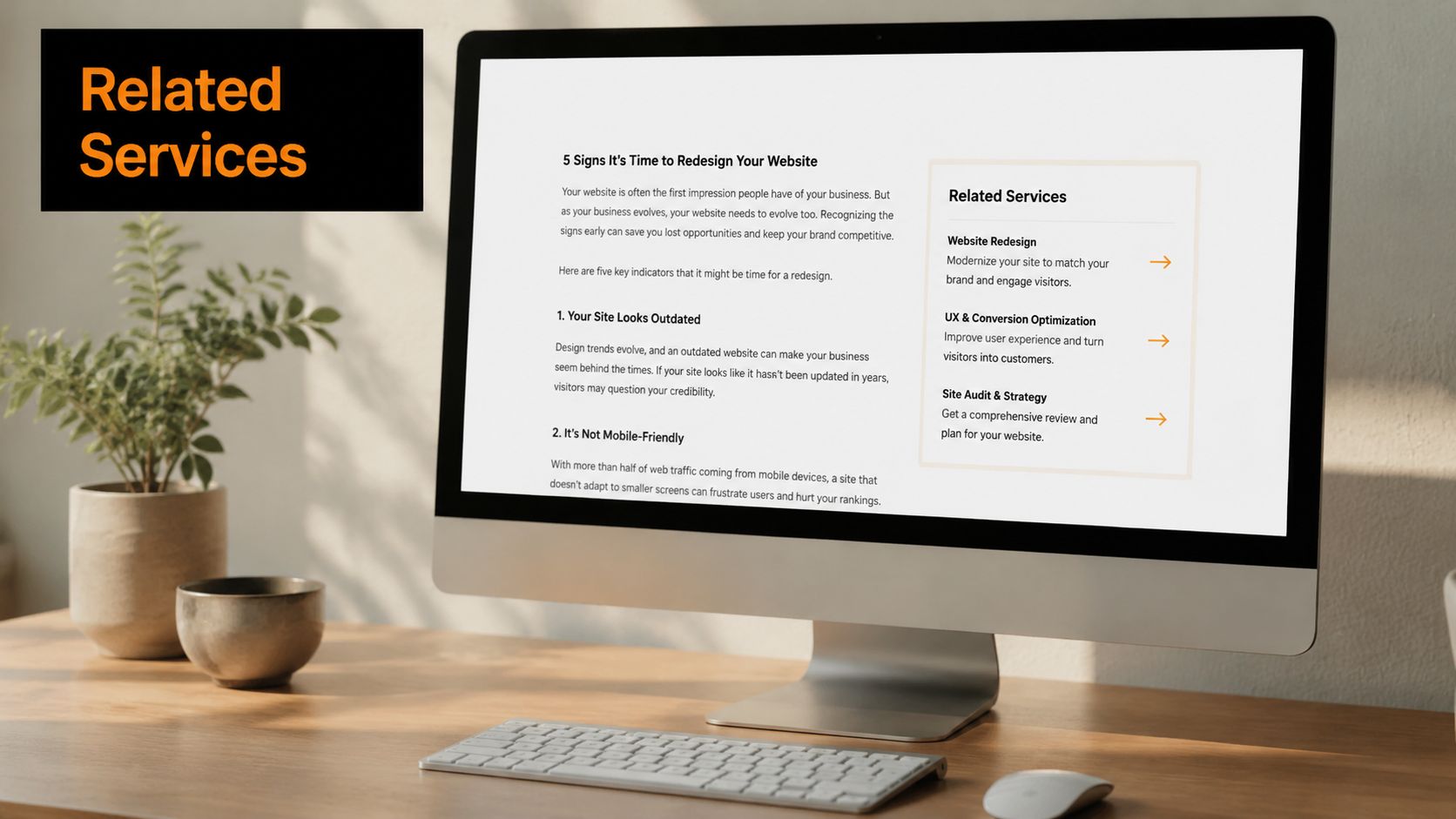
Place these links in the body where the relationship is explained, then consider a short Related Services area near the bottom. Use clear wording such as “compare roof replacement options” or “schedule a professional roof inspection,” not a generic “learn more.”
The main trade-off is between discovery and distraction. Too few links hide useful services. Too many links turn the page into a directory and weaken the primary call to action. A practical starting point is to connect the page to the related services a customer would reasonably consider next, then remove any link that doesn't help someone make a decision.
Review competitor service menus for common combinations, but don't copy their structure automatically. Your links should reflect your own offerings, service boundaries, and sales process.
6. Link Deep Into Content With Targeted Long-Form Pages
Broad category pages are useful, but they can't answer every specific question a potential customer has. Deep pages address focused topics that often appear later in the buying journey. They can also give service teams a place to explain complicated decisions without overcrowding a commercial landing page.
A roofing company might create pages about roof leak detection methods and water damage repair after roof leaks, then link to them from its broader roof repair page. An HVAC business could publish SEER rating explained for Florida heat and connect it to AC installation and efficiency content. A healthcare provider might explain an ACL reconstruction recovery timeline, while a legal firm could publish a detailed page about breathalyzer challenges in Florida.
Make each deep page distinct
Before publishing, define the exact question the page answers and the customer action it should support. Don't create several URLs that repeat the same service description with minor keyword changes. A focused page should add information that the broader service page doesn't provide.
Use links in both directions:
- From broad to specific: The roof repair page can introduce leak detection and link to the detailed guide.
- From specific to commercial: The leak detection guide can link back to roof repair services when a visitor needs professional help.
- Between related details: A page about water damage can reference emergency repair where the relationship is relevant.
- From location content: A business serving North Fort Myers can connect a locally relevant deep page to its main service-area page.
The plan for long-form pages may involve substantial articles, but length alone doesn't create value. Cover the topic completely, use headings that match user questions, include practical next steps, and update the page when services or regulations change. Link from already-indexed, relevant pages soon after publication. One source explains that a new URL with no inbound internal links may not enter the crawl queue through internal discovery and may instead depend on an XML sitemap or external backlinks (internal link discovery guidance).
7. Use Contextual Linking Within Body Content Rather Than Only Navigation
A navigation menu tells visitors what your business offers. A contextual link explains why a related page matters at a particular moment. That distinction makes in-text links valuable for both usability and architecture.
Consider a roofing article discussing replacement decisions. The sentence “Before scheduling your roof replacement, arrange a professional roof inspection” gives the reader a logical next step. An HVAC maintenance article can mention preventive furnace maintenance when discussing seasonal preparation. A healthcare page about knee injury prevention can link to physical therapy when it explains persistent pain or instability. A DUI consequences article can connect hardship-license information to the firm's defense service.
Write naturally, then find the links
Don't begin by stuffing links into a draft. Write the explanation first, then scan for moments where a reader would benefit from more detail or a service option. Link the first meaningful mention of a topic when possible, and avoid repeating the same destination throughout every paragraph.
The surrounding sentence should make the relationship obvious. “Read more” tells nobody what comes next. “Review our AC maintenance plans before scheduling seasonal service” gives the visitor a reason to click and identifies the destination.
A disciplined workflow helps:
- Edit after drafting: Look for useful transitions instead of forcing links while writing.
- Prioritize relevance: Link the paragraph's subject, not merely the site's general theme.
- Use natural variations: Related phrasing can support clarity without repeating an exact-match anchor.
- Check the click path: Confirm the destination answers the question raised by the source page.
- Read aloud: If the link interrupts the sentence, rewrite it.
Keep contextual linking selective. The objective isn't maximum link density. It's to place helpful recommendations where they support comprehension, comparison, or conversion.
A contextual link should answer the visitor's next question, not interrupt the current one.
Navigation, footers, and sidebars still matter, but they shouldn't carry the entire internal linking strategy. Body content provides the explanation that makes a recommendation meaningful.
8. Add Internal Links in Featured or Highlighted Content Boxes
A well-designed content box can surface important links without interrupting the main explanation. Labels such as Related Services, Next Steps, Pro Tips, and Popular Resources give visitors a clear reason to explore another page.
A roofing company might add a Related Services box to its repair page with links to roof inspection, gutter repair, and maintenance plans. An HVAC contractor could place a Customer Tips box on an AC repair page linking to filter replacement guidance, maintenance plans, and energy-saving advice. A law firm might use a Related Practice Areas box to connect DUI defense with license suspension defense and sentencing appeals.
Keep the module focused
Use a consistent design across the site so visitors recognize the pattern. Limit the box to the most relevant links, keep the title specific, and make sure the module works on smaller screens. A visually prominent box shouldn't push the primary form or phone number so far down the page that customers struggle to take action.
Useful tests include:
- Placement: Compare sidebar, mid-content, and lower-page positions based on the page's purpose.
- Selection: Change links when the featured service is seasonal, unavailable, or no longer a priority.
- Presentation: Use borders, color, or a small icon, but preserve contrast and readable text.
- Mobile behavior: Confirm that links remain easy to tap and don't create a cramped stack.
- Measurement: Track clicks on the module links and review whether visitors continue toward contact or booking pages.
Avoid adding boxes to every section. One or two relevant modules are usually easier to understand than a page filled with competing recommendations. A box is most effective when it supports the content immediately around it, such as showing treatment options after a discussion of knee pain or showing inspection options after explaining roof damage.
8-Point Internal Linking Comparison
| Strategy | 🔄 Implementation Complexity | ⚡ Resource Requirements & Speed | 📊 Expected Outcomes | 💡 Ideal Use Cases | ⭐ Key Advantages |
|---|---|---|---|---|---|
| Use Descriptive Anchor Text That Matches User Intent | Low, editorial updates, minimal workflow | Low resources; quick to implement | Moderate 📊, better CTR & topical signals | Any pages with internal links; quick SEO wins | Improves accessibility, clarity, and CTR ⭐ |
| Organize Content with Silos and Hub-and-Spoke Structures | High, planning, architecture changes, taxonomy work | High resources; longer rollout (content + dev) | High 📊, stronger topical rankings and authority | Large sites or businesses aiming for topic authority | Concentrates link equity and improves navigation ⭐ |
| Link to Cornerstone Content From Every Relevant Page | Moderate, audit then systematic linking | Moderate resources; faster once pages exist | High 📊, boosts priority page rankings & conversions | Businesses with clear revenue-driving pages | Centralizes authority and simplifies linking strategy ⭐ |
| Implement Breadcrumb Navigation to Clarify Site Structure | Moderate, dev + schema markup and styling | Moderate resources; medium implementation speed | Moderate 📊, better UX, crawlability, SERP snippets | Sites with deep hierarchies (e‑commerce, services) | Improves navigation, crawl efficiency, and CTR ⭐ |
| Strategic Cross-Linking Between Related Service Pages | Moderate, mapping required but editorial work | Low resources; quick edits possible | Moderate 📊, improves discovery and conversion flow | Service sites with sibling/complementary pages | Enhances user journey and pages-per-session ⭐ |
| Link Deep Into Content With Targeted Long-Form Pages | High, content research and production effort | High resources; slower to produce quality pages | High 📊, captures long-tail, qualified traffic | Content-driven SEO strategies targeting long-tail queries | Expands keyword coverage and reduces reliance on few pages ⭐ |
| Use Contextual Linking Within Body Content Rather Than Only Navigation | Moderate, editorial judgement and content edits | Low resources; quick to apply during edits | High 📊, editorial links carry more value and CTR | Blog posts, guides, and explanatory content | More natural, higher-value links; better engagement ⭐ |
| Add Internal Links in Featured/Highlighted Content Boxes | Moderate, design + dev + content selection | Moderate resources; medium implementation speed | Moderate 📊, higher visibility and CTR on links | Long-form pages and conversion-focused content | Visual prominence increases clicks and conversions ⭐ |
Make Every Important Page Easier to Reach
Internal linking is most useful when it follows business priorities. A small company doesn't need to rebuild its entire website before making progress. It needs to connect the pages that matter to revenue, local visibility, and customer decisions.
Start with a focused audit of your highest-value pages. List your main service pages, location pages, cornerstone resources, and pages that receive meaningful organic visits or referral traffic. Then check whether each page has relevant links pointing to it, whether the links use understandable anchor text, and whether visitors can reach it without working through an unnecessarily deep path.
Google's crawl guidance says crawl budget depends on overall site quality and whether pages are worth crawling, and it recommends managing URL inventory and improving the quality of content targeted for crawling (Google's crawl budget documentation). That matters even for a smaller company because a clean structure helps search engines discover and interpret the pages you want to promote.
Prioritize fixes in a practical order:
- Replace generic anchors: Change “click here” and “learn more” when a descriptive phrase would clarify the destination.
- Map revenue-focused hubs: Group services, supporting content, and location pages around customer search behavior.
- Connect cornerstone and deep pages: Make sure key pages receive links from relevant content and return useful links to supporting resources.
- Verify breadcrumbs: Check hierarchy, wording, structured data, and mobile display.
- Add contextual service links: Use customer questions and journey logic to connect related pages.
- Review highlighted modules: Remove stale recommendations and confirm that boxes remain readable and relevant on mobile.
- Find orphaned and underlinked pages: A compiled benchmark reported that 53% of URLs had three or fewer internal links pointing to them (InLinks internal-linking opportunities analysis). Use that evidence as a reason to inspect distribution, not as a target to inflate every page's link count.
Document each change with the source URL, destination URL, anchor text, reason for the link, and date. Then use transparent reporting to assess discovery, engagement, and conversion paths. Don't assume a ranking change came from internal linking alone. Compare priority pages over time, check crawl and indexing signals, review analytics behavior, and ask whether visitors are reaching the next useful step.
Businesses in Fort Myers and Southwest Florida that want help prioritizing this work can consider Polaris Marketing Solutions, which offers a complimentary online analysis and competitor report before broader SEO planning. The right audit is manageable, specific, and tied to business outcomes.
Polaris Marketing Solutions can review your internal linking structure, revenue pages, local service areas, and competitor landscape to identify practical SEO opportunities. Visit Polaris Marketing Solutions to request a complimentary online analysis and competitor report, then use the findings to prioritize links that support discovery, engagement, and qualified leads.