

You're standing outside a Fort Myers boutique when a customer sees a product post on Instagram. She taps through, opens Google Maps to check the hours, compares the item with other retailers in Safari, and returns to your site ready to buy. The page loads slowly, the checkout asks for too much information, and she leaves. A few minutes later, she calls the store and asks you to reserve the product.
That sequence is e commerce on mobile in real life. The sale can begin in social media, continue through local search, move across browser tabs, fail at checkout, and still end with a phone call. Your mobile storefront has to support every one of those moments, not just the payment screen.
Mobile commerce reached $2.2 trillion in global sales in 2023 and represented 60% of worldwide e-commerce sales, according to Statista's mobile commerce data. Businesses that treat mobile as a smaller version of desktop are already designing for the wrong customer behavior.
The Mobile Customer Journey
The Fort Myers shopper begins with discovery, not a product search. She notices a boutique's Instagram post while waiting for a friend, taps the profile link, and lands on a product page. The image must show the item clearly before she scrolls, the price must be visible, and the first button must be easy to tap with one thumb.
She then switches to Google Maps. She wants directions, store hours, parking information, and a phone number. An inaccurate map pin or missing holiday schedule can end the journey before she visits the website again. A visible click-to-call button gives her a second path to purchase when browsing becomes inconvenient.
Practical rule: Every mobile discovery surface should answer one immediate question, such as “What is it?”, “Where are you?”, “Are you open?”, or “How do I buy it?”
Back in Safari, she compares prices across tabs. Product photography, shipping details, availability, and return information compete with distractions from messages, calls, and other apps. A page that forces her to hunt for size options or delivery terms loses attention quickly.
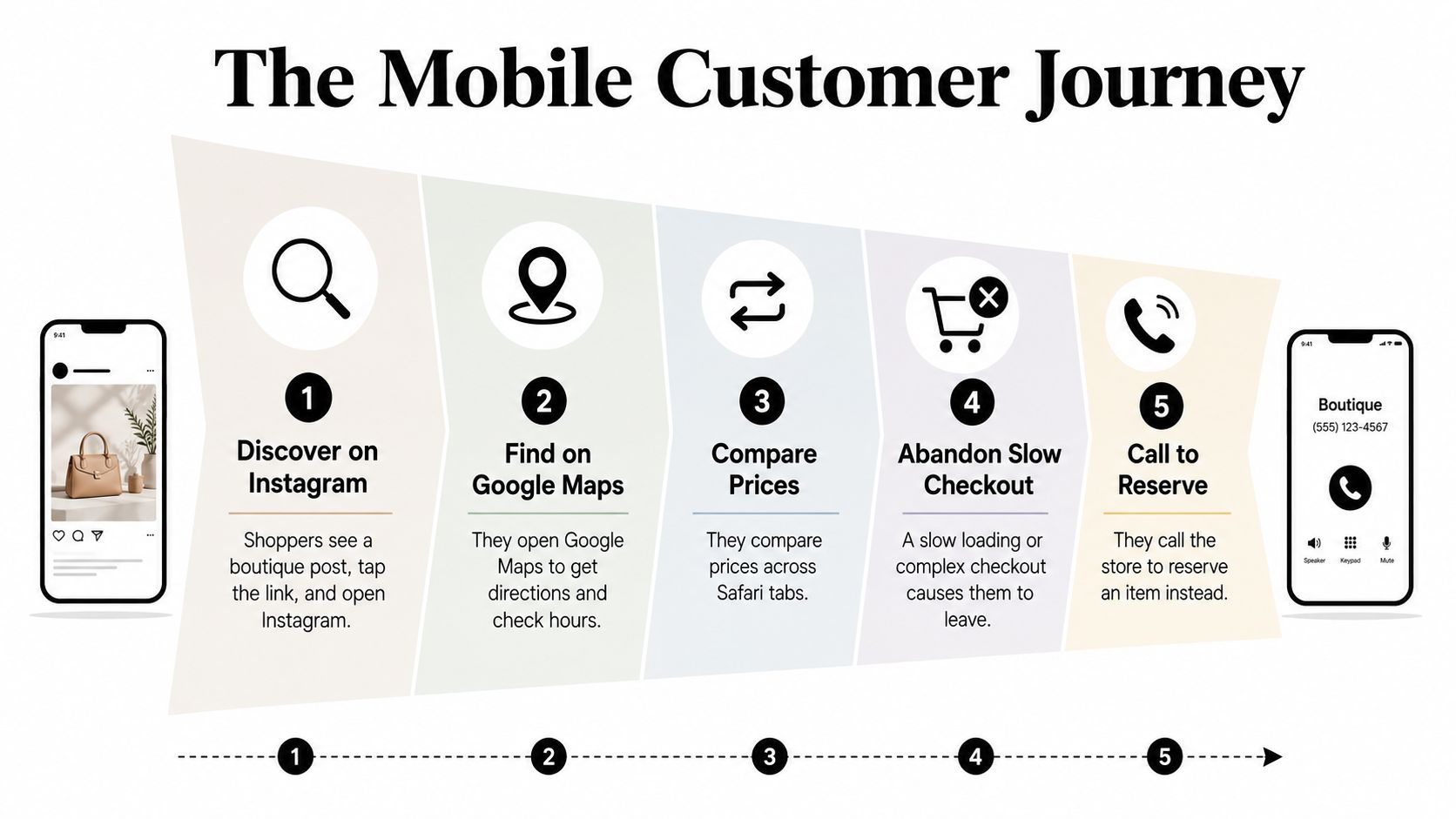
The shopper adds the item to her cart, but the checkout takes too long on a weak connection. The cart should remain saved if she closes the browser, and returning to the store should not force her to start over. A simple SMS link to the saved cart can recover the sale without requiring her to remember the product.
Finally, she calls to reserve the item. That call isn't a failure. It's evidence that intent survived, while the digital path didn't. Track calls, map actions, product views, cart additions, and completed orders together so you can see where mobile shoppers need help.
The practical outcome is a connected system: faster product pages, stronger local visibility, shorter checkout flows, and measurement that follows the customer from discovery to revenue.
Understanding Mobile Commerce
Mobile commerce covers purchases, bookings, payments, and orders started or completed through a smartphone browser, mobile app, or progressive web app. That includes product sales, appointment scheduling, mobile coupons, digital payments, and in-app purchases.
A mobile storefront works like a neighborhood shop window for customers who may be walking, comparing search results, checking maps, answering messages, or taking a call:
- The phone screen is the window. Show the product, offer, reviews, and availability without making customers hunt.
- The app icon or saved website is the door. It gives returning customers a quicker route back.
- The cart and payment screen are the checkout counter. Each unnecessary field adds another reason to leave.
- The confirmation email or SMS is the receipt. It confirms the order and explains what happens next.
Mobile commerce is too large to treat as a side project. Statista projected mobile e-commerce sales to reach $3.4 trillion by 2027, compared with $982 billion in 2018, in its global mobile commerce forecast. A separate historical series places mobile commerce at $500 billion in 2017, $1.10 trillion in 2020, and $2.07 trillion in 2024, with mobile's share of retail e-commerce projected to reach 63% by 2028, according to Ringly's compiled market series.
The business decision goes beyond choosing a phone-friendly theme. It affects payment support, content design, inventory visibility, customer service, and the way you measure demand. A local service company may gain more from mobile booking and click-to-call than from a loyalty app. A boutique may need saved carts, social product links, and local pickup. A busy bakery may need a short ordering path that works during a Saturday morning rush.
Three practical maturity levels
| Level | Characteristics | Typical Investment | Best For |
|---|---|---|---|
| Mobile-friendly | Responsive pages, readable text, tap-friendly buttons, basic mobile payments | Focused website improvements | Businesses validating mobile demand |
| Mobile-first | Mobile shapes navigation, product pages, checkout, analytics, and local actions | Website or theme rebuild plus conversion work | Businesses receiving substantial phone traffic |
| Mobile-only or app-led | App loyalty, push messaging, saved payment details, device-native features, and app-specific retention | Ongoing product, security, and app management | Businesses with frequent repeat customers |
Choose the level customer behavior supports. Tap-to-pay, SMS receipts, and mobile wallets can produce immediate gains without an app. App loyalty requires frequent repeat visits to justify downloads, updates, support, and retention campaigns. For small and mid-sized businesses, prove repeat demand first, then fund the technology that removes a measured obstacle.
Improving Mobile UX and Performance
Mobile improvements should be shipped as revenue tests, not decorative redesigns. Start with the product page because it carries the customer from interest to action.
Use a large product image, a short scannable description, clear availability, and a sticky add-to-cart bar that remains accessible as the shopper scrolls. Keep primary navigation and purchase controls inside the comfortable thumb zone. Measure product-view-to-cart rate, cart-to-checkout rate, and completed orders before and after each change.
Fix the parts customers touch
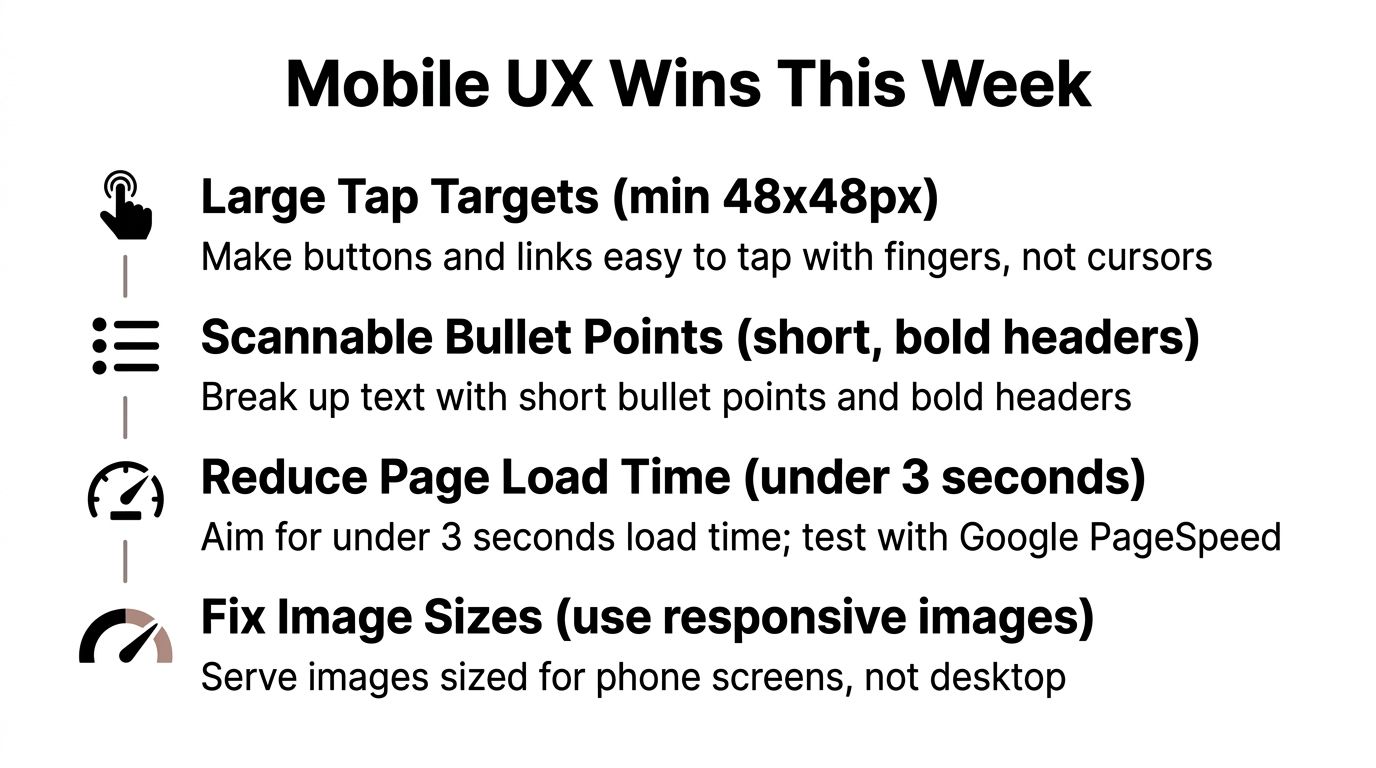
Replace dense paragraphs with short bullets and bold labels. A roofing company can put “Service area,” “Emergency availability,” and “Request an estimate” near the top of a service page. A retailer can show size, color, pickup availability, shipping timing, and returns without making shoppers search.
Make buttons and links large enough to tap comfortably, and separate adjacent actions such as “Buy now” and “Add to cart.” Use predictive search so a customer typing “linen” sees relevant products before completing the full word. Track search exits, product selection rate, and time from search to product view.
Forms create avoidable work. Replace a 12-field checkout with a 4-field version that asks only for the information required to process the order. Use mobile keyboard types for phone numbers and ZIP codes, enable browser autofill, and default to guest checkout. Compare form completion, checkout errors, and payment completion.
Treat speed as a commercial priority
Serve responsive images with srcset, lazy-load below-the-fold media, and use WebP where your platform supports it. Compress hero images below 150 KB when image quality remains acceptable. Remove unused scripts, reduce JavaScript payloads, and eliminate assets that block the first meaningful render.
Deloitte found that a 0.1-second improvement in mobile site speed increased retail conversions by 8.4% and average order value by 9.2%, while travel conversions increased 10.1%, in its Millisecond Makes Millions study. These figures make performance testing worth prioritizing, especially for stores paying for mobile advertising.
Use Google PageSpeed Insights and real devices, not just a desktop browser. Aim for a Largest Contentful Paint under 2.5 seconds and Cumulative Layout Shift under 0.1 as practical Core Web Vitals targets. The required visual also uses an under-three-second load goal, but your analytics should show whether speed changes improve product views, carts, and completed payments.
For broader layout guidance, review best store design from Webtwizz, then compare those recommendations with your own analytics. A theme rebuild may be justified when templates, scripts, or navigation prevent you from fixing the largest mobile bottlenecks. You can also use this ecommerce website design resource to evaluate structure before paying for a full redesign.
Choosing Between Responsive Web, PWA, and App
A responsive website is the default starting point for most small businesses because it supports search discovery, social links, maps, and direct browser access without requiring an installation. A progressive web app adds app-like behavior, such as home-screen access and selected offline capabilities, while a native app provides the deepest access to device features and repeat-customer tools.
The correct choice depends on buying frequency and operating capacity. A Fort Myers bakery taking occasional weekend orders probably needs a fast responsive site. A service company managing recurring appointments may benefit from saved customer details and reminders, but it still needs browser discovery. A retailer with a strong repeat-purchase pattern may justify an app loyalty program.
| Factor | Responsive Website | Progressive Web App | Native App |
|---|---|---|---|
| Discovery | Strong for search, maps, and social links | Strong if web pages remain crawlable | Weak for first-time discovery without a companion website |
| Build cost | Usually the lowest | Moderate, depending on features | Highest because separate app development may be required |
| Maintenance | Centralized website updates | Website plus app-like functionality | Ongoing operating system, store, and app maintenance |
| App store approval | Not required | Usually avoids traditional store dependence | Required for common distribution paths |
| Push notifications | Limited | Available through supported browser experiences | Strong device-native reach |
| Offline behavior | Limited | Better support for selected cached experiences | Deepest potential |
| Repeat purchasing | Good with saved accounts and wallets | Strong for returning users | Strongest for frequent loyalty use |
| Best fit | SEO-led acquisition and local commerce | Retention without full app friction | High-frequency buying and device-native features |
Don't build an app to compensate for a weak website. If customers can't find your business, understand the offer, or finish checkout in a browser, an app adds cost without solving the underlying problem.
Use a scoring review based on customer frequency, order complexity, retention value, notification needs, and internal support. Businesses considering a more advanced build can review ecommerce mobile app development for the capabilities and trade-offs involved. For the underlying commerce platform, compare options in this guide to ecommerce platforms for small business.
Reducing Checkout and Payment Friction
Mobile checkout fails when the buyer must type too much, make too many decisions, or guess whether the payment worked. Fix the payment path before investing in another acquisition campaign.
Enable Apple Pay, Google Pay, and Shop Pay where your platform and payment processor support them. Wallets let returning customers approve payment without manually entering card details. For local orders with low consideration, place a buy-now option near the product summary, but keep the standard cart available for customers buying multiple items.
Remove unnecessary typing
Ask for email, phone, and ZIP code first, then collect only the address fields required for fulfillment. Use numeric keyboards for phone and postal information, enable autofill, and keep labels visible while customers type. A four-field form can be easier to complete than a long form that asks for optional marketing details before payment.
Show shipping costs, taxes, pickup timing, and the full order summary before the final payment tap. Unexpected costs are especially damaging on a small screen because customers may not have the patience to return to earlier steps and recalculate the total.
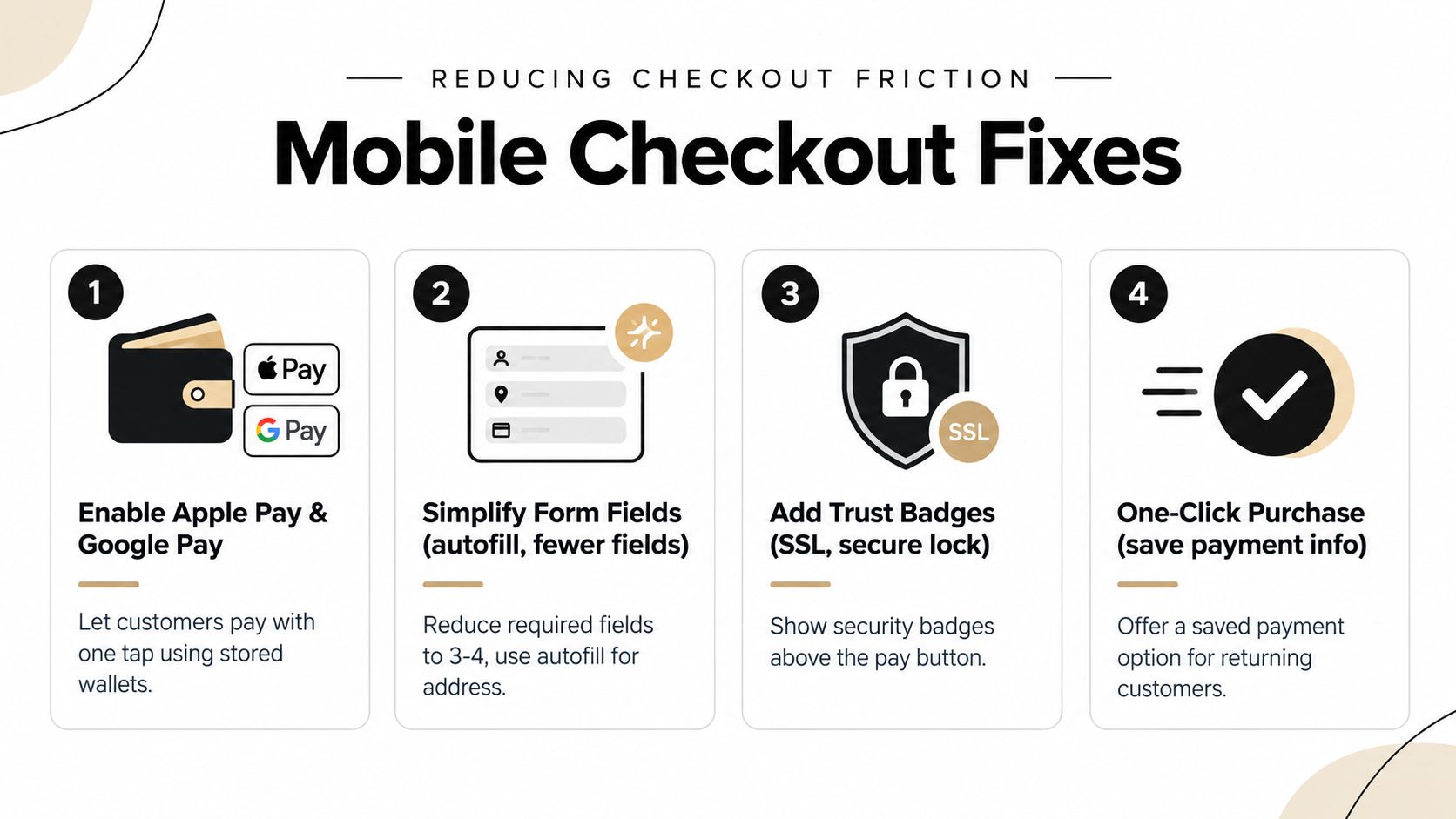
Keep carts persistent across sessions. Offer a saved-cart link by SMS or email when someone requests a quote, abandons a reservation, or asks a staff member for help. For a local retailer, a message saying “Your item is still reserved in your cart” is more useful than a generic promotional reminder.
Make the payment screen trustworthy
Place the return policy, support phone number, customer reviews, and security indicators close to the purchase decision. An SSL badge near the payment button can reinforce trust, but it shouldn't replace clear information about fulfillment and refunds.
Failed payments need specific recovery messages. “Payment declined” is not enough. Tell the customer whether to check the billing ZIP code, try another card, use a wallet, or contact the bank. Never erase the cart after an error.
Mobile conversion benchmarks show the problem clearly. One summary reports mobile conversion around 1.8% to 2.8%, compared with 3.6% to 3.9% on desktop, while mobile cart abandonment reaches 78% to 85% in the cited mobile commerce optimization benchmark. Another benchmark places mobile conversion around 2.0%, desktop between 3.0% and 3.9%, and mobile app conversion around 3.5%, as described by The Retail Exec.
Run an afternoon test. Record the current checkout-start and payment-completion rates, enable a wallet, remove optional fields, test an intentional payment error, and review the results by device. Use the completed order rate and average order value as your decision metrics.
Strengthening Local Mobile Search Visibility
Local mobile commerce starts before the customer reaches your website. A buyer may search “boutique near me,” open a map result, check photos, read reviews, call the business, and only then open a product page. Your Google Business Profile, website, citations, and reviews must agree about who you are and how customers can buy.
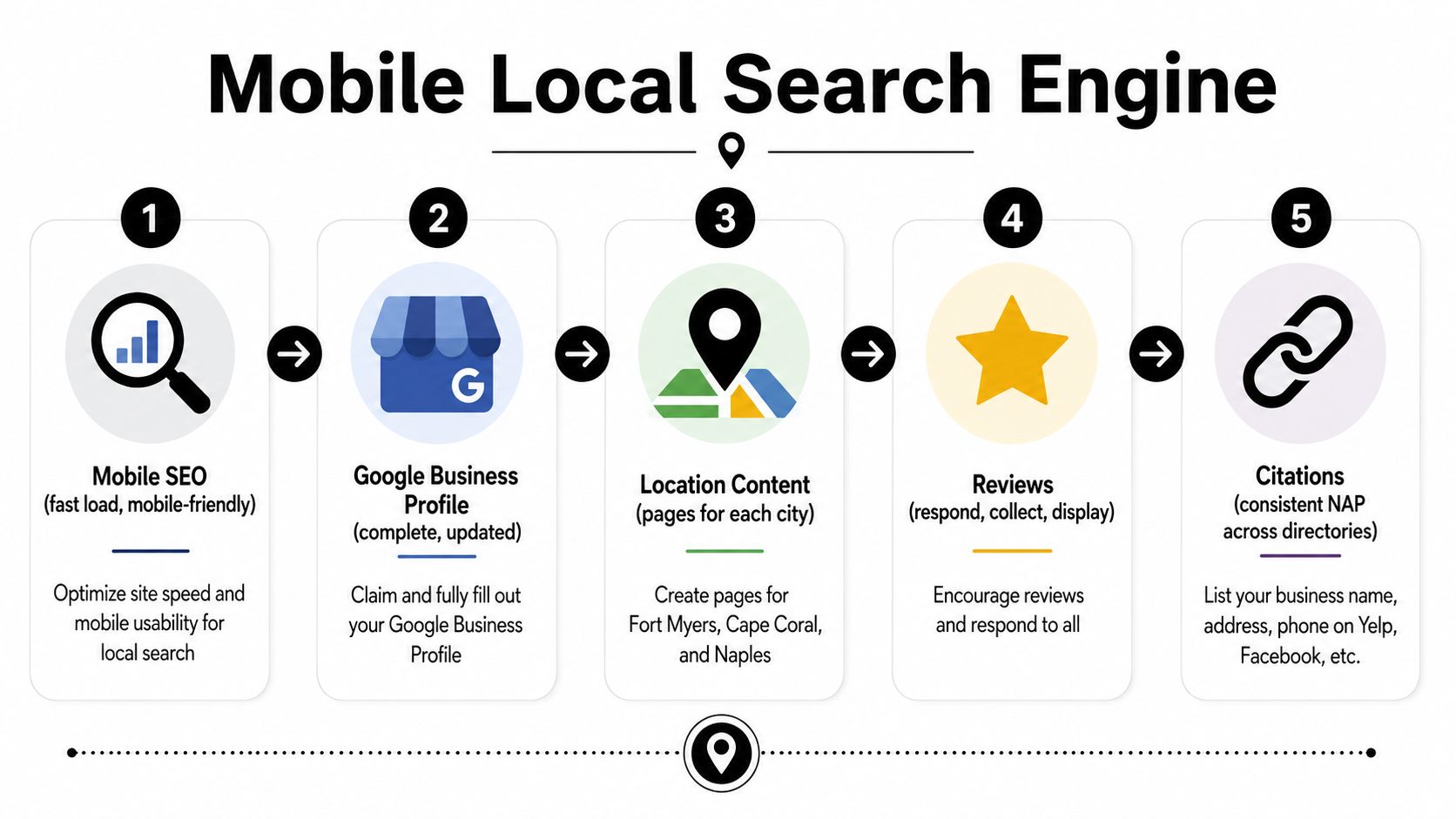
Complete every relevant Google Business Profile field. Select accurate categories, list services, maintain hours, upload current photos, and verify that the map pin leads to the correct entrance. Make phone, directions, booking, pickup, and product links work with a thumb tap.
Build content around service areas
Create useful location pages for Fort Myers, Cape Coral, Estero, Bonita Springs, and Naples when you serve those markets. Each page should explain availability, delivery or service boundaries, local pickup details, common customer questions, and the next action. Don't copy the same page and change only the city name.
Standardize your business name, address, and phone number across directories such as Yelp, Facebook, and industry listings. Correct inconsistent contact details, duplicate profiles, and outdated hours. Add LocalBusiness and Product schema where the page content supports it, then validate the markup before publishing.
Connect visibility to sales
Reviews do more than support reputation. They help a shopper decide whether to call, visit, book, or buy. Ask customers for honest reviews after completed orders, respond to positive and negative feedback, and display relevant product or service reviews on mobile pages.
Track Google Business Profile actions, direction requests, phone calls, booking clicks, organic landing pages, and revenue from tagged campaigns. Generic traffic can look impressive while producing few local orders. A map visitor who calls for availability may be more valuable than a browser who reads several pages and leaves.
Use this guide to ranking in Google Maps as a practical checklist, then test every important action on an actual phone. Local visibility only creates revenue when the shopper can complete the next step without switching to a desktop.
Measuring, Securing, and Implementing Mobile Commerce
Raw mobile traffic is a weak management metric. A business can attract many phone visitors and still lose revenue because customers fail at product selection, cart creation, checkout, or payment.
Build a funnel that answers five operational questions:
- Product view rate: Do mobile landing-page visitors reach a product or service detail page?
- Add-to-cart rate: Does the detail page create enough confidence to start an order?
- Checkout start rate: Does the cart move customers into the payment flow?
- Payment completion rate: Do shoppers finish after entering checkout?
- Average order value: Do mobile orders support profitable fulfillment?
Review these metrics by landing page, campaign, location, product category, and device type. A paid Instagram campaign may produce many sessions but weak checkout starts. A Google Maps listing may produce fewer visits but stronger calls and local pickup orders. Your budget should follow completed commercial actions, not visits alone.
Measure the failure point, not just the audience source.
Security protects conversion as well as customer information. Use HTTPS across the complete site, select PCI-compliant payment gateways, tokenize stored card details, and restrict administrator access with two-factor authentication. Configure fraud rules appropriate to your order profile, and publish clear refund and data-deletion policies.
Before launch, work through this implementation checklist:
- Platform setup: Confirm product, inventory, tax, shipping, pickup, booking, and notification settings.
- Theme optimization: Test navigation, sticky actions, image behavior, forms, and accessibility on real phones.
- Payment integration: Enable supported wallets, guest checkout, tokenized returning-customer payments, and failed-payment recovery.
- Analytics configuration: Track product views, searches, carts, checkout starts, payments, calls, booking clicks, and revenue.
- Legal pages: Publish privacy, returns, shipping, terms, and data-deletion information where customers can find it.
- Device testing: Test iPhone and Android browsers, weak connections, rotating screens, autofill, coupon fields, and error states.
- Soft launch: Send a limited audience through the full journey before increasing advertising spend.
One recent industry benchmark reports mobile traffic conversion at 2.85%, compared with 3.9% on desktop, and says mobile apps convert at roughly twice the rate of mobile web in its mobile commerce performance analysis. Those figures aren't a target for every business. They're a reason to inspect each funnel step instead of assuming high mobile traffic means healthy mobile revenue.
A Prioritized Mobile Commerce Action Plan
Start with the cheapest fixes that remove visible friction.
Week 1 quick wins
Compress oversized product images, check tap targets, repair broken map and click-to-call actions, enable available mobile wallets, and clean up your Google Business Profile. Measure page speed, product views, cart additions, calls, and completed orders before making changes.
Month 1 investments
Move to a responsive theme if the current design fights mobile behavior. Rebuild checkout around guest purchasing, autofill, saved carts, clear totals, and specific payment errors. Configure analytics so every campaign and local action connects to revenue rather than vanity traffic.
Quarter 1 strategic moves
Consider a PWA pilot if repeat customers need faster access without the cost of a full native app. Test a loyalty program when customers purchase frequently enough to return. Add paid mobile campaigns only after product pages, checkout, payments, and tracking work reliably.
A local service business should prioritize calls and bookings. A retailer should prioritize product discovery, inventory clarity, and payment completion. Review the funnel weekly during major campaigns and monthly during normal operations. Keep the roadmap tied to measurable friction, customer frequency, margin, and available staff time.
Polaris Marketing Solutions helps Fort Myers and Southwest Florida businesses improve mobile website design, local SEO, paid campaigns, and e-commerce conversion paths. Visit Polaris Marketing Solutions to request an online analysis and competitor report, then identify the mobile fixes most likely to support your next sale.