
You're probably looking at a website that looks fine on your laptop and does almost nothing for your business. The logo is clean, the hero photo is pretty, the homepage feels expensive, and yet the phone isn't ringing the way it should. That's the normal failure mode for website design for real estate agents, and it's why I'd rather talk about conversions than colors.
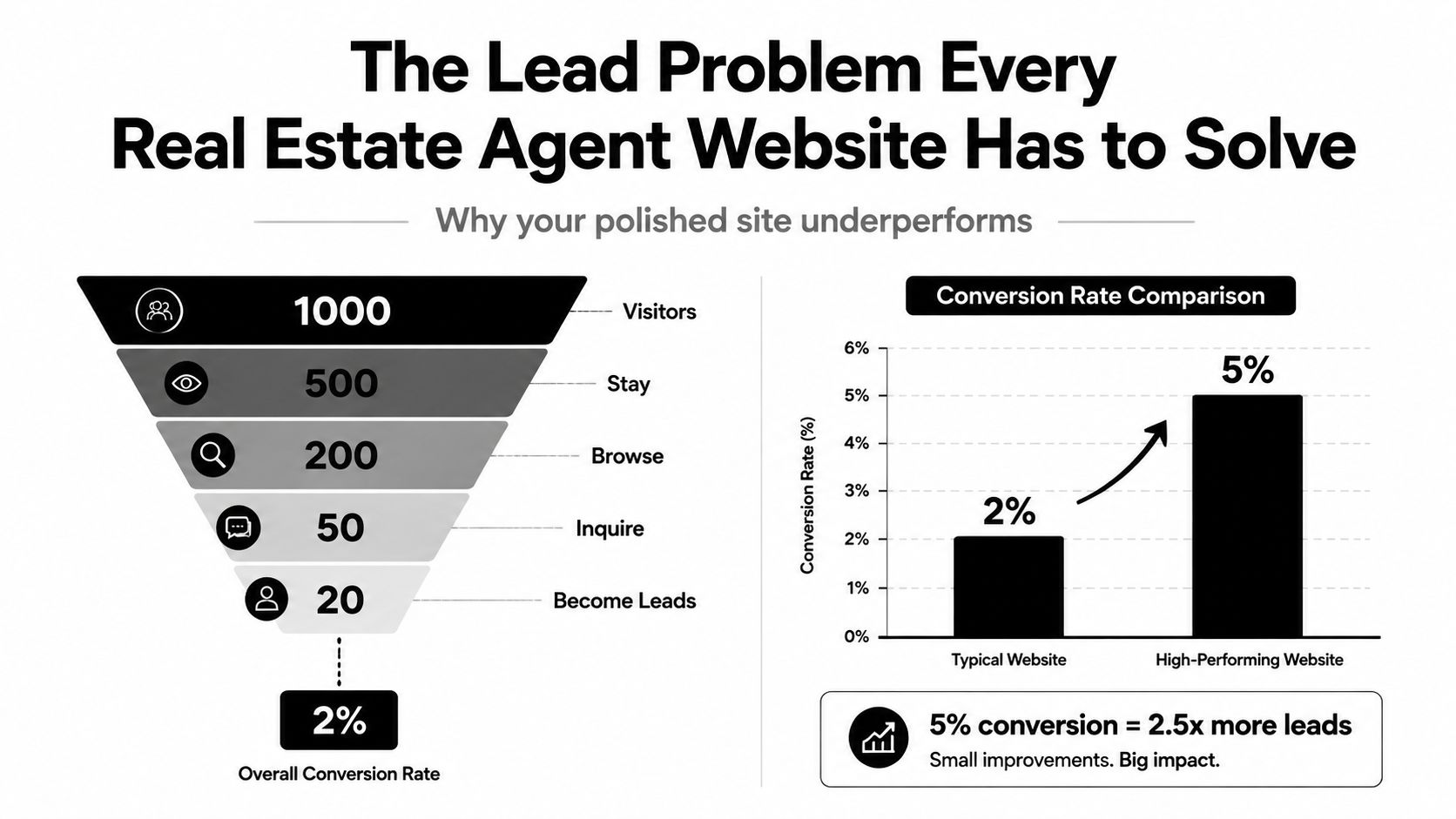
The hard truth is simple. A typical agent site converts only about 1% to 2% of visitors into leads, while better-optimized sites can reach 5% to 10%+. That gap is the whole game, because it means the same traffic can produce a very different pipeline if the site is built to capture intent instead of just display branding. Well-built IDX sites with strong lead capture and mobile optimization can also produce 400% longer session times than static agent sites, which tells you visitors stick around when the site helps them search. See the conversion math behind real estate websites
A real estate site has four jobs, and most agents only do one of them halfway. It has to be the storefront window that gets found in local search, the front desk that lets buyers search listings, the brochure rack that turns browsers into leads, and the back office that shows what's working. If any one of those breaks, the whole site feels busy but ineffective.
Practical rule: if your site can't answer who you serve, what area you cover, and how a visitor becomes a lead within a few seconds, it's not a business asset yet.
For agents who want a broader lead system around the website, outbound lead gen workflows for real estate are worth studying too. The site should support that follow-up engine, not sit off to the side as a digital business card.
The Lead Problem Every Real Estate Agent Website Has to Solve
A lot of agents launch a site, announce it, and then stop checking the numbers because the result is already obvious. The design looks clean, the pages load, and the lead count stays flat. That is a conversion problem. If the site does not turn attention into action, it is just an expensive online brochure.
Friction is the core challenge. A visitor lands on the homepage, has to guess where to search, scrolls past vague copy, and never sees a clear next step. A listing page without a strong call to action, a seller page without a reason to inquire, or a contact form buried in the footer all create the same outcome. People leave before they raise their hand.
Order matters here. Fix the pages that catch intent first, then tighten the paths that move someone from browsing to booking a conversation. A site that makes search easy, surfaces trust fast, and routes every serious visitor into a lead form will outperform a prettier site that treats the homepage like a billboard. That is the conversion math agents ignore.
A lot of agents also treat the website like a separate project from the rest of their pipeline. That is a mistake. If your follow-up depends on email, CRM notes, or outbound lead gen workflows for real estate, the site has to feed that system cleanly or the whole operation leaks.
The self-audit is simple. Can a stranger tell what area you serve within a few seconds, find the search path without hunting, contact you from a listing page, and get routed into a real follow-up system? If any of those steps feels hard, the site is losing leads by design. The fix is not more decoration. It is clearer paths, fewer clicks, and stronger calls to action where buyers and sellers make decisions.
Must-Have Features That Actually Move Leads
If I were handing a designer a real estate build brief, I'd keep it short and ruthless. IDX search, clear lead capture, mobile-friendly listing pages, a seller path, and a CRM connection. Everything else is secondary until those pieces work together.
What to include first
IDX search is essential. Put it high on the homepage and give it a simple placeholder line like, “Search homes by city, neighborhood, or price range.” Don't make visitors guess where to start.
Lead capture forms on listing pages matter more than an overdesigned homepage. Every property page should give a visitor a fast way to ask for details, book a showing, or request a follow-up without scrolling forever.
A seller pipeline page is often missing, and that's a mistake. Sellers want to know how you market a listing, what they should expect, and what happens after they sign. A page with short sections like “pricing,” “presentation,” and “promotion” does more work than a generic services page.
A CRM connection keeps the site from becoming a digital inbox graveyard. If form fills don't land somewhere organized, leads get lost, follow-up gets sloppy, and the site looks better than it performs.
Testimonials and proof blocks should sit near decision points, not buried in a menu. A short block that says, “What local clients liked about working with me,” followed by real reviews, is enough. If you want a deeper content system around lead capture, Email List Building is worth pairing with the site so the traffic doesn't disappear after one visit.
What to skip or delay
Chatbots, mortgage calculators, and elaborate valuation widgets can wait if they slow the site or distract from search. They're nice when they're done well, but too many agents pile them onto the homepage like confetti. That creates clutter, and clutter kills action.
A better sample structure looks like this, homepage first: search bar, neighborhood entry points, one trust block, one seller block, one featured listing block, then a simple contact path. That's enough to start. The point isn't to show everything your platform can do. The point is to make the right thing easy to do.
Mobile Speed and Core Web Vitals as a Conversion Lever
Real estate sites get heavy fast. Big listing photos, IDX widgets, mapping tools, and third-party scripts all compete for space on the page, and the visitor on a phone feels every extra second of that mess. The fix is not cosmetic. It's technical, and it affects whether people stay long enough to inquire.
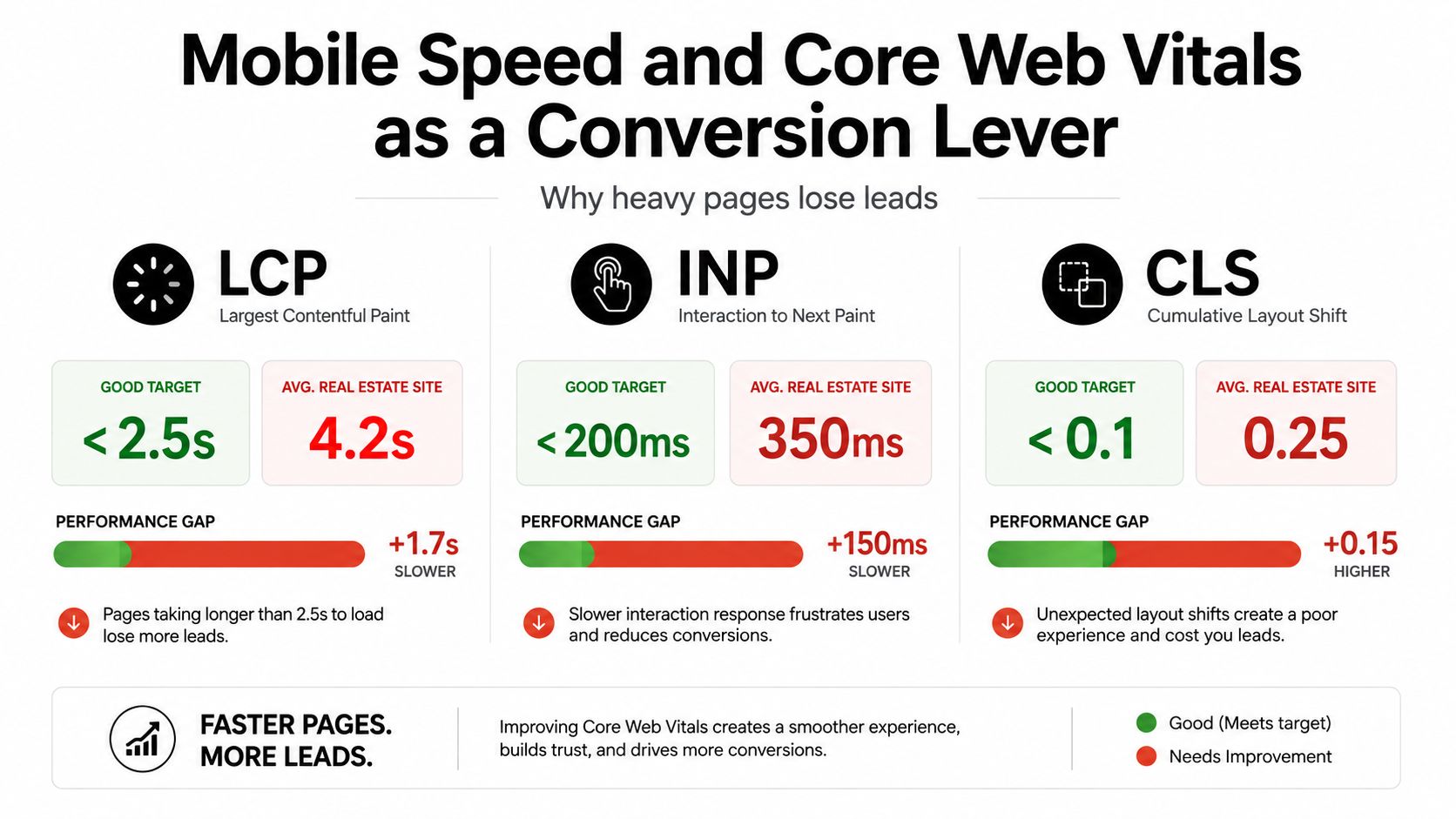
The easiest rule to remember is the one that matters in the field. Keep key pages under 3 seconds on 4G, use lazy loading for galleries and virtual tours, compress hero and listing images, and minimize heavy scripts so Core Web Vitals stay healthy. That guidance is consistent across real estate web best practices
What to fix first
Lazy load galleries and virtual tours. Don't make the entire media stack load before the listing becomes useful.
Compress hero images. If your homepage banner is bloated, you're paying for vanity with lost attention.
Defer non-critical scripts. Chat widgets, tracking tools, and extra plugins can wait until the page is visible.
Pick an IDX provider carefully. Some inject too much JavaScript and create a drag that's hard to recover from.
Use this Core Web Vitals optimization resource to pressure-test anything a developer proposes.
A good practical test is boring, which is exactly why it works. Open PageSpeed Insights, check the site on your own phone over cellular, and look at the user data if the Chrome experience report is available. If a listing page takes too long to become usable, the visitor does what every buyer does online. They leave.
Choosing a CMS, IDX, and Hosting Stack
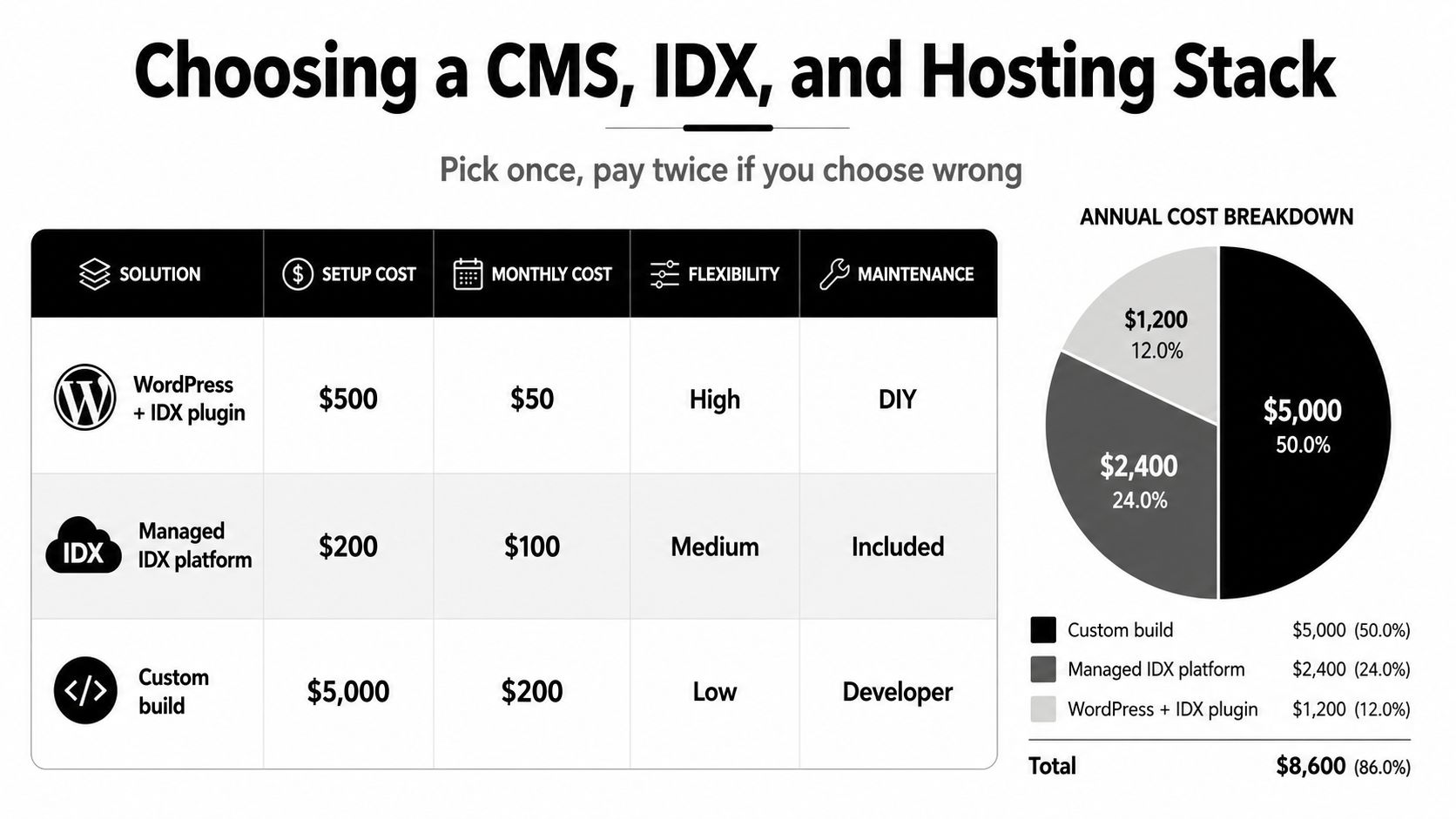
Pick the wrong stack and you'll pay for it twice, once at launch and again when you need to rebuild. The right choice depends on how much control you want, how much maintenance you can handle, and whether you care more about flexibility or convenience.
My straight take on the main options
WordPress with an IDX plugin is the best fit if you want control over content, local SEO, and page structure. It's the most flexible setup, but it asks more from you or your developer.
Agent-specific platforms like Real Geeks or KVCore make sense if you want the plumbing mostly wired for you. You trade some flexibility for convenience and fewer moving parts.
Squarespace works for a smaller personal-brand site, especially if you're not trying to run a deep IDX strategy. I'd keep it to simpler agents with lighter listing demands.
A rough budget snapshot helps keep the conversation honest. A WordPress build can start with a lower setup and stay relatively manageable, a managed IDX platform costs more every month but reduces maintenance, and a custom build is where you go when the business justifies the complexity. This comparison of website builders for small businesses is useful if you're deciding whether a hosted system or WordPress makes more sense for your team.
Compare the stack before you sign
| Platform | Monthly Cost Range | IDX Integration | SEO Control | Best For |
|---|---|---|---|---|
| WordPress + IDX plugin | Lower to moderate | Strong, depending on provider | High | Agents who want flexibility |
| Managed IDX platform | Moderate to higher | Built in | Medium | Agents who want less setup |
| Custom build | Highest | Custom | High, but expensive to manage | Teams with bigger budgets |
Hosting matters more on image-heavy sites than most agents realize. A cheap shared host can work for a light brochure site, but it can struggle under listing photos and scripts. Managed hosting is the safer choice when speed and uptime matter.
The decision rule is simple. Choose WordPress if you want SEO control and have technical help. Choose an agent platform if you want a more guided setup. Choose Squarespace only if your site is going to stay relatively small and personal.
Local SEO and Google Business Profile Integration
If you want local leads, your site has to speak the language of places, not just services. Build one strong page for each neighborhood you want to win, and write it like someone who works that market. School notes, nearby landmarks, market commentary, and a map belong on the page because they help real buyers decide whether the area fits.
Your website and your Google Business Profile should work together, not sit in separate silos. Keep the NAP data identical, link your GBP to a real listings page on your site, use the same photos where it makes sense, and connect review schema on the site to the reviews already visible in your profile. That gives Google a cleaner local signal and gives prospects a brand that feels organized.
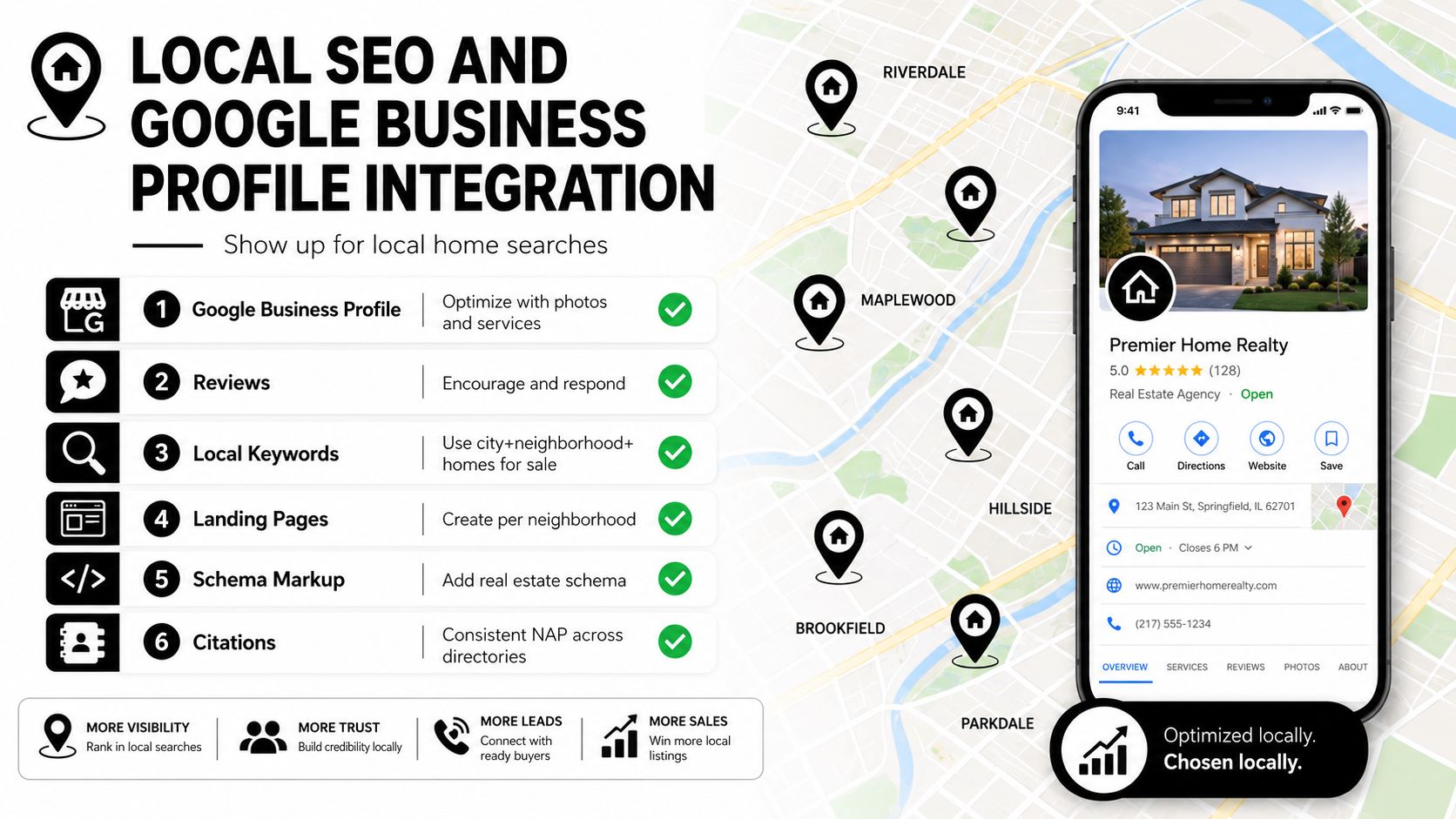
The reason this matters is simple. Buyers start online, compare local options fast, and often make their first judgment before they ever call you. Those numbers explain why the website has become the center of the search journey
Local SEO for real estate agents is the practical playbook I'd hand to any agent who wants a repeatable local system instead of random posting. Keep the routine tight. Publish one neighborhood page, one market update, and one FAQ each month. That is not flashy, but it builds authority where it counts.
A practical first-quarter rhythm
- Neighborhood Page: Build one area page with local copy, a map, and a short trust block.
- Market Update: Write one post that answers a seller or buyer question in plain English.
- FAQ: Add one question that mirrors how a real client speaks.
Agents who stick to that cadence stop treating the website like a one-time project and start treating it like a live asset. That is the shift that matters.
Designing for AI Search and Answer Engines
A buyer asks a voice assistant which neighborhoods fit a budget, a relocation client asks an AI tool which school zones hold value, and your site either gives a clean answer or gets skipped. This is the major shift. Classic SEO still matters, but AI-driven search now rewards pages that are easy to parse, easy to quote, and easy to trust.
The pages that get picked up are the ones that stay plain and specific. Give Google and answer engines a clear About page, a direct agent bio, neighborhood pages with tight FAQ blocks, and short paragraphs that answer one question at a time. If a machine is trying to identify who you are or which area fits a buyer, it needs crisp language, not marketing fog.
What to write differently
Define yourself plainly. Say who you are, what market you serve, and what kind of clients you help.
Use FAQ blocks that sound human. Questions like “Is this neighborhood good for first-time buyers?” or “What do sellers need to know before listing here?” are far more useful than generic fluff.
Add structured data. LocalBusiness and Agent schema help machines understand the page as an entity, not just a pretty layout.
Write quotable paragraphs. Short, direct answers are easier for answer engines to reuse.
A useful test is to read a neighborhood page out loud and ask whether a buyer could repeat the answer to someone else. If not, the page needs tighter language. A strong AI search page also supports the same answer in a few places, on the bio, on the neighborhood page, and in the FAQ, so the machine does not have to guess. That is the standard now, because conversational search rewards pages that answer cleanly without forcing the visitor to dig for the point.
Hiring an Agency Without Getting Burned
Most agents will not build the site themselves, and that is fine. The mistake is hiring too quickly and assuming a pretty homepage means the project is handled. I have seen a lot of polished proposals that fall apart after launch, and the ones that hold up answer the same basic questions before anyone signs.
Spend according to the level of help you need. A DIY template usually lands under $1,500, a small local agency often falls in the $2,500 to $7,500 range, and a full-service regional agency can run $8,000 to $25,000. Price alone does not tell you much. Scope, ownership, and handoff tell you everything.
What to ask before you sign
- Ownership: Who owns the domain, content, and assets when the project ends?
- Analytics: Will I get access to the tracking setup on day one?
- Lead routing: Where do form fills go, and who gets notified?
- IDX experience: How many real estate sites have you shipped?
- Speed commitment: What are you doing to keep mobile pages fast?
- Reporting: Do you provide monthly reporting after launch?
- Handover: What is included at the end of the project?
- Content: Who writes the neighborhood and listing copy?
- Schema: Is structured data part of the build?
- Mobile testing: How do you verify the site on a phone, not just on desktop?
- Revision process: How many rounds are included before launch?
- Support: What happens if something breaks after go-live?
- SEO basics: How do you handle titles, descriptions, and internal linking?
- Platform choice: Why are you recommending this stack over the others?
- Timeline: What has to happen before the first live version?
Watch for the easy red flags. If an agency has no real estate case studies, wants a big upfront deposit without a clear scope, skips analytics handoff, or cannot show real IDX experience, keep looking.
| Tier | Budget | Typical Timeline | Deliverables | Key Question to Ask |
|---|---|---|---|---|
| DIY template | Lower | Faster | Basic site, simple lead forms | Who owns the site after launch? |
| Small local agency | Moderate | Moderate | Custom pages, IDX, basic SEO | How do you handle lead routing? |
| Full-service regional agency | Higher | Longer | Strategy, design, content, reporting | What happens in the first 90 days? |
One option in the market is Polaris Marketing Solutions, which handles website design, hosting, and local SEO for small and mid-sized businesses, including real estate sites. The core question is still process, ownership, and follow-through. That matters more than the pitch deck.
Your 90-Day Rollout Plan and Final Checklist
The cleanest rollout is boring, disciplined, and easy to measure. Don't try to launch everything at once. Build the base, publish the pages that make money, then start improving the local and AI search layers after the site is live.
Days 1 to 30
Lock the domain, confirm Google Business Profile access, connect analytics, install schema, and test IDX speed on a phone. If the foundation is shaky, every later effort gets weaker.
Days 31 to 60
Publish the priority pages, neighborhood pages, listing landing pages, a valuation page, and at least one FAQ-driven content page. These are the pages that give visitors a reason to stay and take action.
Days 61 to 90
Start the monthly reporting cadence, add local SEO updates, tighten internal links, and improve pages that aren't converting. The site stops being a launch and starts being an asset.
The agent who wins in 2026 won't be the one with the prettiest homepage. It'll be the one whose site loads fast, answers specific local questions, and pushes leads into a real follow-up system on day one.
If you want a site that does that without wasting money on features you don't need, talk to a team that builds for lead flow, not just visuals. Start with Polaris Marketing Solutions, and ask for a website plan that covers speed, local SEO, and lead capture from the first draft.