
You’ve searched for your business on Google, and… nothing. It’s a gut-wrenching moment for any business owner, but don't panic. More often than not, the reason you’re invisible online comes down to a few common, and fixable, issues. The single most frequent problem? An incomplete or unverified Google Business Profile.
Let's start digging into why potential customers can't find you.
Your Quick Google Visibility Diagnostic
When you’re invisible on Google, especially as a local business in Fort Myers or anywhere in Southwest Florida, it feels like your doors are closed. You’ve put in the work to build your company, maybe even have a great website, but the phone isn't ringing because new customers simply don’t know you exist.
This guide is your roadmap back to visibility. We'll start with a quick diagnostic check to figure out exactly where the problem is. Usually, it boils down to one of three things.
Where The Problem Usually Hides
Your business's disappearing act on Google can almost always be traced back to your Google Business Profile (GBP), your website's technical setup, or your overall authority in your local market.
- Google Business Profile Problems: This is culprit number one. An unverified, suspended, or even just incomplete profile is like having an unlisted phone number. Google simply won't show what it can't confirm. Actionable Example: Search for your business name on Google Maps. If you see a listing with an "Own this business?" link, it means your profile is unclaimed and likely unverified.
- Website Indexing Issues: Sometimes, your own website is the problem. It might have a setting that's accidentally blocking Google from "reading" its pages, or it might not have been submitted to Google in the first place. Actionable Example: Go to Google and search
site:yourdomain.com. If you see "did not match any documents," your website is not in Google's index. - A Lack of Local Authority: Google is all about trust. It needs to see consistent mentions of your business name, address, and phone number across the web—not just on your site—to feel confident you're a legitimate local operation. Actionable Example: Search for your business phone number in quotes (e.g., "(239) 555-1234"). If you see old addresses or different business names pop up in the results from directories like Yelp or Yellowpages, you have an authority problem.
This flowchart breaks down the first two points, giving you a simple path to follow. Start here.
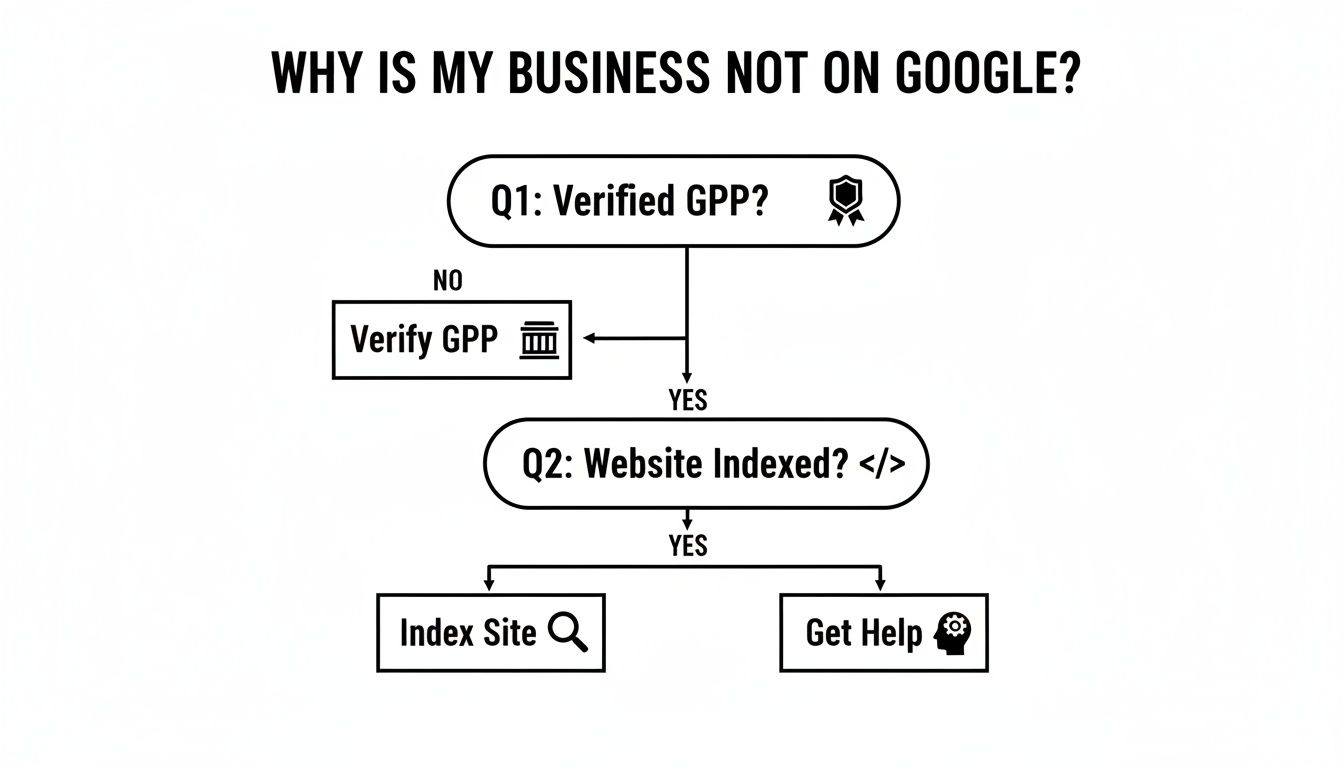
As you can see, your first stop should always be your Google Business Profile. It’s the fastest way to make an impact in local search.
To help you quickly identify the root cause, here’s a checklist summarizing the most common issues we see.
Quick Diagnostic Checklist For Google Visibility Issues
| Common Problem | Primary Diagnostic Tool | Estimated Fix Time |
|---|---|---|
| Unverified Google Business Profile | Google Business Profile Dashboard | 5 minutes to 2 weeks |
| Incomplete/Inaccurate GBP Info | Google Business Profile Dashboard | 15-30 minutes |
| Website Not Indexed | Google Search Console ("site:" search) | 1 day to 4+ weeks |
| Accidental "noindex" Tag | Website's code or SEO plugin | 5-10 minutes |
| Inconsistent NAP Citations | Manual Google Searches / Semrush | Ongoing process |
| Recent Google Penalty | Google Search Console (Manual Actions) | Varies greatly |
This table gives you a starting point. While some fixes are quick, others, like building citations or recovering from a penalty, take time and consistent effort.
The Make-or-Break Role of Verification
It's staggering, but our experience shows that a huge number of small businesses—around 72%—never properly verify and fill out their Google Business Profile. Google treats unverified listings as little more than unconfirmed rumors, which absolutely tanks your visibility and locks you out of key features.
A complete, verified profile isn't just a small tweak; it's a game-changer. Businesses that get this right see 5 to 9 times more customer engagement, from clicks to calls to direction requests.
Another crucial step in this process is confirming domain ownership for Google. This syncs your website with Google's ecosystem, creating a clear link between your Business Profile and your digital home base.
If you’ve run through these initial checks and you're still coming up empty, the problem might be deeper. Hidden technical SEO issues or even a penalty from Google could be holding you back, and those require a much more thorough investigation. Actionable Example: Check Google Search Console for "Manual Actions" or "Security Issues" notifications. A message here is a clear sign of a deeper problem that needs immediate attention.
Optimize Your Google Business Profile To Get Found
Think of your Google Business Profile (GBP) as your digital storefront sign. If it’s incomplete, unverified, or just plain wrong, you're essentially invisible on Google Maps and in that all-important local 3-pack—where nearly half of all Google searches happen. So many business owners treat their profile like a one-and-done data entry task, but it’s hands-down your most powerful tool for local visibility.
Here's the bottom line: your GBP is the foundation of your entire local online presence. Without a solid, verified foundation, everything else you do—from building a great website to posting on social media—will have a much smaller impact. This is often the exact reason a business with a beautiful website is still nowhere to be found on Google.
Ensure Perfect NAP Consistency
One of the very first signals Google looks for to trust your business is NAP consistency. That’s your business Name, Address, and Phone number. These three details have to be absolutely identical everywhere they show up online, from your GBP and website to local directories like Yelp and Angi.
Even the smallest variations can cause big problems for Google's algorithm. If your profile lists "123 Main St" but your website says "123 Main Street," Google sees that as a red flag. That tiny inconsistency chips away at its trust in your data, which can seriously hurt your rankings.
Actionable Example: A Fort Myers paving contractor had "SWFL Paving Inc." on their Google profile, "SWFL Paving" on Facebook, and "SWFL Paving, Incorporated" on Yelp. This kind of fragmentation just confuses Google. The fix was simple but crucial: we picked one official name—"SWFL Paving Inc."—and went to work updating every single online mention to match it perfectly.
Strategically Select Your Business Categories
Your business categories are how you tell Google exactly what you do and which customer searches you should show up for. Getting this right is critical. You get one primary category and can add several secondary categories.
Your primary category needs to be the most accurate, specific description of your main service. It carries the most weight in Google's ranking algorithm.
Think of your primary category as the main aisle your business belongs in. Secondary categories are the other aisles where customers might also look for you. Getting this right is a vital part of optimizing your Google Business Profile for Small Businesses.
Actionable Example: A law firm in Naples shouldn't just pick "Lawyer." That's way too broad. A much better primary category would be something specific like "Personal Injury Attorney." That precision helps Google connect you with people searching for that exact service.
Secondary categories then let you capture related searches. That same firm could add secondary categories like:
- Car Accident Attorney
- Wrongful Death Attorney
- Trial Attorney
This strategy ensures you appear for both hyper-specific and more general searches, which maximizes your chances of getting found.
Write A Compelling Business Description
Your business description is your 750-character sales pitch to both Google and your potential customers. It’s your chance to explain who you are, what problems you solve, and why you're the right choice.
Don't just list services. You need to write for a human first, but weave in the terms your customers are actually searching for, including local identifiers. A great description doesn't just state facts; it sells the solution.
Let’s look at an example for a Cape Coral air conditioning company.
- Weak Description: "We offer AC repair, installation, and maintenance. We have been in business for 10 years. Call us for a quote."
- Strong, Optimized Description: "Is your AC failing in the brutal Florida heat? We provide fast, reliable emergency AC repair in Cape Coral and Fort Myers. As a local, family-owned business, we specialize in everything from routine tune-ups to complete system installations, making sure your home stays cool. Our certified techs are experts in leak detection and energy-efficient upgrades. Contact us for honest pricing and same-day service to get your comfort back."
See the difference? The strong version uses natural keywords like "emergency AC repair in Cape Coral," mentions specific value adds like "leak detection," and speaks directly to a customer's immediate problem. For a deeper dive, grab our complete Google My Business optimization checklist to see how all these pieces fit together.
Find and Fix Website Issues Hiding You From Google
A perfectly tuned Google Business Profile is a massive first step, but it’s only half the job. If your website is slow, clunky, or just plain confusing, Google simply won't send its users there. This can sink your visibility, no matter how great your GBP looks. Think of it this way: your website and your Google profile are a team, and when one is weak, the whole strategy suffers.

Your GBP is the billboard on the highway, and your website is the actual storefront it points to. A fantastic billboard won't matter if the store is a mess when customers arrive. People won't stick around, and eventually, Google will notice and stop sending them your way. Let's run a quick diagnostic on the most common website problems that make businesses invisible and walk through how to fix them.
Check if Google Has Indexed Your Website
Before we get into the weeds, let's start with the simplest check of all. We need to see if Google has "indexed" your website. Indexing just means Google has crawled your site, analyzed its content, and added it to its huge database. If you're not in the index, you can't show up in search results. Period.
It’s a quick test. Just go to Google and type this into the search bar, swapping yourdomain.com with your website's address:
site:yourdomain.com
If you see a list of your website's pages, great—Google knows you exist! But if you get a message like "Your search – site:yourdomain.com – did not match any documents," you've got an indexing problem. Actionable Example: If your site isn't indexed, your first step is to log into Google Search Console, add your domain as a property, and submit your sitemap.xml file. This directly tells Google about your site and asks it to start crawling.
Create Content for Every Service and Location
One of the biggest mistakes we see local businesses make is trying to cram every service they offer onto a single, generic page. To rank well, you have to prove your expertise on very specific topics. That means creating dedicated pages for each service you provide and every location you cover.
This strategy sends incredibly clear signals to Google about what you do and where you do it. Actionable Example: A roofer in Southwest Florida shouldn't just have a vague "Services" page. They need individual pages with unique URLs like:
swflroofer.com/roof-repair-fort-myersswflroofer.com/new-roof-installation-cape-coralswflroofer.com/emergency-storm-damage-bonita-springs
Each of these pages needs unique content that dives into that specific service for that specific town. This structure not only helps you rank for more focused keywords but, just as importantly, it gives users a much better experience—and Google rewards that. You can read more about how user experience affects SEO in our guide.
Mobile-Friendliness Is Not Negotiable
Here’s a hard truth: more than 60% of all Google searches now happen on a mobile device. If your website forces people to pinch and zoom just to read your phone number, you’re delivering a frustrating experience. Google has recognized this for years and made mobile-friendliness a major ranking factor.
A site that isn't mobile-friendly is the digital version of a store with a door that's stuck. Potential customers will just give up and walk over to your competitor whose site actually works. This isn't a bonus feature; it's a must-have for being visible in 2026.
Actionable Example: Use Google's free Mobile-Friendly Test tool. Just enter your website's URL. If it fails, the report will often list specific problems, such as "Clickable elements too close together" or "Content wider than screen." Share this report with your web developer to fix the issues.
Slow Page Speed Kills Your Rankings
Page speed is another make-or-break factor. If your website takes more than a few seconds to load, people are gone. Study after study shows that even a one-second delay in load time can crush your conversions and send your bounce rate through the roof.
Google wants to send its users to fast, efficient websites. A slow site signals a poor user experience, and your rankings will absolutely suffer for it. The usual suspects behind a slow site are:
- Large, unoptimized images: Huge, high-resolution photos are one of the biggest speed killers.
- Bloated code: Messy themes and too many plugins can bog down your site's performance.
- Cheap, slow web hosting: Your hosting plan plays a massive role in how fast your site loads.
Actionable Example: Run your website through Google's PageSpeed Insights tool. It will give you a performance score and specific recommendations. A common one is "Properly size images." You can fix this by using a free online tool like TinyPNG to compress your image files before uploading them to your website. A 2MB photo can often be reduced to 200KB with no visible loss in quality.
Build Local Authority With Citations and Reviews
If you've cleaned up your Google Business Profile and your website is in good technical shape, but you're still not showing up on Google, the answer often lies beyond your own digital properties. Google doesn't just take your word for it; it scans the entire web for clues about your business's credibility and prominence.
Two of the most powerful signals it looks for are local citations and customer reviews.
Think of these as digital votes of confidence. When other reputable sites mention your business consistently and real customers vouch for you, Google’s trust grows. That trust is what earns you better visibility, especially in a competitive market like Southwest Florida.
The Critical Role of NAP Consistency in Citations
A local citation is any online mention of your business's core information: Name, Address, and Phone number (NAP). You'll find them on local business directories like Yelp, industry-specific portals, social media, and local blogs. They are the absolute bedrock of local authority.
But here’s the catch: getting mentioned isn't enough. The information has to be perfectly consistent everywhere it appears.
Even a tiny variation—listing "123 Main St." on your Google profile but "123 Main Street" on Angi—sows seeds of doubt. It forces Google's algorithm to question if it's looking at the same entity. That split-second of confusion is all it takes to hurt your ranking potential.
Inconsistent NAP information is one of the fastest ways to become invisible online. Some studies even suggest that severe inconsistencies can tank your local search visibility by as much as 70%. It’s like handing out different addresses for the same party—your guests (and Google) are going to get lost.
Actionable Example: Imagine a Naples-based law firm moves to a new office down the street. They diligently update their website and Google Business Profile but forget about their old listings on Avvo, FindLaw, and the local chamber of commerce site. Google now sees conflicting addresses, which erodes its trust and allows a more consistent competitor to jump ahead of them for searches like "Naples personal injury lawyer."
Auditing and Building High-Quality Citations
Your first job is to conduct a citation audit to see where your business is listed and, more importantly, what information is out there.
Start with a few manual searches. Simply Google your business name, phone number, and address (both new and old). This will quickly uncover your most visible listings on major platforms.
Then, dig deeper with a tool. For a comprehensive look, services like Semrush, BrightLocal, or Moz Local can scan hundreds of sources and flag every inconsistency for you.
Create your master list. In a simple spreadsheet, log every citation you find. Track the URL, the NAP shown, and whether it's correct or needs fixing.
Tackle the cleanup. Work your way through the list, claiming profiles and submitting corrections for any inaccurate listings. Always prioritize the high-authority sites first—think Facebook, Apple Maps, and Bing Places.
Build new, relevant citations. Once your existing footprint is clean, you can start building new ones. Focus on quality over quantity. Actionable Example: A local plumber should focus on getting listed in the Fort Myers Chamber of Commerce directory or a trade-specific site like the "Plumbing, Heating, Cooling Contractors Association" over 100 generic, low-quality directories.
Turning Customer Reviews into Ranking Fuel
Citations build a foundation of trust, but customer reviews bring that trust to life. Reviews are a huge ranking factor because they provide social proof—real people confirming you’re an active, relevant business that delivers on its promises.
The data is clear: businesses with a steady stream of recent, positive reviews simply rank higher. In a crowded market like Southwest Florida, this becomes a deciding factor. Here, a business might need 40% more reviews than the local average just to crack the top-three "map pack." If you want to get into the weeds on this, you can explore the top reasons for visibility issues on Google Maps.
Here’s how to ethically encourage your happy customers to share their experience:
Ask at the right moment. The best time is immediately after a positive interaction—when a customer praises your work or expresses satisfaction with their purchase. Actionable Example: A roofer just finished a job, and the homeowner says, "The new roof looks fantastic!" The roofer should immediately respond, "Thank you! We're so glad you love it. If you have a moment, sharing your experience on Google would help us a lot."
Make it incredibly easy. Don't make them hunt for it. Send them a direct link to your Google review page via email or text. Actionable Example: Use a free tool to generate a direct "leave a review" link for your GBP. Put that link in a follow-up email with the subject "How did we do?" or create a QR code for your printed invoices that leads directly to the review page. The fewer clicks, the better.
Respond to every single review. This is non-negotiable. Thanking customers for positive reviews shows you're listening and appreciate their business. Responding professionally to negative feedback shows accountability and a commitment to making things right, which is a powerful signal to both potential customers and Google.
Troubleshoot Advanced Ranking Problems
So you’ve done the work. You’ve claimed and optimized your Google Business Profile, tidied up your website, and started building local citations. But you’re still nowhere to be found. It’s a frustrating spot to be in, and honestly, it’s where a lot of business owners are tempted to throw in the towel.
When the basics aren’t moving the needle, it usually means the problem is buried a little deeper. We could be looking at old penalties, a recent Google algorithm shift, or maybe you just need a faster way to get in front of customers right now. Let's dig into these more complex issues and figure out what’s holding you back.
Identifying and Resolving Google Penalties
A sudden, jarring drop in your rankings—or disappearing completely—is a major red flag for a Google penalty. These aren't random glitches. A manual action, as Google calls it, happens when a human reviewer decides your site is breaking the rules.
Often, these penalties are ghosts from the past. A cheap SEO company you hired years ago or a former employee who tried some shady tactics could have left you with a problem you’re only discovering today.
Common Causes of Manual Actions:
- Unnatural Links: This is a big one. Buying links, getting involved in link exchange schemes, or spamming low-quality directories just for a backlink will get you in trouble.
- Keyword Stuffing: We’ve all seen it. A footer crammed with "Fort Myers Best Roofer Roofing Company" is a textbook example of what not to do.
- Thin or Scraped Content: Publishing pages with little value or, worse, just copying and pasting content from another website is a surefire way to get penalized.
Actionable Example: The only way to know for sure is to check Google Search Console. Head to the "Security & Manual Actions" tab and look under "Manual actions." If it says "No issues detected," you can breathe a sigh of relief. If not, Google will tell you what’s wrong. From there, you can fix the problems (e.g., using the Disavow Tool to tell Google to ignore toxic backlinks) and submit a reconsideration request.
Recovering from Google Algorithm Updates
Sometimes, your visibility vanishes overnight, but it’s not a penalty. It’s an algorithm update. Google is constantly tweaking its system with "core updates" to deliver better search results. One day you’re on top, and the next, you’ve been pushed down several pages.
This isn’t a punishment. It’s a re-evaluation. An update simply means Google raised the bar for quality, and your site no longer clears it.
A core update doesn't mean your site did something wrong. It often means other sites are now doing things better, or Google has changed what "better" means. The key to recovery is not a quick fix, but a deep analysis of what the update prioritized.
Actionable Example: If you think an update hit your site, line up the date your traffic tanked with a list of known Google updates (sites like Search Engine Land track these). The fix isn’t about undoing something wrong; it’s about improving everything. A Fort Myers plumber, for instance, might need to turn a basic "leak detection" service page into a comprehensive guide with diagrams, local case studies, and customer videos to demonstrate superior expertise.
Gaining Immediate Visibility with PPC Advertising
Fixing deep-rooted SEO problems is the right long-term play, but it doesn’t happen overnight. What about the leads you need today? When you can’t afford to wait, Pay-Per-Click (PPC) advertising through Google Ads is your answer.
PPC lets you cut the line. You can place your business right at the top of Google search results for your most profitable keywords, bypassing the organic ranking marathon entirely.
Actionable Example: A new law firm in Naples can launch a targeted ad campaign and show up tomorrow for searches like "car accident lawyer Naples." This brings in immediate leads and revenue while their long-term SEO strategy has time to build momentum.
Benefits of a Local PPC Campaign:
- Immediate Top Placement: Your ads can appear above all organic and map results.
- Hyper-Targeting: Zero in on customers by specific city, ZIP code, or even neighborhood.
- Budget Control: You set the spending limit and only pay when a potential customer actually clicks your ad.
- Data and Insights: PPC gives you instant feedback on which keywords and messages work best, which is incredibly valuable for your SEO strategy, too.
For a business in Fort Myers, a smart local PPC campaign can be the bridge that gets you from quiet phones to a steady stream of customers while your organic visibility catches up.
Your Questions About Google Visibility Answered
We get it. You've worked through this guide, trying to pinpoint why your business is playing hide-and-seek with Google, and you probably still have some nagging questions. This is a tough spot for any business owner, and we hear these same concerns from clients all over Southwest Florida.
Let's tackle some of the most common questions we get from businesses in Fort Myers, Naples, and the surrounding areas.
How Long Does It Take to Show Up on Google After Fixing These Issues?
This is always the first question, and the honest-to-goodness answer is: it depends. The timeline hinges on what the root problem was and just how crowded your local market is.
Actionable Example: For straightforward fixes, like finally getting a Google Business Profile verified, you might see your business pop up on Google Maps in as little as a week or two. If you were just correcting a wrong address or phone number, those changes can also show up pretty quickly once Google gives them the green light.
But for the deeper issues, you need to be patient. If your website was brand new or had serious technical problems making it invisible to Google, it can realistically take 3 to 6 months of steady work to earn solid rankings for the searches that matter. Think of it this way: building authority with new content and local citations is a marathon, not a sprint. While small on-page tweaks might give you a bump in weeks, earning Google's long-term trust takes time.
My Business Has Multiple Locations. How Do I Get Them All to Show Up?
This is a classic growing pain for businesses expanding across Southwest Florida. The key is a dedicated multi-location strategy. Whatever you do, don't try to cram multiple storefronts into a single Google Business Profile—that's a surefire way to confuse Google and tank the visibility of all your locations.
You need to create a separate, unique, and fully verified Google Business Profile for each and every physical address.
Actionable Example: Imagine a roofing company with offices in Fort Myers and Bonita Springs. They need two completely distinct profiles:
- Profile 1: "SWFL Roofers – Fort Myers" with the Fort Myers address and local phone number.
- Profile 2: "SWFL Roofers – Bonita Springs" with the Bonita Springs address and a different local number.
Your website has to back this up, too. This means building out unique landing pages for each location—like yourwebsite.com/fort-myers-roofing and yourwebsite.com/bonita-springs-roofing. Each page needs its own unique content, photos, and details that are genuinely relevant to that city. All your directory listings and citations must also point to the correct, specific address for each location.
Can I Rank In Naples If My Business Is Located In Fort Myers?
Yes, it's possible—but you're signing up for an uphill battle. Google's local algorithm is obsessed with proximity. A plumber physically located in Naples will almost always have a home-field advantage for searches like "plumber in Naples."
To have a fighting chance of ranking in a city where you don't have a physical address, you have to send overwhelming digital signals that you're a major player there.
You must prove to Google that even though your office is in Fort Myers, your service area and customer base are firmly established in Naples. This requires an aggressive, targeted content and authority-building strategy.
Here’s where you start:
- Create a Hyper-Specific Service Area Page: Build a detailed page on your site dedicated solely to "Your Service in Naples." Don't just list the city name. Actionable Example: Write about projects you’ve actually done there, mention local landmarks, and talk about specific challenges for Naples homeowners (e.g., "installing hurricane-rated windows in Port Royal homes").
- Get Naples-Specific Reviews: Actively push your happy Naples customers to leave you a Google review. Actionable Example: When they do, gently ask if they could mention the city in their feedback (e.g., "They did a fantastic job on our home in Naples.").
- Hunt for Naples-Based Citations: Get your business listed in Naples-focused online directories or join the local chamber of commerce.
I Did Everything and I Am Still Not Showing Up. What Is Next?
If you've followed this entire guide, given it several months for the changes to kick in, and you're still nowhere to be found, it’s time to bring in a professional for a deep-dive SEO audit.
At this point, the problem is likely something hidden deep in your site’s technical code or a ghost from your past. Actionable Example: It could be a rogue "noindex" tag accidentally telling Google to ignore a critical page, a penalty from a past SEO company's shady tactics, or simply that your local competition is so fierce that a DIY approach just won't cut it.
A professional agency can run a full diagnostic to uncover the true root cause and map out a clear recovery plan.
Don't let online invisibility hold your business back any longer. If you’re tired of guessing and ready for a clear strategy, the team at Polaris Marketing Solutions can help. We start with a complimentary analysis to show you exactly where you stand and what it takes to get found. Get your free competitor report today and start turning searches into customers.