
If you run a medical practice in Fort Myers, Cape Coral, Bonita Springs, Naples, or anywhere nearby, you already know the pattern. The phone rings, but not enough. The schedule has gaps. And then a clinic down the road keeps showing up in Google Maps, even when your team is stronger, your care is better, and your patient experience is cleaner. That's not a branding problem. It's a search problem.
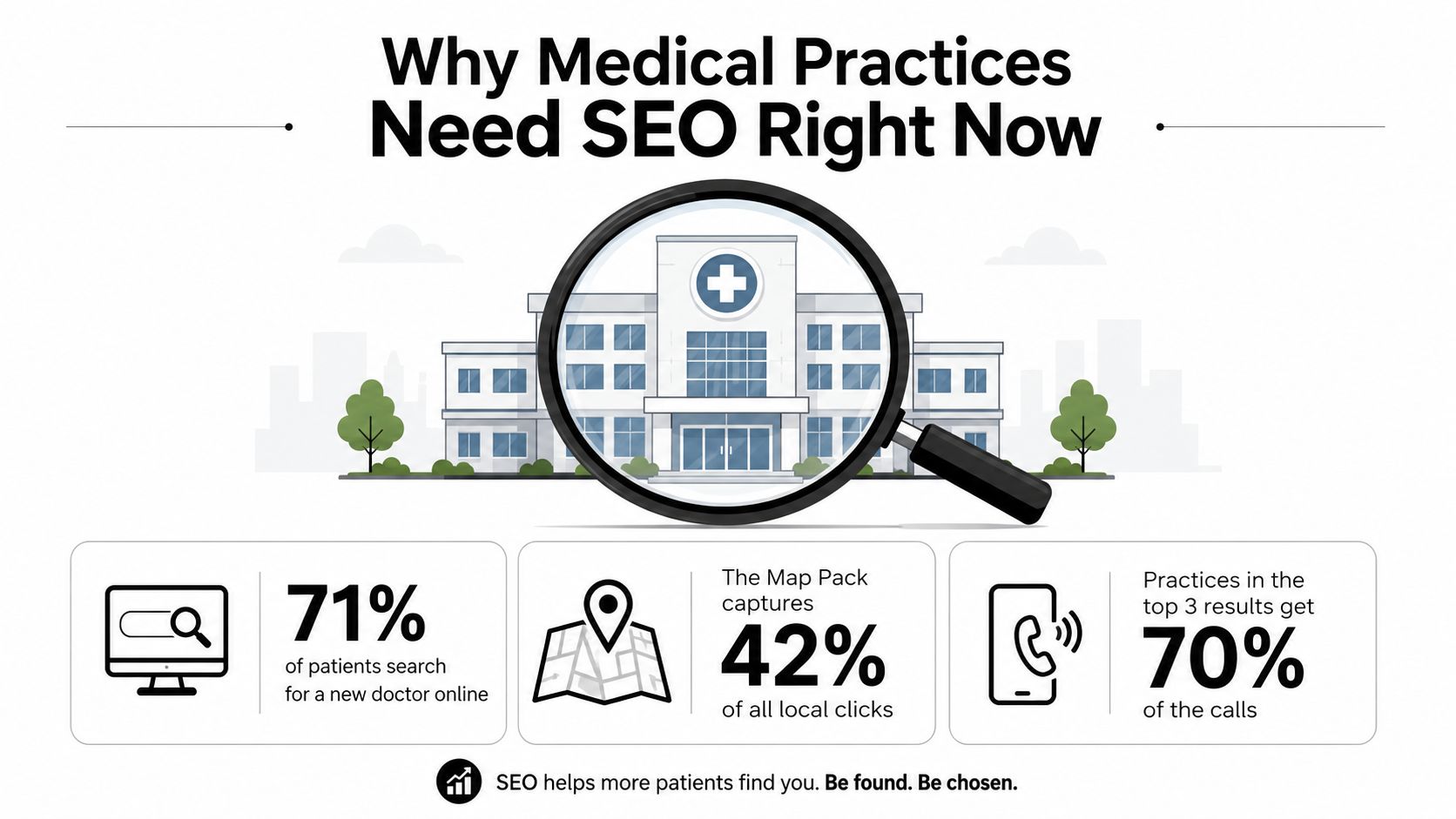
SEO for medical practices is about showing up when a real patient is ready to act, not when they're casually browsing. Google handles more than 100 billion healthcare searches each year, that's roughly 70,000 health-related searches per minute, and 7% of all Google searches are health-related according to the healthcare statistics benchmark in the brief (WebFX healthcare statistics and factoids). Add the fact that 46% of Google searches seek local information from the same source, and the job becomes obvious. You're not trying to win abstract visibility. You're trying to be the practice that appears when a nearby patient searches for care and books the slot.
A lot of practices still treat SEO like a side project. That's a mistake. One healthcare revenue-growth resource worth keeping nearby is the Happy Billing revenue growth guide, because the practices that win online are usually the ones that think in terms of revenue flow, not vanity traffic.
By the end of this guide, you'll have a prioritized system for ranking in your service area, generating patient calls, and proving ROI to partners or a board.
Why Medical Practices Need SEO Right Now
A Fort Myers-area clinic owner can see the problem fast. The doctor is busy, the staff is competent, referrals are steady, yet the practice down the street keeps taking the map pack spots for the exact services this clinic wants. That other practice is not always better clinically. It is easier for Google to read, easier for patients to trust at a glance, and easier to call.
SEO for medical practices is a patient-acquisition system. Organic search drives a large share of new patient website sessions in healthcare, and the brief cites a 2026 healthcare SEO summary reporting 54% to 68% of new patient website sessions from organic search, with SEO leads closing at 14.6% compared with 1.7% for outbound tactics (WebTonic healthcare SEO statistics). Clinics, dentists, and specialty groups in Fort Myers, Cape Coral, and Naples cannot treat search as a side channel and expect steady growth.
Local intent is the true value
Patients do not search “healthcare” in the abstract. They search for a doctor, specialist, dentist, or urgent care near them, right when they need one. That is where the combination of high total search volume and local intent matters, because the searcher is already close to booking.
Practical rule: if your practice wants more booked appointments, optimize for the moment a nearby patient decides to act, not for broad awareness.
The cost side matters too. The brief cites SEO cost per lead of $40 to $90, and another healthcare marketing analysis notes that patient acquisition cost via organic SEO can range from $95 for dental practices to $850+ for cardiology and neurology, with results often taking 4 to 9 months to reach meaningful flow (WebTonic healthcare SEO statistics). That is why practices in competitive specialties need a durable organic system. Paid ads cover short-term gaps. SEO lowers dependence on them, and the Happy Billing revenue growth guide is a useful reminder to measure search work against revenue, not just traffic.
What this means in plain English
If you run a practice in Southwest Florida, the goal is not just to rank. The goal is to own the search moment when a patient is comparing nearby options. The clinic with the clearest listing, strongest local relevance, and most trustworthy site usually wins the call, even if it is not the biggest practice in town.
Skip vanity traffic. Build the search system that keeps generating patient calls, booked appointments, and usable revenue per provider after the ad budget pauses. For the profile side of that system, use the Google Business Profile optimization checklist from Polaris Marketing Solutions and get the basics right before you chase anything else.
Setting Up Your Google Business Profile the Right Way
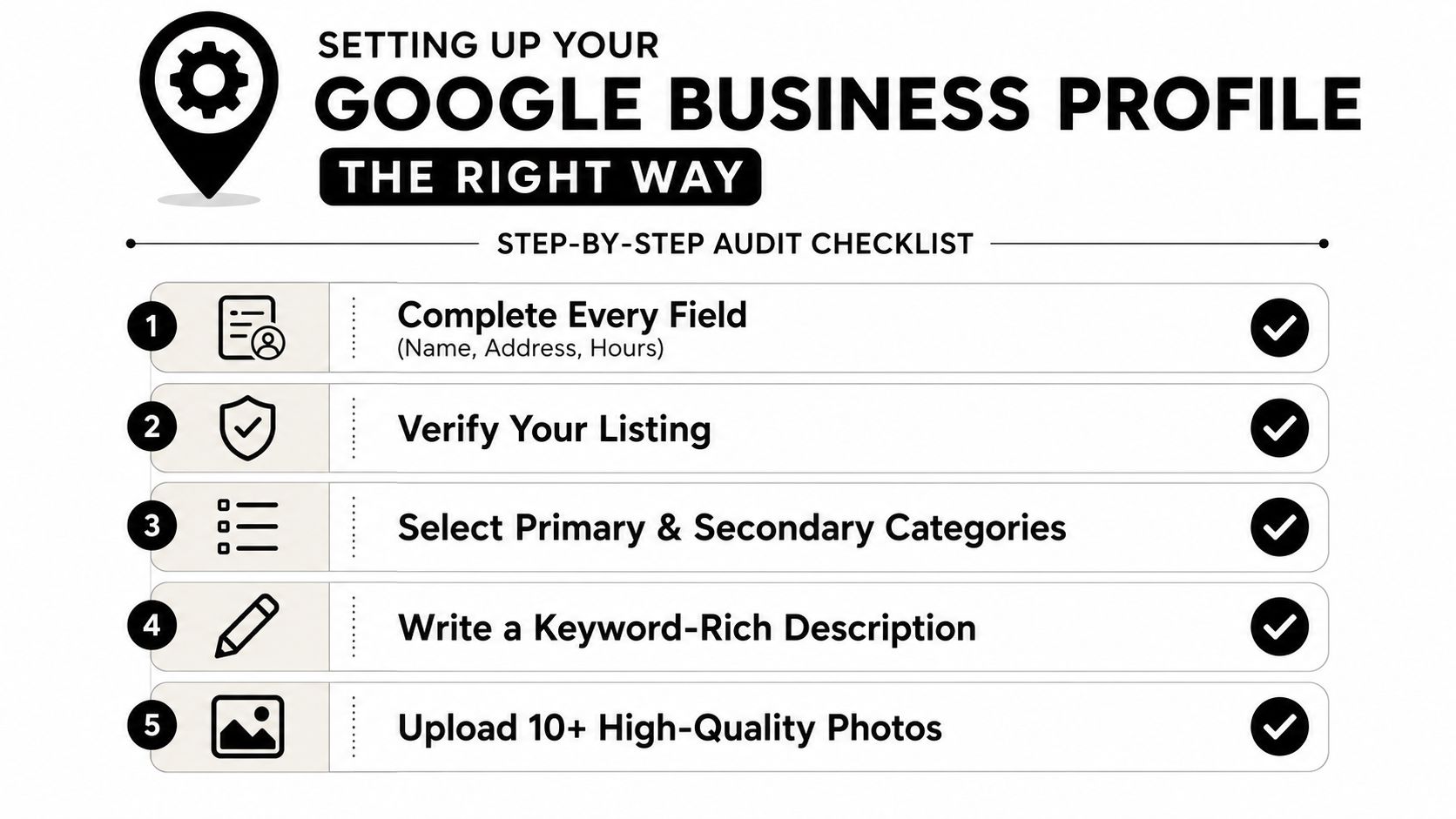
Your Google Business Profile is the front door. If it's incomplete, messy, or inconsistent, everything else has to work harder. The cleanest workflow is simple. Audit it, complete every field, and verify the listing before you chase content or links. That sequence matches the healthcare SEO guidance in the brief, which says the highest-impact workflow starts with the profile, then NAP consistency, then pages that already have ranking potential.
Fill the profile like a patient will use it
Start with the basics. Make sure the name, address, hours, phone number, website, and appointment link are correct. Then choose the right category. A general dentist shouldn't hide under a vague label when a more specific one exists. A pediatric dentist should look like a pediatric dentist. A cosmetic dentist should look like a cosmetic dentist. The category has to match what patients are searching for, not what sounds broadest.
Next, complete the services list. Don't stuff it with marketing language. List real services patients ask for, the same way front-desk staff describes them on the phone. Then upload photos that remove doubt.
- Exterior photos: show the building, entry, signage, and parking access.
- Interior photos: make waiting areas and treatment rooms familiar before the first visit.
- Staff photos: show the team patients will meet.
- Equipment photos: help specialty practices show capability without overexplaining.
Add the appointment link, test it on mobile, and make sure it lands on the correct booking path. Messaging and Q&A should be set up too, because those features can reduce unnecessary front-desk calls and help patients get quick answers without waiting on hold.
Skip this: blank profile fields, stock-looking imagery, and vague service descriptions.
Do this instead: a complete profile with clear categories, usable photos, and a booking path that works on a phone.
A Bonita Springs example
A Bonita Springs family practice that completes its profile the right way usually sees a few practical changes within the first 60 days. The map listing becomes clearer, the phone starts ringing with more relevant calls, and staff spend less time repeating basic information like hours, location, and appointment options. That's not magic. It's just a better storefront.
If you want a useful checklist for tightening the profile details, the Google My Business optimization checklist is worth comparing against your current setup. Keep the focus on accuracy and completeness, not gimmicks.
The point is simple. The profile should help a patient choose you faster. If it doesn't, it's underperforming.
Building a Local Keyword Map Around Real Patient Questions
Stop building pages around whatever sounds like “good SEO.” Build them around questions patients ask. That's how you stop guessing and start mapping demand. A Southwest Florida cardiology practice, for example, shouldn't just chase broad “Fort Myers cardiologist” language and call it strategy. It should map patient questions to provider expertise, then decide which queries deserve a service page, which deserve a condition page, and which deserve a location page.
Use three buckets, not one generic list
The cleanest keyword map for a medical practice usually falls into three buckets.
| Intent Bucket | Example Query | Best-Fit Page Type |
|---|---|---|
| Condition | what causes plantar fasciitis | Condition page |
| Procedure | how long does a root canal take | Procedure page |
| Proximity | urgent care Cape Coral open Sunday | Location or service page |
The reason this works is simple. Patients search differently depending on urgency and certainty. Someone asking about symptoms needs education. Someone asking about a procedure needs clarity and reassurance. Someone searching with a city name needs immediate local proof that you're nearby and available.
Build pages from the question, not the theme
Outrank Playbooks recommends question-based H2 and H3 structures such as “What are the early signs of [condition]?” and “How is [procedure] performed?” because they outperform theme-based pages. A page built around a single patient question gives Google and readers a clear match. A page titled “Our Cardiology Services” doesn't.
That's the wrong approach for a specialty practice. Stuffing “Fort Myers cardiologist” into every heading makes the site read like a template, not a clinical authority. It also spreads intent too thin. Instead, identify the 20 highest-intent searches, then sort them by patient need and commercial value. For a cardiology group, that usually means condition pages, procedure pages, and provider pages tied to specific expertise.
Best practice: one page, one intent. If the page tries to answer five different patient questions, it usually answers none of them well.
Tie each cluster to a real page type
Many practices lose momentum. They do the keyword research, then dump everything into one service page. Don't do that. If a query cluster is about symptoms, build a condition page. If it's about treatment, build a procedure page. If it's about accessibility or geography, build a location page.
That structure makes the next step easier. Each keyword cluster becomes a page patients can understand, book from, and trust.
Crafting Service Pages, Provider Bios, and Medical Schema
A treatment page has one job if you want appointments, and it has to do three things at the same time. It needs to answer the patient's question, show clinical credibility, and make booking obvious. If any one of those pieces is weak, the page usually loses. The brief's technical guidance is direct for a reason. Medical pages need named clinician authorship, visible credentials, and a real conversion path.
Build the service page like a clinical resource
Start the page with a short clinical introduction written or reviewed by the named provider. Then add a credentials block, a plain-language explanation of who the treatment is for, and FAQs pulled from the keyword map. Internal links should point to related conditions or adjacent services so the page stays connected to the rest of the site.
A strong flow looks like this:
- Clinical introduction from a named clinician.
- Conditions treated or patients served in plain language.
- FAQs that answer the exact questions patients search.
- Clear conversion options such as call, request appointment, or online scheduling.
Use the structure, not the decoration, from the high-converting landing pages examples. The page should move a patient from question to action without making them hunt for the next step.
Provider bios matter more than most practices admit
A real provider bio should include licensure, board certifications, hospital affiliations, a headshot, and languages spoken. That is not filler. That is what helps patients decide whether they trust the person behind the page. It also matters for multi-provider practices, where staff turnover can erode rankings if listings are not kept current.
Recent guidance in the brief emphasizes keeping identical NAP, headshots, bios, and cross-links across directory profiles, then updating listings the same week a provider changes and redirecting old provider URLs immediately. That protects the practice when a doctor leaves or moves locations. A single accurate listing is worth more than ten incomplete ones.
Add schema, but do not worship it
The useful schema types here are MedicalCondition, MedicalProcedure, Physician, MedicalClinic, and FAQ. Schema does not rank the page by itself, but it helps search engines and AI systems parse the page correctly. If you want your content to be easier to surface in search, schema belongs on the page.
The trust layer belongs on every page too. HTTPS, secure forms, and clear clinical authorship should be standard. If a patient does not trust the page, they do not book from it.
For practices that want a structured schema roadmap, the SEO tab enhancement request is a useful reference point for how schema gets operationalized on real sites. Use it as a technical prompt, not a shortcut.
Winning the Map Pack With Citations and Reviews
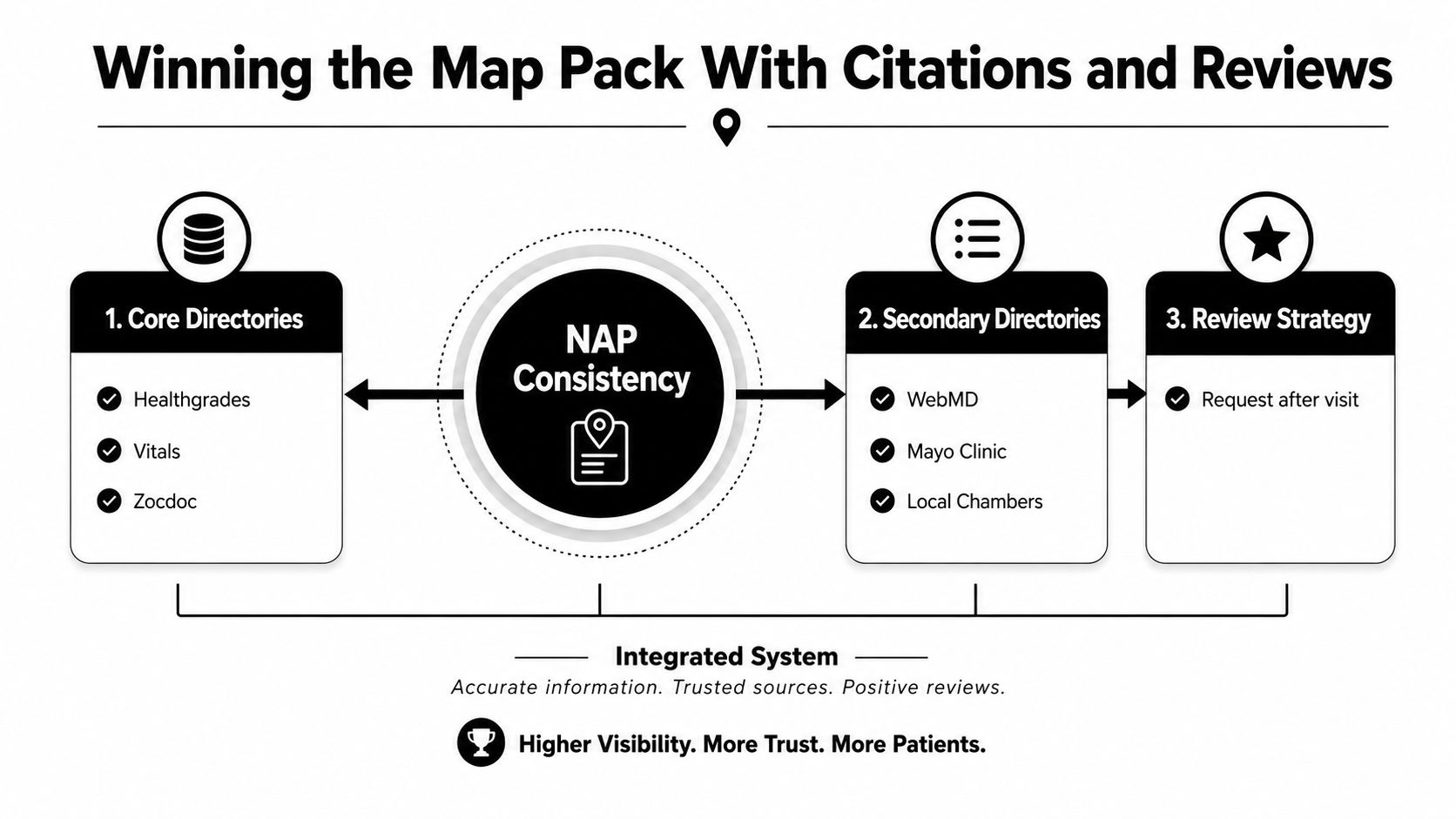
Citations and reviews belong together. Treating them as separate tactics is a common mistake. Google wants consistency, prominence, and trust, and patients want confirmation that the practice is real, active, and responsive. If your listings say one thing, your reviews say another, and your phone number changes from directory to directory, you're making Google work too hard.
Clean up the listing ecosystem first
Start with NAP consistency, meaning name, address, and phone need to match everywhere. Then prioritize the directories that matter most for healthcare visibility, including Healthgrades, Vitals, Zocdoc, WebMD, Yelp, Apple Maps, and Bing Places. Duplicate listings are poison because they confuse both Google and patients, especially when a practice has changed locations or rebranded.
If you're fixing citations at scale, the process has to be boring and methodical. One clean version of the truth is better than ten half-updated profiles.
For a practical citation workflow, the local citation building services page is a useful example of how this work gets organized.
Build a review habit, not a last-minute scramble
A review engine works when the staff makes it routine. Ask after the appointment, not weeks later. Keep the ask simple, ethical, and focused on the patient experience. Don't nudge people to mention diagnoses or medical details. And when a negative review lands, respond carefully without revealing protected information.
A good response doesn't argue. It confirms you take feedback seriously and moves the discussion offline.
The brief's Estero dental example is the right model. The practice doubled monthly reviews by training front-desk staff on a single ask script. That's the point. The win came from consistency, not creativity.
Owner responses matter too. They show that someone at the practice is paying attention, and that matters both to patients and to the map pack. If your listings are active, your reviews are current, and your responses sound human, you look far more credible than a competitor with stale profiles and no engagement.
If you need a reminder that off-site signals are only one part of the system, keep them separate from technical cleanup. This section is about reputation and local trust, not site speed or crawl issues.
Technical SEO and Mobile for Patient-Booking Sites
A lot of medical sites don't fail because of bad content. They fail because the patient never makes it to the booking confirmation. Slow pages, broken redirects, unindexed location pages, and clunky mobile flows drain appointments. The brief's technical guidance is clear here, and it should be taken seriously. Roughly 65% of healthcare searches happen on mobile, and Google indexes the mobile version, so the phone experience is not a side issue (DeltaV Digital healthcare SEO guide).
Fix the booking path before you publish more pages
If it takes more than four steps from landing page to confirmation, you have a conversion problem that SEO alone won't solve, according to the healthcare SEO guide in the brief. That rule matters because even a well-ranked page can lose the appointment if the form is too long, the button is buried, or the scheduling flow feels uncertain.
The technical baseline should be boring and solid:
- HTTPS everywhere so the site is secure.
- Core Web Vitals work so pages load cleanly and interactions feel responsive.
- XML sitemap submission so important pages are discoverable.
- Crawl-error cleanup so patients don't land on dead pages.
- Redirect chain cleanup when a provider or location closes.
If a location page disappears during a redesign, or a physician leaves and the URL just 404s, that's a fixable loss. Redirect it properly and update the internal links immediately.
Secure forms and mobile-first design are not optional
The brief also warns that patient-facing forms and chat tools must be HIPAA-conscious and encrypted. That's the standard. On top of that, mobile-responsive design is critical because patient searches are mobile-heavy, and page speed under 3 seconds is highlighted as a priority in the medical SEO guidance in the brief (Target Patients MD medical SEO guide; Integrity Marketing medical practices SEO guide). If a form feels unsafe or slow, patients leave.
A platform decision can matter too. If your website builder makes mobile editing, page structure, or tracking painful, that becomes an SEO bottleneck. For practices comparing site tools, the improve rankings with a website builder resource is a practical reminder that the platform should support speed, structure, and clean publishing.
Don't let technical debt hide behind rankings
A site can rank and still lose money if technical friction scares patients off. Rankings are not the finish line. Appointments are.
Measuring Patient Acquisition and Your 90-Day Rollout
If you can't tie SEO to booked appointments, you're guessing. That's the whole problem with vanity reporting. A practice owner doesn't need more screenshots of keyword positions. They need to know which pages generate calls, which locations convert, and where the booking flow breaks. The brief is right to push call tracking, form tracking, CRM integration, and monthly reporting on organic patient volume and cost per acquisition by location.
Build a measurement stack you'll actually use
Start with call tracking numbers tied to both the Google Business Profile and the website. Then track every appointment request form. Push those leads into the same CRM or front-desk system the team already uses so the data doesn't get trapped in a marketing dashboard. That gives you a clean view of organic leads versus booked patients.
Report by location. Report by service line. Report by page. If a page brings in traffic but not appointments, it's a conversion problem. If a booking flow is slow, fix that before you write another blog post. A slow checkout or a broken booking path costs more than a missing article.
A practical 30-60-90 day rollout
Month 1, GBP optimization and citations. Finish the profile, clean up NAP, and handle the core directory listings first.
Month 2, content and reviews. Publish the top service and condition pages, then train the front desk on the review ask.
Month 3, measure and refine. Review calls, forms, booked appointments, and page-level performance. Cut what's not producing.
That sequence keeps the work tied to revenue instead of busywork. It also gives small practices a realistic path forward without turning SEO into a never-ending rebuild.
If you want a practical starting point, Polaris Marketing Solutions offers a complimentary online analysis and competitor report for Southwest Florida practices that want to see where they're losing ground. A local team can review your visibility, citations, and booking path before you spend more on content that won't convert.
If your practice needs a cleaner path from Google Maps to booked appointments, Polaris Marketing Solutions can help you fix the pieces that actually move revenue, from Google Business Profile setup to local SEO, citations, and conversion-focused pages. Visit Polaris Marketing Solutions to request a complimentary online analysis and competitor report, then use it to decide where the next appointment should come from.