
If you run a small business in Fort Myers, you probably know the feeling. It's Tuesday, you've got a job in Cape Coral at nine, a quote in Naples at noon, and your phone is full of half-finished tasks you meant to handle yesterday. Social media sits there in the background, important enough to worry about, annoying enough to ignore, and every tool that promises to make it easy starts sounding the same after a while.
That's the question behind Really Simple Social. Not whether social media matters, it obviously does when there are about 5.66 billion active social media users worldwide and people use an average of 6.75 different networks per month (Sprout Social). The question is whether a simple posting tool is the right thing to buy, or whether that money should go into the stuff that wins local work, like Google Business Profile, reviews, and service-area SEO.
Why Most Small Businesses Overcomplicate Social Media
A contractor doesn't usually fail at social because he lacks opinions. He fails because the day gets away from him. The truck needs a part, the estimator is late, a customer wants an invoice corrected, and by the time the phone is quiet, the last thing anyone wants to do is write a post about spring maintenance.
That's why “simple” sounds attractive. But simple only matters if it reduces friction without hiding the actual problem, which is usually inconsistency, not platform choice. Social platforms are fragmented now, and people aren't hanging out on one app anymore. They spread their attention across networks, and the average person is spending roughly 2 hours and 40 minutes per day on social apps (Sprout Social).
Practical rule: if social posting takes so much effort that you skip weeks at a time, the tool isn't the first problem. The workflow is.
That's where a lot of owners get trapped. They buy scheduling software, then still don't know what to say, when to say it, or how to connect posts to leads. If you want the broader strategy before you buy anything, build a social media strategy that works is a useful starting point because it treats social as part of the funnel, not a side hobby.
The honest way to look at Really Simple Social is this. It's not a magic fix for weak marketing. It's a convenience layer for owners who already know they should post, but need a way to stop losing the week to content creation.
What Really Simple Social Is and Is Not
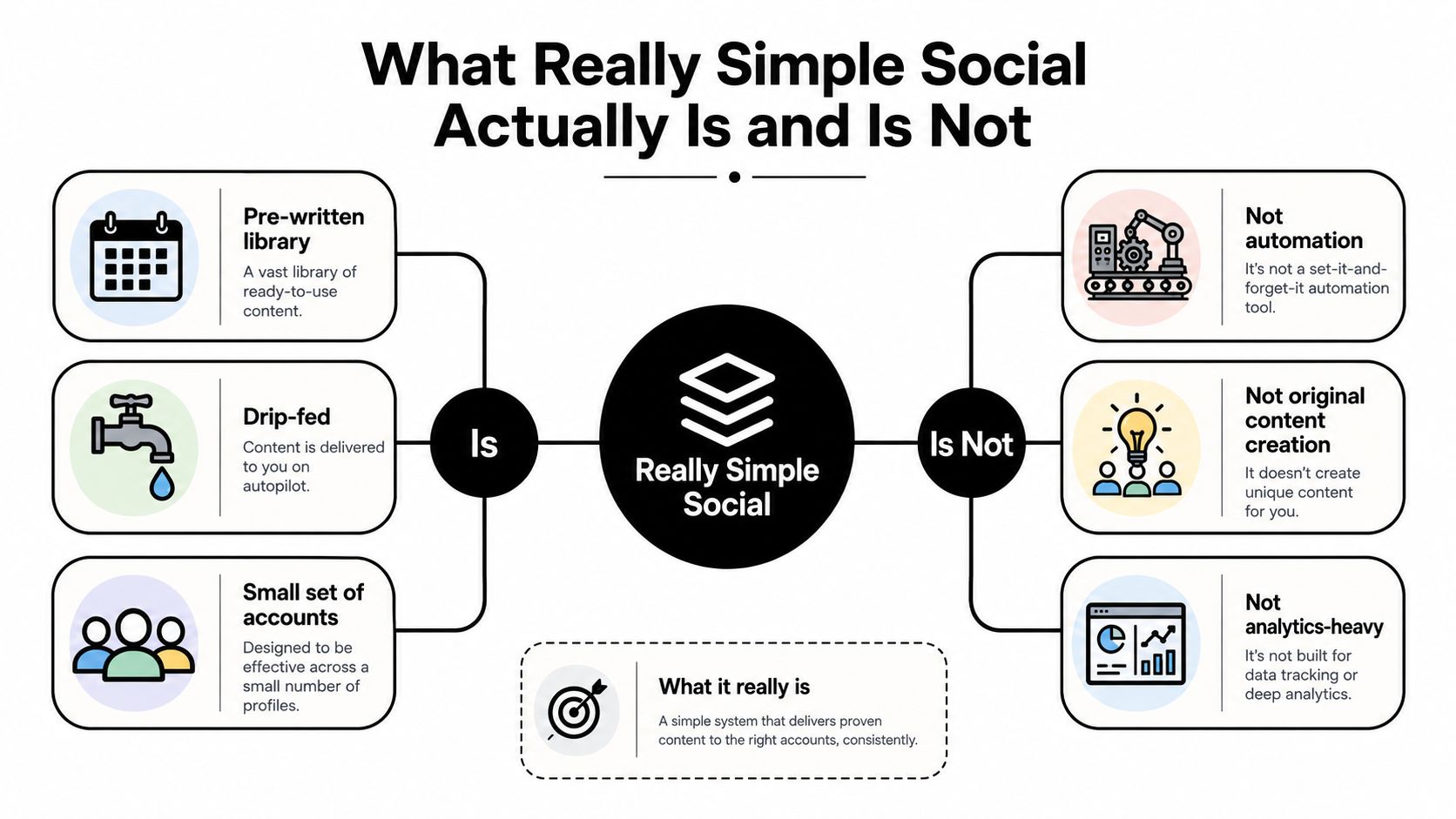
Really Simple Social is a done-for-you posting system. It gives you prepared content, sends it out on a simple cadence, and cuts the time you spend on social down to a manageable level. That is useful for owners who want fewer moving parts, not a full-time content operation.
Buy it for what it does, and skip the fantasy version. You are not getting a full social media management platform with deep campaign control. You are not getting an ad manager. You are not getting a content studio. You are also not replacing local SEO or Google Business Profile work with it.
The model is straightforward. Really Simple Social works more like a subscription content pack than custom marketing help. The posts are assembled for you, but they still carry the same general tone and structure many small businesses will recognize. That is fine if your goal is consistency. It is weak if your business needs original campaigns or heavy brand differentiation.
For a small operator, that trade-off often makes sense. A simple system is worth paying for when the alternative is no posting at all, because silence hurts more than average content. I have seen home-service owners in Southwest Florida spend money on flashy software they never use, when that budget would have done more work in small business social media management tools tied to reviews, local SEO, and basic follow-up.
Sociotechnical thinking is the right way to judge it. A tool is never just software, it is software, workflow, roles, and decision paths working together. If the posting layer is easy but nobody owns approval, review response, or local proof, the setup looks tidy while the marketing stays thin. That is the kind of gap an AI social assistant for business can reduce only if the rest of the process is already in place.
Core Features and Pricing You Should Evaluate
When I evaluate a tool like this for a home-services client, I don't start with the sales page. I start with the boring parts that matter. Does it let you keep a steady posting rhythm, does it give you content categories that match your business, and does it stay out of your way?
A decent Really Simple Social style setup usually includes an evergreen post library, category-based suggestions, a scheduling cadence, basic analytics, and image or graphic templates. That stack is useful if your current process is “post whenever I remember.” It's less useful if your process already includes content planning, reporting, and lead tracking.
Here's the blunt version. The features that earn their keep are the ones that save labor and keep the feed alive. The features that usually turn into padding are the shiny dashboard extras that look impressive in a demo but don't help a roofer book one more estimate.
| Feature | What It Does | Value for a Small Business |
|---|---|---|
| Evergreen post library | Reuses prepared content on a schedule | High if you need consistency without writing from scratch |
| Category-based suggestions | Sorts posts by topic like tips, promos, or updates | High if it helps you cover different angles without guessing |
| Scheduling cadence | Drips posts out automatically | High if no one on staff can post reliably |
| Basic analytics | Shows simple performance signals | Medium, useful for checking activity, not for deep ROI |
| Image or graphic templates | Makes visual posts faster to publish | Medium, good for speed, not a substitute for proof |
If you're comparing tools, the useful benchmark is not flashy automation. It's whether the entry plan covers the basics without burying you in upsells. A smart buyer also checks how the tool compares to broader AI social assistant for business options, because many of those platforms offer more flexibility, but they also demand more from the user.
I'd also compare it with a broader stack like the one discussed in this social media management tools for small businesses guide, because the right choice depends on whether you need posting help, engagement help, or a real marketing system.
My rule: if a feature doesn't save time or improve consistency, it's decoration.
Use Cases for Home Services in Southwest Florida
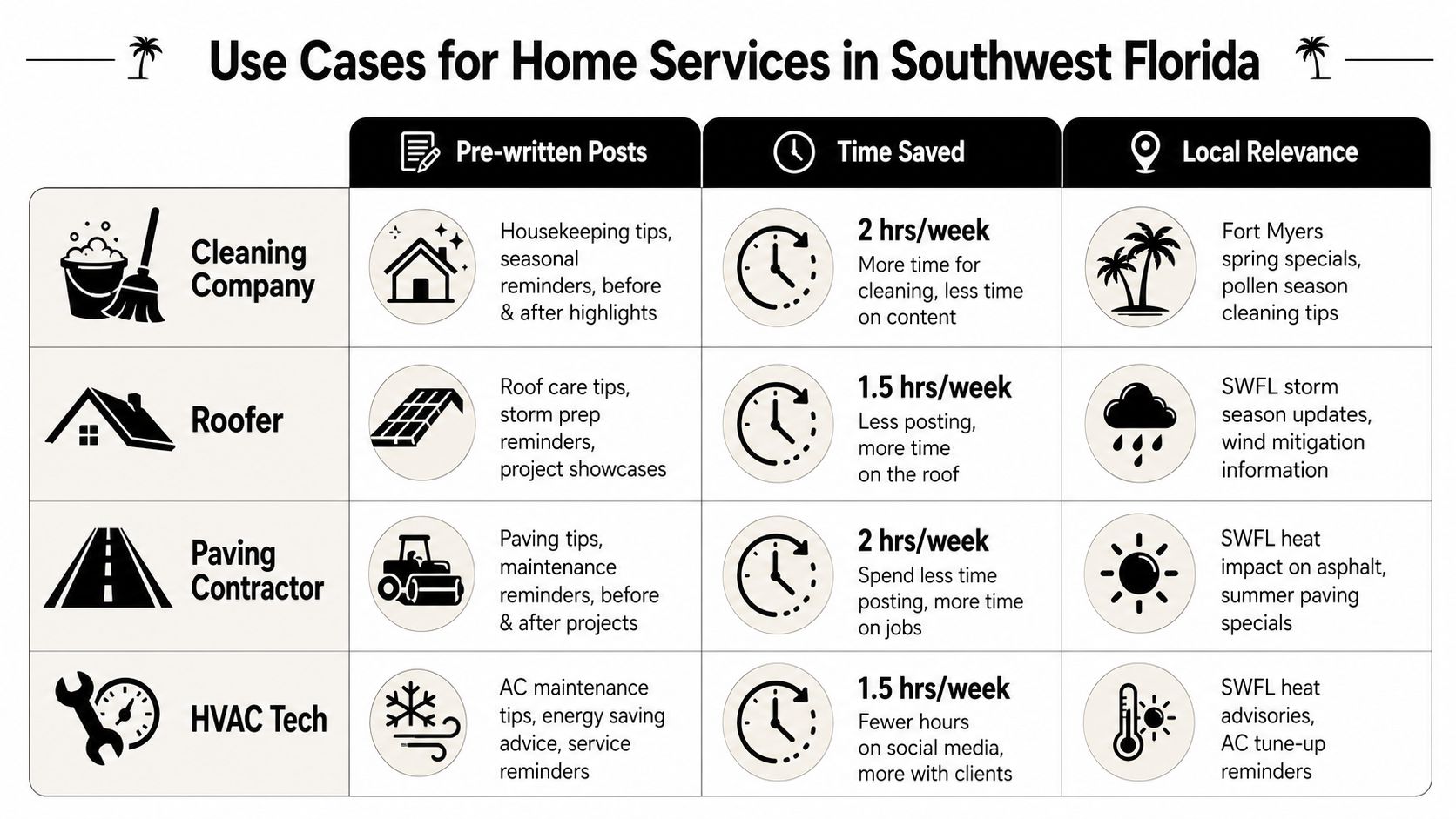
A Fort Myers cleaning company does not need the same social setup as a Naples HVAC crew. The cleaner needs reminders, seasonal tips, and trust signals. The roofer needs proof of work and local credibility. The paving contractor needs before-and-after visuals. The HVAC tech needs urgency and reliability.
That's why generic national social content usually disappoints local operators. People hire home-services businesses when they need confidence, not entertainment. Google Business Profile, reviews, and location signals usually do the heavy lifting, and social works best when it reinforces those same trust cues instead of drifting off into generic brand chatter.
A tool like Really Simple Social is useful when the alternative is no presence at all. That's the solo operator who's working jobs, answering calls, and never getting around to posting. It's also reasonable for the owner who wants a low-maintenance way to stay visible while the marketing budget goes toward search and reviews.
For a contractor in storm-prone Southwest Florida, content relevance matters more than novelty. A local resource like the Sarasota water mitigation guide shows the kind of practical, location-aware topic that fits service marketing. That is the standard to compare against, not random memes or filler posts.
For a business that already has a content engine, the tool is often a distraction. If your phone rings because you've built service pages, gotten reviews, and connected your content to inquiries, more scheduled posts won't fix a broken funnel. In that case, I'd keep the budget on digital marketing for home services that supports lead flow, not just visibility.
A Weekly Workflow That Pairs Simple Social With Local SEO
The best use of a simple social tool is not “set it and forget it.” It's to make social one small part of a weekly trust-building loop. If you do that, the posts stop feeling random and start supporting the same signals that help local buyers choose you.
Monday, handle review responses. Tuesday, publish a Google Business Profile post. Wednesday, let Really Simple Social push a pre-written post. Thursday, update a service-area page or add a short blog post. Friday, publish one proof-based social post with a before-and-after, testimonial, or short case study.
The time budget stays manageable if you're disciplined. Most small businesses can keep this under control by batching the work instead of treating each channel like a separate job. The point is not volume. The point is alignment.
The reason this works is simple. Social should reinforce the same themes your website and profile already communicate, such as competence, local presence, and proof. If you separate those pieces, the marketing gets noisy. If you coordinate them, every touchpoint does a little more work.
Practical rule: one trust signal repeated across search, reviews, and social is more valuable than three disconnected posts.
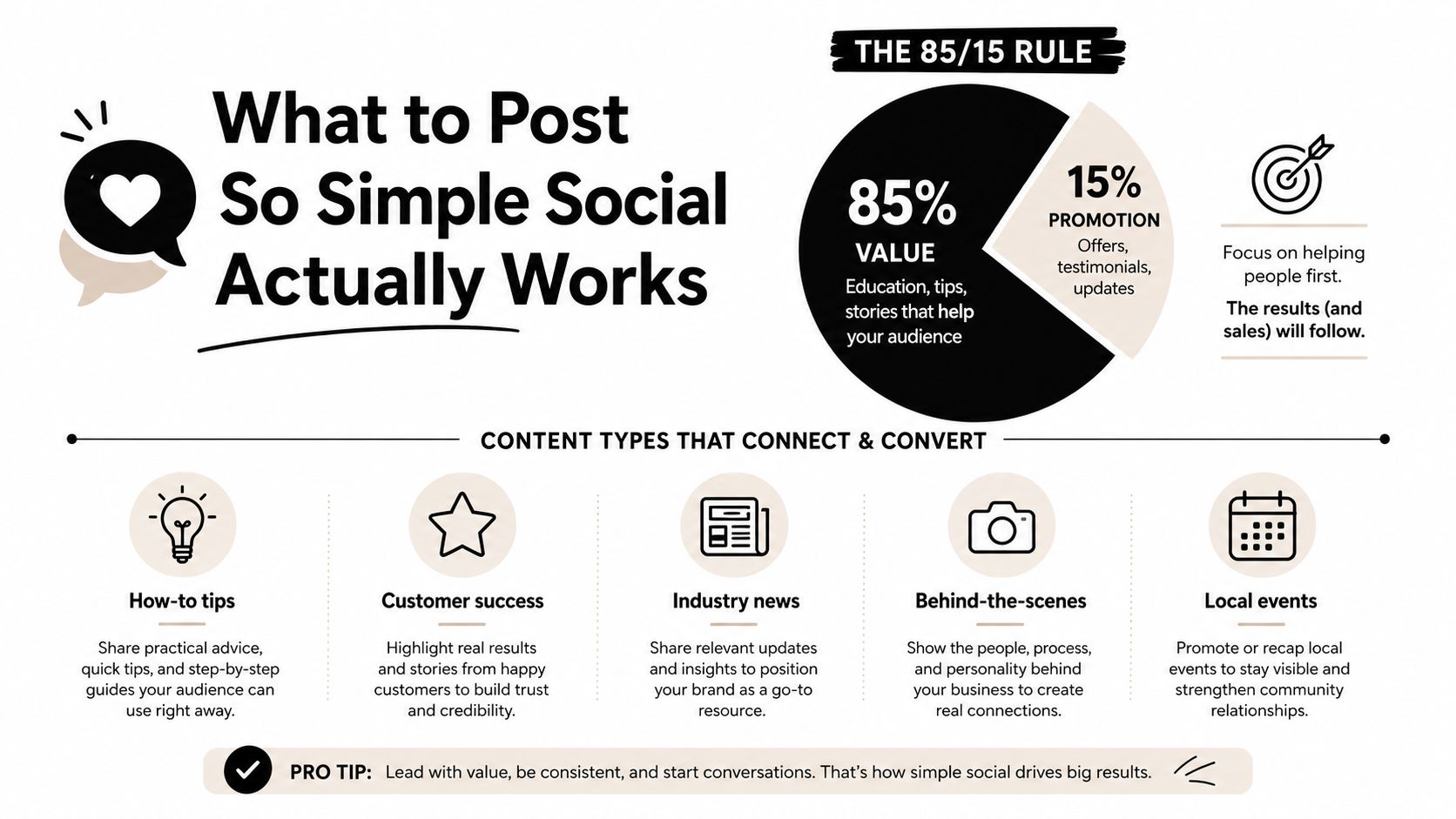
If you need a framework for the content side, the 85/15 rule is a solid one. Keep 85% of content focused on value and only 15% on direct promotion, and plan around 3 to 5 core content pillars with roughly 3 to 5 posts per week if your capacity allows (PostEverywhere). For engagement, use content that creates comments, reach, and action, not just passive likes (Impact.com).
A simple way to organize it is this:
- Monday: reply to reviews and flag weak spots in the customer experience.
- Tuesday: post a quick service reminder on Google Business Profile.
- Wednesday: publish the pre-written post from the tool.
- Thursday: add one local update, FAQ, or service-area note to the website.
- Friday: post one proof piece, such as a client quote or project photo.
What to Post So Simple Social Works
A simple posting tool does not fix bad content. If the feed is full of vague “happy Friday” filler, the tool just helps you publish weak posts faster. The content still has to sound like your business and answer a real concern from a customer who is ready to call.
For contractors, I recommend building around 3 to 5 content pillars. Home services usually do best with homeowner tips, behind-the-scenes team content, proof of work, local community presence, and the occasional offer. That mix keeps the page useful instead of turning it into one long sales pitch.
The 85/15 rule keeps the balance straight. Most posts should give value, not ask for the sale. The promotional pieces that do appear should read like proof, not hype. A testimonial from a Fort Myers customer earns more trust than a generic discount graphic.
Keep the copy short. Carnegie Mellon's Marcom guidance recommends posts under 100 characters for stronger engagement and suggests short paragraphs with grade 5 to 7 reading-level language so people can scan them quickly (CMU Marcom PDF). That is not academic fluff. It is the difference between a post someone reads and a post someone scrolls past.
A contractor-friendly template looks like this:
- How-to tip: “Storm season checkup, clean gutters before the next heavy rain.”
- Customer proof: “New roof completed in Cape Coral, customer said the crew left the yard spotless.”
- Behind the scenes: “Today's HVAC install, old unit out, new one running by afternoon.”
- Local presence: “Serving Bonita Springs this week, call for a quick estimate.”
- Offer with purpose: “Free inspection this week for homeowners dealing with leaks.”
A content calendar keeps those ideas from sitting in someone's head. If you want a simple planning system, use how to create a content calendar and map the posts before the week starts.
A short video can help too, especially if you want a quick reminder of how concise messaging plays on social.
Alternatives Worth Comparing Before You Buy
The honest comparison starts with the cheapest option. You can build a self-managed routine with free or low-cost tools. That gives you control, but it also demands discipline, a content brain, and somebody who posts on time.
The next option is outsourcing. A freelancer or agency can handle content and posting, and that helps if you want more polished execution. The trade-off is cost and oversight. You still need someone to approve the right message, make sure it matches local demand, and connect it to the rest of the marketing stack.
Then there's the option many owners ignore because it feels less flashy. Put the budget into Google Business Profile, review generation, and local SEO. For a local service business, that often does more for leads than an extra month of generic posting. If someone wants a roofer, a cleaner, or an HVAC tech, visibility in search and trust on the profile usually matter more than a pretty feed.
This is also where a tool like Buffer, Hootsuite, or Later makes more sense than a narrowly simple system. Those platforms give you more control over scheduling and management, but they also ask you to do more of the work yourself. I'd use them only if someone on your team is already comfortable with content planning.
My decision rule is blunt.
- If you cannot post at all today, a simple tool earns its place.
- If you can post but can't prove ROI, the tool is not the fix, content quality and tracking are.
- If leads already come from search and reviews, spend on the channel that produces calls, not just impressions.
That's the way I'd evaluate it for a Fort Myers home-services company, and it's the same advice I give clients who want their marketing to feel lighter without becoming weaker.
The Honest Verdict and How to Move Forward
Buy Really Simple Social if you are a solo operator or small team with almost no social presence and you need a low-effort way to stay visible. Use it as a starter system, not as your whole marketing plan. Layer in local SEO, review requests, and Google Business Profile work within 90 days, or the tool will just keep you mildly busy.
Skip it if you already post consistently but the phone still isn't ringing. That means your bottleneck is not frequency. It's positioning, proof, local relevance, or tracking. Skip it too if you're running an agency that needs multi-client control, because a narrow posting product rarely solves that kind of complexity.
I'd also skip it for any business that hasn't optimized the basics yet. If your Google Business Profile is weak, your reviews are thin, or your service pages don't match what local buyers are searching for, social is a side task. It is not the main event.
A practical 30-day plan is simple. Pick one posting system. Tighten your Google Business Profile. Ask for reviews every week. Publish one proof-based social post, one tip, and one local update. Then check whether the work is bringing more inquiries, not just more activity.
If you want help building that kind of integrated system, Polaris Marketing Solutions works with Fort Myers and Southwest Florida businesses on social media management, local SEO, review strategy, and service-area content. Visit Polaris Marketing Solutions if you want a marketing plan that treats social as one part of a lead-generation system, not a standalone toy.