
A Fort Myers roofing company can have a decent website, a clean logo, and a Facebook page, then still sound dead on Google. The calls stay quiet because the business never finished the one profile that customers see first when they search on mobile for roof repair, HVAC help, cleaning, or legal services. Google Business Profile setup isn't admin work in 2026, it's the first real gate to local visibility.
Google Business Profile now sits at huge scale, with over 215 million listings globally, about 7.1 million U.S. businesses, and roughly 28,000 new profiles created every day worldwide, plus +6.4% year-over-year listing growth from one 2025 estimate (SQ Magazine's Google My Business statistics). That matters in Southwest Florida because customers are rarely browsing for entertainment, they're searching from a truck, a job site, or a driveway and want a phone number, directions, and hours right now. If your profile is half built, you're competing with millions of complete listings that already answer those questions.
Why a Google Business Profile Is the First Gate to Local Visibility
A Fort Myers roofing owner usually notices the problem the hard way. The crews are busy, the website is live, but a search for “roof repair near me” doesn't surface the business in Maps, and the phone never rings from Google. The issue usually isn't the service, it's the profile. Until the listing is claimed, verified, and filled out properly, Google has very little reason to trust it enough to show it in local results.
If you still need the plain-English version of what a Google Business Profile is and why it matters, start there. A Business Profile is more than a directory entry. Google's performance documentation tracks high-intent actions like calls, website clicks, messages, and direction requests inside the Performance area, which is exactly why the profile works like a conversion asset, not a static listing (Google Business Profile metrics documentation). In local search, people often find you before they know your name, especially when the query is category-based rather than branded. That's why a complete profile earns attention, while a thin one gets skipped.
Practical rule: if the profile doesn't help a stranger call you, navigate to you, or book you, it's not finished yet.
For service businesses in Southwest Florida, that distinction matters. A Cape Coral cleaning company may never get a walk-in customer, but it still needs enough profile detail to win the click, the call, and the direction request from someone comparing three providers on a phone screen. The profile is the storefront Google shows. For contractors, HVAC companies, cleaners, and law firms, that storefront has to produce phone calls and driving directions, not just a name on a map.
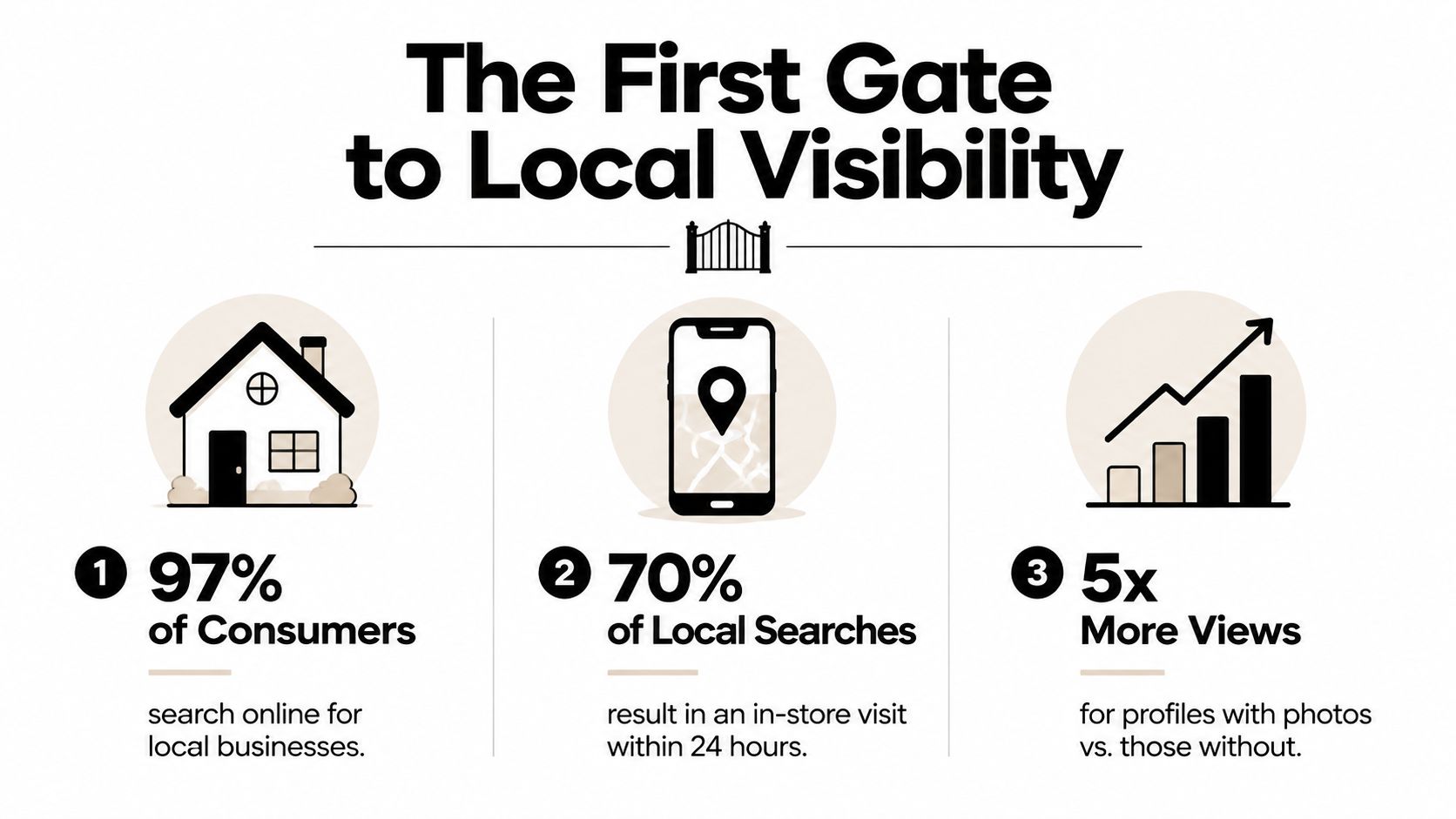
Google's own system rewards completeness in a way that's easy to miss when people treat setup like a one-time task. Performance data shows how often profiles earn visibility through category-based discovery, and that is how many customers first find a business they did not already know by name (Google Business Profile metrics documentation). Completed profiles also tend to do better once someone lands on them, because the business information, category fit, and action buttons are already there. The point is simple, a filled-out profile converts better than an empty one.
If your reputation needs cleanup too, pair the profile work with a solid guide to online reputation management. Bad reviews, old photos, and inconsistent business info all slow down trust before a customer ever calls.
What you need before you touch the add page
Google wants the business's canonical NAP data, meaning the name, address, phone, hours, and categories need to be consistent before setup starts (Google's Business Profile guidelines). There should be one profile per business, and the profile should be created for each eligible location, using the fewest categories needed to describe the core business. That sounds simple, but it's where a lot of service businesses get jammed up.
A Fort Myers HVAC company should decide in advance who owns the profile, because Google requires a Google Account to sign up and lets you use either a new account or an existing one with any email address (Google account and eligibility guidance). If a profile already exists in Search or Maps, claim it. If not, create it from Google's add page and move straight into verification (Create a Business Profile).
- Check the name first: search the exact business name, because a previous employee or a lead-gen site may have already created a listing.
- Match the signage: if the address on the storefront, mailbox, and documents doesn't line up, verification can stall.
- Pick a real owner: the person managing the listing should be someone who can respond when Google asks for changes or proof.
- Confirm eligibility: not every business model qualifies the same way, so check before you spend time filling fields.
A Naples law firm that already appears in Maps shouldn't create a second profile just because the existing one looks incomplete. A duplicate is a problem, not a shortcut. The clean move is to claim the existing listing, correct the NAP data, and document any weirdness caused by old employees, directories, or third-party lead sites.
Creating and Claiming Your Google Business Profile
A Bonita Springs pressure-washing company that doesn't show up anywhere in Google has a different path than a Naples law office that already appears in Search. The first business starts from scratch. The second one needs to claim what's already there and avoid creating a duplicate, because Google's guidelines allow only one profile per business and require the fewest categories needed to describe the core business (Google's Business Profile guidelines).
Start with the business name Google already sees
If the business exists in Search or Maps, use the claim flow. If it doesn't, go to Google's add page, click Add your business to Google, and follow the prompts until you reach verification (Google's create-a-profile guidance). A Naples law firm can do this from the office manager's account rather than waiting on a third party to create the listing first.
The name should match the business identity, not a keyword-heavy version. Google is picky here because the name field sets the tone for the whole profile. If the business has one physical office and a service area, that needs to be represented accurately instead of stuffed into the name.
Choose the category that fits the core work
A lot of businesses pick a category that's too broad because it feels safer. It usually isn't. The category should describe the core service, and secondary categories should only be added when they reflect what the business does.
Straight answer: don't force extra categories into the profile just because competitors are doing it. If it doesn't describe the business, it doesn't belong there.
A Fort Myers cleaning company might start with the most specific cleaning category that fits its main offer, then add related services later if they're real and actively sold. A service-area roofing contractor should keep the profile tied to the true business model, not a fantasy storefront. Google's system works better when the category matches how customers hire the company.
Enter address or service area with discipline
Service-area businesses need a geographic anchor even when they don't want customers walking into an office. Google still needs to understand where the business operates, and expert walkthroughs note that service-area businesses shouldn't skip the location piece because it affects local discovery. That doesn't mean publishing a fake showroom or letting the public wander into a warehouse.
Use the address rules, then add the service area where appropriate. A Bonita Springs pressure-washing company can serve nearby towns without pretending to have a retail storefront. The profile should reflect how the business really operates, not how someone wishes it did.
If you want help keeping all of this organized after launch, Polaris Marketing Solutions handles GBP management service work for businesses that need the profile claimed, cleaned up, and maintained instead of forgotten.
Verification Methods and How to Get Approved Faster
Verification is the gate that turns a draft profile into a live one. Google says verification is required to confirm the business is real and the manager is authorized, and the method can vary by business (Apptoto's Google Business Profile guide). For a Southwest Florida service business, that gate matters because the profile has to drive phone calls and direction requests, not just sit there looking complete.
Pick the method that matches your timeline
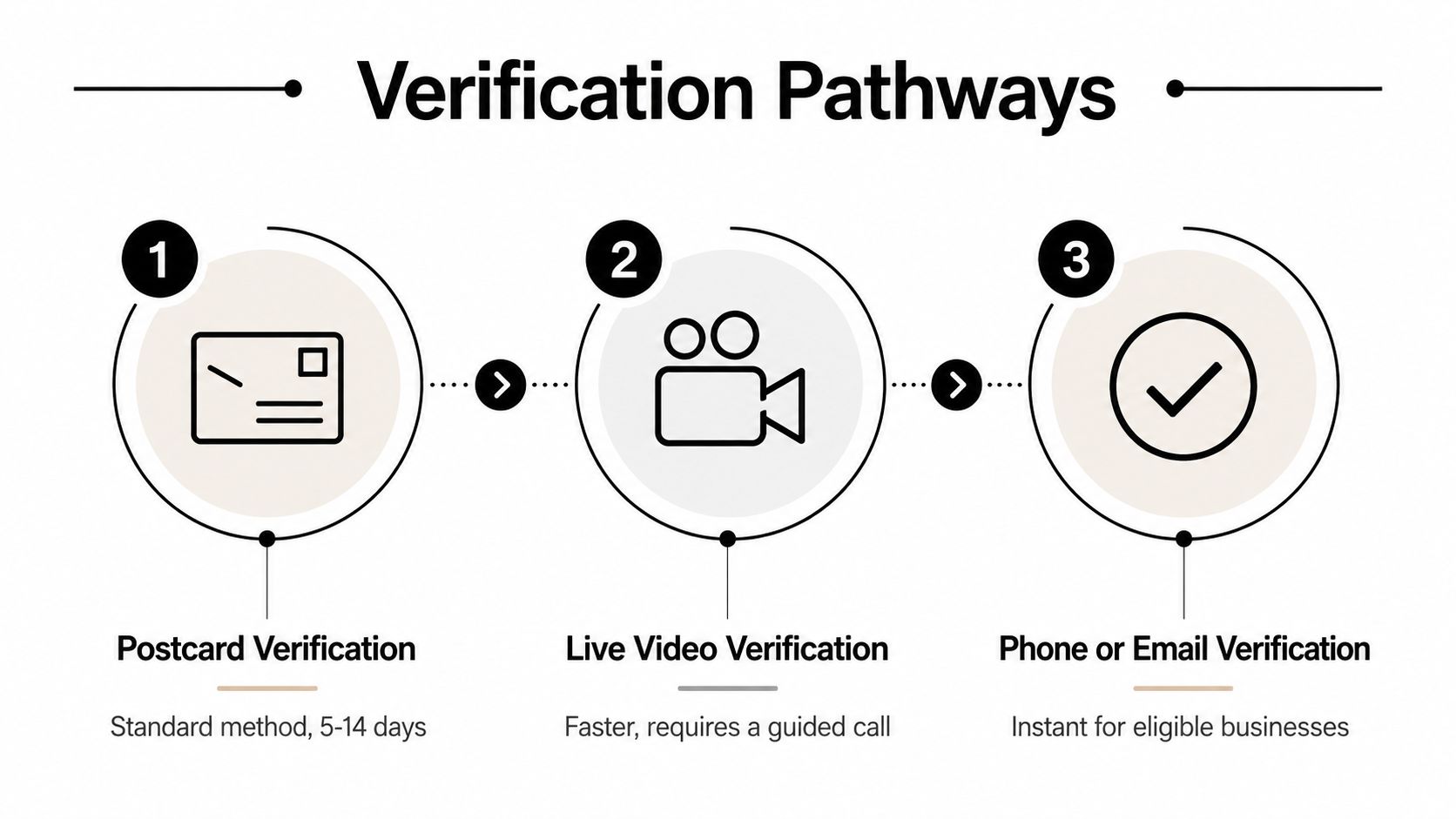
Google's available verification methods can include postcard by mail, phone or SMS, email for select businesses, video recording, and live video call (Apptoto's Google Business Profile guide). Google also says postcard verification typically takes 5 to 14 days, while phone or SMS can be instant and video submissions may take a few days (Apptoto's Google Business Profile guide). If the business has an eligible phone or SMS option, that is usually the fastest path, especially for contractors who want the listing live before the next call comes in.
For a Naples law firm, phone or email verification is the least painful when available. For a service-area plumbing company, a postcard may still be the only option, which means the address and signage have to be clean before the code request goes out. If the mailbox label is sloppy or the address is inconsistent, the verification mail has nowhere reliable to land.
Make the verification request easy to approve
The mistakes that stall approval are usually boring ones. The address does not match the signage. The business name on the profile does not match the business's actual branding. The service-area setup skips the geographic anchor and leaves Google guessing.
A Fort Myers HVAC company should make sure the location on the request is the same one customers would find on a bill, a van, and the front door. If only postcard verification is offered, do not rush the request before the address is stable. A few extra minutes of cleanup beats waiting on a code that never lands.
Keep the profile boring during verification. Matching names, matching addresses, and a real location beat clever wording every time.
The process goes faster when the documentation is already aligned. That means the owner account is ready, the business name is settled, the contact details are consistent, and the person handling the profile can respond immediately if Google asks for a live video or additional proof. A verified profile is easier to get through when every field points to the same business and the same operating details.
Optimizing Every Profile Field for Local Search
A verified profile still is not finished. It is open for business, and the fields inside it decide whether a Fort Myers cleaning company or an Estero roofing contractor turns that listing into calls, direction requests, and booked work. For Southwest Florida service-area businesses, the profile has to do more than sit in Maps. It has to help someone choose you fast when they are on a phone and ready to act.
Fill the fields that actually help customers choose you
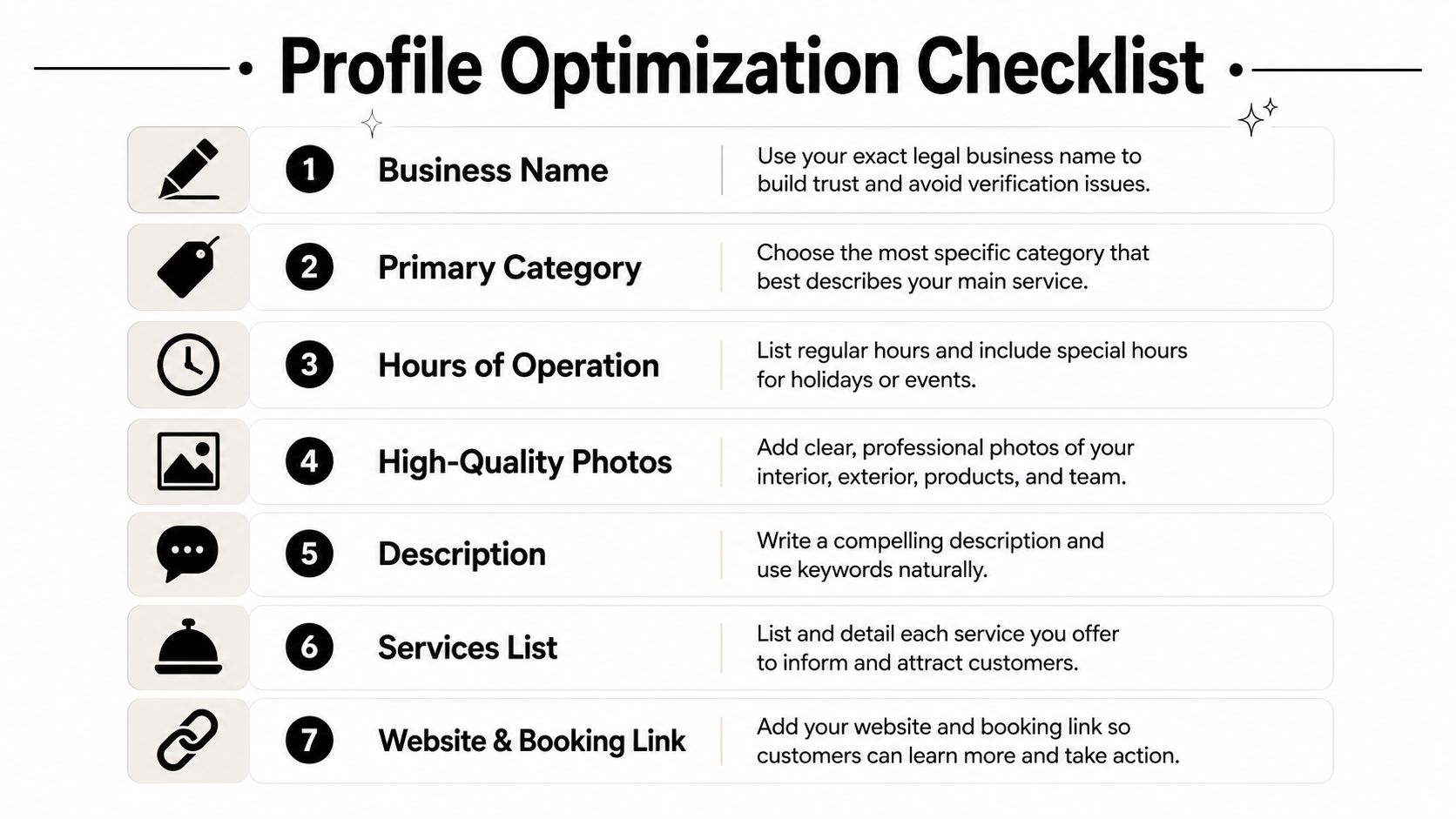
Start with the name, category, hours, website, services, and description. Those are the fields people inspect first in Maps and Search, and they shape whether the profile feels complete or half-built. A blank description or a recycled website paragraph does not help anyone, and it usually reads like filler.
- Business Name: keep it real and consistent with the legal and public-facing identity.
- Primary Category: choose the most specific fit for the core service.
- Hours of Operation: include special hours so customers are not left guessing on holidays.
- Photos: show the exterior, interior, team, and actual work.
- Description: write plain language that names the services without stuffing keywords.
- Services List: spell out what you really sell, not just one generic line.
- Website and Booking Link: send people to the page that closes the lead, not a generic homepage if a service page is better.
A Fort Myers cleaning company can list residential cleaning and commercial cleaning as separate services if both are real offers. An Estero roofing contractor can name the service-area towns in the service section without pretending the company has storefronts in each one. A healthcare provider can add accessibility details and telehealth-relevant attributes when they apply, because those signals matter to the right customer.
Use a structured field checklist like this Google My Business optimization checklist after the profile is live. It helps keep the setup consistent without turning the listing into keyword soup.
Write the description like a service page, not a brochure
The description works best when it tells people what you do, where you work, and what kind of jobs you handle. Do not copy the website's About page, and do not pad it with repeated city names. Use natural language that sounds like a real person explaining the business to a homeowner.
A Naples law firm should say what practice areas it handles and who it serves. A Cape Coral cleaning company should say whether it handles homes, rentals, offices, or post-construction cleanup. Keep it concise, direct, and honest.
The profile should answer the questions a buyer already has. Will this company take the job, serve the area, and show up looking organized? If the answer is clear from the description, the category, and the service list, the profile has a better shot at converting a searcher into a call.
Photos, Posts, and Engagement Signals That Move the Needle
A verified profile with decent field completion is only the starting point. The profiles that keep winning in the Fort Myers map pack are the ones that look alive. That means fresh photos, sensible posts, and fast responses when customers reach out.
Show the business the way customers expect to see it
Photos should answer the unspoken questions. Does the place look legitimate? Do the crew members show up in branded gear? Does the work look clean? A one-person cleaning company can do a lot with a few strong images, while a multi-truck HVAC operation can show larger crew coverage, equipment, and before-and-after shots.
A useful photo set usually includes exterior shots, interior shots if customers visit, team photos, finished work, and work-in-progress images. The point is trust, not decoration. If someone is comparing three service businesses on a phone, real images help one listing feel more credible than another.
For practical photo ideas, the Virtual Tour Easy photo strategy is a helpful reference for thinking through image variety and presentation.
Use Posts and Q&A like a light-touch sales tool
Posts work best when they sound like updates, not ads. A seasonal AC tune-up offer, a holiday closure notice, or a reminder that the company still takes emergency calls can all help a profile feel current. Q&A should be seeded with the questions customers ask over and over, then monitored so the answers stay accurate.
Practical rule: publish enough to look active, not so much that the profile reads like a flyer rack.
A one-person cleaning company doesn't need daily posting to stay relevant. A multi-truck HVAC company can support a stronger posting rhythm because it has more trucks, more jobs, and more content to show. Either way, the business should respond to messages and questions quickly enough that the profile feels managed by humans, not left on autopilot.
Reviews, Insights, and Measuring Real Performance
A Google Business Profile is not finished work after setup. In Fort Myers, I see the same pattern over and over. The contractors who treat it like a conversion asset get more calls, more direction requests, and better follow-up. The ones who treat it like a directory listing usually end up guessing which lead source is doing anything.
Reviews are where that becomes obvious. They are public trust signals, but they are also a workflow. The businesses that do well do not just hope for reviews, they ask for them in a clean, repeatable way and respond with a steady hand when the feedback is not flattering.
Treat reviews like front-desk work, not a side project
Ask for reviews after a completed job, after a resolved issue, or after a customer compliments the team. Do not pressure people, and do not offer anything sketchy in return. A seasonal Southwest Florida business may see review spikes during tourist months, which means the owner needs a consistent process so momentum does not fall off when the season slows down.
A strong response strategy matters too. Thank the positive reviews, answer the negative ones without getting defensive, and ignore bait when a review is obviously fake or off-topic until it can be handled properly through the platform. Reputation work is part customer service, part local SEO, and part proof that the company pays attention after the invoice is sent. The reputation management insights on reviews are worth reading alongside your own tracking if you want to understand why a steady review flow helps a profile earn trust.
Read Insights like a business owner, not a marketer
Google's Performance area shows what people did after they found the profile, including searches, views, calls, directions, website clicks, and messages. Not every metric carries the same weight. Calls and directions usually matter more than vanity views because they sit closer to revenue, especially for service-area businesses in Southwest Florida that need phone calls and route requests, not casual walk-ins.
| GBP Metric | What It Measures | Local Business Action | Example for a Fort Myers HVAC Company |
|---|---|---|---|
| Calls | People tapping to phone the business | Staff the line during business hours | Answer more live calls during heat-wave days |
| Direction Requests | People asking for directions to the location | Check address accuracy and signage | Make sure the office address is easy to reach |
| Website Clicks | People choosing to learn more online | Improve the landing page and booking flow | Send traffic to the AC repair page |
| Messages | People asking questions directly | Reply faster and set expectations | Route urgent repair questions to dispatch |
For contractors, the table is more useful than a raw dashboard screenshot. If calls are coming in but directions are weak, the profile may be good at creating interest but weak at pushing people toward the shop or office. If direction requests are strong and calls are thin, the listing may be helping people find the place without giving them a good reason to pick up the phone.
A Fort Myers legal practice can use the same dashboard to see whether one practice area is pulling more local demand than another. That is the value of the profile. It is not just showing up, it is showing up with enough data to make a better call on service focus, staffing, and follow-up.
Troubleshooting, Maintenance, and FAQ for Long-Term Success
The messy problems usually show up after launch. A business moves. A manager leaves. A duplicate listing appears from a directory crawl. Hours drift out of date and customers get irritated. None of that means the profile is ruined forever, it means somebody stopped keeping it current.
For service businesses in Fort Myers and the rest of Southwest Florida, that lapse shows up fast. A profile that should be driving calls and route requests starts sending people to the wrong number, the wrong office, or a stale service area. Once that happens, the listing stops acting like a conversion asset and starts acting like a liability.
Keep a simple maintenance rhythm
Suspensions, ownership transfers, duplicate profiles, and address changes should be handled fast, not ignored until they turn into a bigger headache. A front-desk manager can keep the listing in shape with a short recurring checklist.
- Check hours weekly: especially before holidays and storm season.
- Review new photos monthly: remove stale images and add fresh work.
- Watch for duplicate listings: especially after a move or a rebrand.
- Confirm contact details: the phone number and website should still be right.
- Respond to reviews and questions: don't let the profile look abandoned.
If a service-area business wants to hide its address, that works best when the setup matches a real service model instead of a fake office just to satisfy the form. If a competitor leaves fake reviews, document them, flag them, and keep your own review process moving. If a business changes ownership, transfer control cleanly instead of letting the profile sit in the old owner's hands.
Storm season creates its own problems. Hours can change without warning, crews may be tied up longer than usual, and emergency calls spike while office coverage gets thinner. Update the profile hours as soon as the schedule changes, then check the call routing and messaging settings so customers are not left hanging.
FAQ
How often should I update my GBP hours during storm season? Update them any time your office schedule changes, your team is closing early, or you are running limited hours. In Southwest Florida, that usually means checking the profile more often than a normal week, because weather disruptions hit service businesses hard and outdated hours create missed calls.
Can a service-area business hide its address? Yes, if the setup reflects a legitimate service-area model and the profile still has the geographic anchor Google needs for local discovery.
What if a competitor leaves fake reviews? Don't panic and don't argue in public. Flag the review, keep records, and keep generating real customer feedback.
What if a duplicate profile appears? Claim the correct listing, document the duplicate, and clean up the source of confusion before it spreads across maps and directories.
If the profile keeps breaking in the same way, the problem is usually not Google. It is bad setup, sloppy ownership control, or nobody assigned to maintain it. For contractors and local service firms, that is the difference between a profile that keeps bringing in calls and one that slowly goes stale.