
If you’re a contractor, you need a predictable flow of leads. It's the lifeblood of your business. While Google is great for grabbing homeowners who are actively searching, Facebook Ads let you reach them months before they even type a single keyword. This is how trades like roofing, HVAC, and paving can get ahead of the competition, showcasing their work visually and locking in new customers—often at a much lower cost.
Why Facebook Ads Are a Goldmine for Contractors
Many contractors dismiss Facebook as a place for family photos, but they're missing out on one of the most powerful lead-generation machines available today. Google Ads are fantastic for capturing demand, but you’re only reaching a fraction of your market. Facebook lets you get in front of the other 95% of homeowners in your service area who will need your help eventually but aren't actively looking for it right now.
Think of it this way: Google is like fishing in a small, crowded pond where everyone is casting for the same handful of fish. Facebook gives you access to the entire ocean. You can introduce your brand, show off your quality work, and plant a seed in a homeowner’s mind long before their AC gives out or their roof starts to leak. This is proactive marketing, not reactive.
The Real-World Cost Advantage
For contractors, every marketing dollar has to pull its weight. This is where Facebook Ads truly shine. You can build powerful brand awareness and bring in qualified leads without the sky-high costs that often come with Google Ads, especially in competitive markets.
For example, a roofer can run a simple before-and-after video of a roof they just replaced. A homeowner scrolling their feed in that same neighborhood sees it. They might not need a new roof today, but your company is now top-of-mind. When they notice a few loose shingles a month later, you're the first name they remember.
To put this in perspective, here's a quick breakdown of how the two platforms stack up for contractors, based on real-world campaign data.
Quick Look: Facebook Ads vs Google Ads for Contractors (2026 Estimates)
| Metric | Facebook Ads | Google Ads |
|---|---|---|
| Avg. Cost Per Lead (CPL) | $15 – $50 | $50 – $200+ |
| Lead Intent | Lower (Passive Browsing) | Higher (Active Searching) |
| Primary Goal | Demand Generation & Branding | Lead Capture |
| Targeting | Demographic, Interest, Behavior | Keyword-Based |
| Best For | Visual Trades (Roofing, Paving) | Emergency Services (Plumbing, HVAC) |
The numbers don't lie. Based on our experience managing over $2.3 million in ad spend, we've found that contractors can generate leads on Facebook for 3-5 times less than on Google. That cost difference is a game-changer, allowing you to build a much more robust and predictable sales pipeline for the same budget.
Building Your Brand and Generating Demand
Facebook is a visual platform, which is perfect for contractors. You can tell a powerful story with images and videos that simple text ads just can't match.
- Showcase Your Workmanship: Use high-quality photos and videos of your completed projects. An actionable example is a carousel ad showing three images: the old, cracked driveway; your crew pouring new asphalt; and the final, smooth blacktop with the happy homeowner's car on it.
- Build Trust with Social Proof: Feature video testimonials from happy clients. An actionable example is to film a 30-second clip of a customer, "The Millers," standing in their new kitchen, saying, "We couldn't be happier with the remodel. The team was professional, clean, and finished on schedule."
- Establish Yourself as the Expert: Share quick tips or how-to videos. An actionable example is for a plumber to film a one-minute vertical video explaining how to prevent frozen pipes by wrapping outdoor spigots, positioning them as a helpful authority.
Before you dive deep into a paid strategy, it’s always a good idea to increase your Facebook organic reach, since a strong organic presence will only make your ads perform better. Ultimately, Facebook ads aren't just about finding the next job; they're about building a brand that homeowners in your community know, trust, and call first.
Building Your Audience of Ideal Homeowners
Successful Facebook ads for contractors start long before you write a single line of ad copy. The entire foundation rests on your audience—the specific group of people you want your ads served to. When you get this right, your ad spend works smarter, reaching homeowners who are genuinely likely to book a job instead of being wasted on renters or people living miles outside your service area.
The real power of Facebook isn't just about showing ads to people in your city. It's about the ability to layer demographics, behaviors, and interests to build a laser-focused profile of your ideal customer. This is how you find the exact homeowners who need what you offer, even if they don't know it yet.
Going Beyond Basic Location Targeting
Simply targeting your entire city or county just isn't good enough anymore. You have to get granular. Facebook Ads Manager lets you target specific zip codes, a radius around a central point, or even drop pins on the exact neighborhoods you want to work in. For a local contractor, this is incredibly powerful.
For an actionable example, a roofing company knows that neighborhoods with homes built 20-30 years ago are goldmines for roof replacement jobs. Instead of blowing their budget on the whole city, they can concentrate their ad spend exclusively on the zip codes dominated by these older homes, like "34109" and "34110" in Naples, FL.
Pro Tip: Don't just target where your customers are; target where you want them to be. If you're trying to break into a more affluent suburb, focus your ad dollars there. Use Facebook’s mapping tool to literally draw a boundary around that specific, high-value area.
Layering Demographics, Interests, and Behaviors
Once you've locked in your location, it's time to flesh out your ideal customer profile. Take a minute to think about your best past clients. What do they have in common? Facebook’s detailed targeting options let you find more people just like them.
- Demographics: Start with the non-negotiables. You can select an age range (e.g., 35-65+) and, most importantly, filter for Homeowners. This one filter immediately weeds out renters, which dramatically improves the relevance of your ads.
- Interests: What do people who are in the market for home services also like? You can target broad interests like Home improvement or HGTV, and even specific brands like The Home Depot or Lowe's.
- Behaviors: This is where the targeting gets really intelligent. You can target users based on powerful behaviors like "Likely to Move"—an absolute must for painters, cleaners, or flooring contractors. You can also target by estimated household income, which helps you focus on clients who can actually afford high-ticket services like a full kitchen remodel.
For an actionable example, an HVAC contractor could build a killer audience of homeowners aged 40-65 in specific affluent zip codes who have also shown an interest in "energy efficiency." This pinpoints people who not only own their home but are also thinking about the long-term savings of a new, high-efficiency AC unit.
Unlocking a Goldmine with Custom and Lookalike Audiences
This is the stuff that takes a Facebook ad campaign from good to truly great. Instead of just telling Facebook who you think your customers are, you can show them.
Custom Audiences are built from your own data. For example, you can upload an Excel sheet of your past 1,000 customers—their names, emails, and phone numbers. Facebook then matches this information to user profiles, allowing you to run a "Refer a Friend" ad directly to them.
Lookalike Audiences take this a massive step further. After you upload your customer list to create that Custom Audience, you can ask Facebook to build a "Lookalike." The algorithm analyzes thousands of data points tied to your best customers, and then it finds new people on the platform who share those same characteristics. It's like having a digital bloodhound sniff out your next best clients for you.
The process is surprisingly straightforward:
- Export a clean list of at least 100 of your past customers (including name, email, and phone number) from your CRM.
- In Ads Manager, create a 1% Lookalike Audience based on that list, targeting your primary service area (e.g., "Lee County, Florida").
- Run your best lead-gen ads to this brand new, high-potential audience.
This single strategy consistently delivers a lower cost-per-lead because you’re putting Facebook's powerful machine learning to work finding prospects for you.
As competition gets tougher, knowing your numbers is key. Industry data suggests that home services can expect a cost-per-click of around $2.45 in 2026, and lead generation campaigns are outperforming other objectives with a click-through rate over 60% higher. This makes a well-targeted audience even more critical to keeping your costs down and ROI high. You can find more insights on 2026 contractor ad benchmarks to see how your campaigns measure up. Building these precise audiences ensures your ads are part of that high-performing group, not the ones wasting money.
Creating Ads That Stop the Scroll and Start Conversations
Think about how people use Facebook. They're scrolling fast. Your ad has maybe two seconds—if you're lucky—to make a homeowner stop and pay attention. Generic stock photos and corporate jargon won't cut it. They just blend in. To run successful facebook ads for contractors, your creative has to be authentic, relatable, and impossible to ignore.
The good news is you don’t need a Hollywood production budget. It's all about using the powerful assets you already have to build instant trust. We’ve found that the best-performing ads feel real because they show your actual work and solve real homeowner problems.
Your Best Ad Creatives Are Already in Your Pocket
Your most powerful tool for creating ad visuals isn't a fancy camera—it's the smartphone in your pocket. Homeowners want to hire a local expert they can trust, not a slick, faceless corporation. It’s time to ditch the stock photos and start capturing what you do best.
These simple, high-impact visuals build immediate credibility and work wonders:
- Before-and-After Photos: This is the gold standard. For a roofer, it’s a side-by-side image of a moss-covered roof next to the clean, new architectural shingle roof you installed. It’s undeniable proof of your value.
- Short Job Site Videos: Actionable example: film a quick 15-second time-lapse of your crew laying pavers or a satisfying video of a painter's perfect cut-in line. This raw footage is compelling. It shows off your team's skill and professionalism without feeling like a staged commercial.
- The Owner "Tip" Video: This is a huge trust-builder. Pull out your phone, stand in front of your truck, and record a 30-second video of yourself. For example: "Hey, I'm John from John's HVAC. Did you know a clogged filter can increase your energy bill by 15%? Here's how to change it in 30 seconds." You instantly become the helpful authority.
These authentic assets work because they provide immediate social proof. A potential customer sees real work being done for real people in their own community. That's far more convincing than any polished, impersonal ad.
Writing Ad Copy That Speaks Directly to Homeowners
Your ad copy needs to connect with a homeowner’s frustration and immediately offer your service as the clear solution. Forget the technical terms. Nobody is searching for "EIFS remediation"—they're just worried about the ugly cracks in their stucco.
Frame your copy around their problem. Start with a question they're already asking themselves.
HVAC Contractor Example:
- Pain Point: "Is your AC struggling to keep up with this heat?"
- Solution: "Don't sweat through another Florida summer. We offer same-day diagnostics and transparent repair quotes so you know exactly what to expect."
- Call to Action: "Get a Free Second Opinion Today!"
Paving Contractor Example:
- Pain Point: "Tired of looking at that cracked, uneven driveway?"
- Solution: "Transform your home's curb appeal in as little as one day with a brand-new asphalt or paver driveway."
- Call to Action: "Click for a Free Paving Estimate."
This simple "Problem -> Solution -> Offer" approach just works. It shows you understand their frustration, presents your business as the obvious answer, and gives them an easy, low-risk next step. For a deeper dive into building out your campaigns, exploring the best practices for Facebook ads provides a solid foundation.
Contractor Ad Creative Do's and Don'ts
Knowing what to avoid is just as important as knowing what to do. Keep this simple checklist handy to make sure your ads always look professional and hit the mark.
| Do | Don't |
|---|---|
| Use bright, clear images and videos. | Use blurry, dark, or pixelated photos. |
| Show your actual team and your trucks. | Rely exclusively on generic stock images. |
| Focus on a single, compelling offer. | Overwhelm people with multiple messages. |
| Use a strong, clear call to action (CTA). | Use a weak or vague CTA like "Learn More." |
| Speak in your customer's language. | Use industry jargon and technical terms. |
By sticking to these simple rules, you can create facebook ads for contractors that do more than just stop the scroll—they start valuable conversations. Your ads will stand out because they feel genuine, building the trust you need to turn a casual scroller into your next paying job.
Setting a Budget That Delivers Real ROI
It's the first question every contractor asks, and for good reason: "How much should I actually spend on Facebook Ads?" Throwing money at the platform without a plan is a quick way to get frustrated. But when you treat your ad budget like a strategic investment, it can generate a predictable, powerful return.
A common pitfall is starting too small to get any real data or, just as bad, spending too much without a clear goal. For most contractors just getting their feet wet with Facebook ads, a daily budget between $25 to $50 is the sweet spot. This is just enough to let Facebook's algorithm start figuring out who your ideal customers are without breaking the bank.
Think of this initial spend as your testing ground. You're gathering crucial intel on which ads and audiences are actually connecting with homeowners in your service area. Once you nail down a winning combination that’s bringing in leads at a price you like, you can confidently start scaling up your budget.
Choosing Your Bidding Strategy
Facebook gives you a few ways to control how your budget is spent, but for contractors, it really boils down to two main options. Understanding the difference is key to keeping your lead costs in check.
- Lowest Cost (or Highest Volume): This is the default setting. You’re essentially telling Facebook, "Get me the most leads you can for my budget." It's a great way to maximize the number of leads coming in, but you might see your cost per lead bounce around a bit.
- Cost Cap (or Cost Per Result Goal): Here, you get more control. You tell Facebook the maximum average cost you’re willing to pay for a lead. This helps stabilize your Cost Per Lead (CPL), but be careful—if you set your cap too low compared to your competition, it could limit how many people see your ads.
For an actionable example, a paving contractor just starting out might run "Lowest Cost" for two weeks to see where their CPL lands. If leads are coming in at an average of $35 each, they could then switch to a "Cost Cap" strategy and set the cap at $40. This locks in their profitable lead cost while giving the algorithm enough breathing room to compete effectively in the ad auction.
Connecting Ad Spend to Your Business Goals
This is the most important part. Your budget for facebook ads for contractors can't be just a number you pull out of thin air. It has to be a calculated investment tied directly to what a new job is actually worth to your business.
Let's walk through a simple, real-world calculation.
Say you’re a remodeler, and the average kitchen project brings in $25,000 in revenue. From your own business data, you know you close one out of every ten qualified leads you meet with for an estimate. That’s a 10% lead-to-close rate.
The math is straightforward: To land one new $25,000 job, you need ten qualified leads. This means every single lead that comes in is potentially worth $2,500 to your business ($25,000 / 10 leads).
With that in mind, how much can you really afford to pay for a lead and still be wildly profitable? Even if you paid $100 per lead, your total cost to acquire that $25,000 job would only be $1,000 (10 leads x $100/lead). That's a phenomenal 25x return on investment.
Industry data shows that for home improvement contractors, the average CPL on Facebook is climbing. One analysis noted a CPL around $41.26, which was a big jump from the year before. But with a solid conversion rate of 5.22%, it's still a very strong channel. This context just proves that while costs might be rising, a smart budget strategy is what separates the winners from everyone else. For a more comprehensive look at managing ad spend across different platforms, our guide on PPC management for small business offers additional valuable insights.
Turning Clicks into Paying Jobs
Getting the click is the easy part. What happens in the moments after a homeowner clicks your ad is where your marketing dollars are either won or lost. A click is just potential—it's not a lead, and it's certainly not a paying job.
The single biggest mistake we see contractors make is running a great ad that dumps interested homeowners onto their generic website homepage. It's a jarring experience that kills momentum. You have to create a seamless handoff from the ad to a focused lead capture experience. The ultimate goal here isn't just clicks; it's turning those clicks into scheduled appointments, and learning how to create video content that converts is part of that equation. But even the best ad needs a solid follow-through.
Crafting a High-Converting Landing Page
Instead of your homepage, every ad campaign needs its own dedicated landing page. Think of it as a specialized tool built for one job and one job only: turning an interested visitor into a qualified lead.
A great landing page is clean, simple, and picks up the conversation right where the ad left off. It’s not about overwhelming them with your company’s entire history; it’s about making it dead simple for them to take the next step.
Your landing page absolutely must have these elements:
- A Matching Headline: If your ad says, “Get a Free Roofing Estimate,” your landing page headline must say the exact same thing: "Get Your Free, No-Obligation Roofing Estimate." This consistency builds trust instantly.
- Visual Social Proof: Show them they’re making a good choice. Include photos of your team on the job, powerful before-and-after shots, and real customer reviews or video testimonials. For example, place a quote from a happy client with their photo right below the headline: "They replaced our roof in one day. Fantastic crew!" – Jane D., Fort Myers.
- A Short, Simple Form: Don't ask for their life story. All you need is a name, phone number, and email. Maybe add a small text box for "Project Details." Every extra field you add will lower your conversion rate.
- A Clear Call-to-Action (CTA): Your form submission button needs to be impossible to miss. Use action-focused text like "Request My Free Estimate Now" or "Get My Quote."
A well-designed landing page has no distractions. No navigation menu, no links to other pages. Its sole purpose is to capture the lead. This focused approach can dramatically boost the number of leads you get from the same ad spend.
We cover this critical topic in much more detail in our guide on how to improve website conversion rates.
Tracking Results with the Meta Pixel and Conversions API
If you want to run effective Facebook ads for contractors, you have to measure what's working. Flying blind is the fastest way to waste money. This is where the Meta Pixel and Conversions API come in. They are your campaign’s essential tracking system.
The Meta Pixel is a snippet of code you install on your website. It acts as a scout, reporting back to Facebook when someone visits your landing page or, more importantly, fills out your lead form. The Conversions API is its partner, sending data directly from your server to Facebook, which makes tracking even more accurate and reliable.
Setting these up is non-negotiable. Without them, you have no way of knowing which ads are driving actual leads and which are just burning through your budget.
Once they're installed, you must define your key conversion events. For a contractor, the most important event is almost always a 'Lead'. This tells Facebook's algorithm that a successful conversion happens when a user lands on the "Thank You" page right after submitting your form. This data is what makes your campaigns smarter over time, as Facebook learns who your best customers are and finds more people just like them.
The Pro-Level Move: Offline Conversions
Ready for a technique that separates the beginners from the pros? It's called Offline Conversions. This is the feedback loop that tells Facebook not just who became a lead, but who became a paying customer.
This is how your ad spend turns into real, measurable profit.
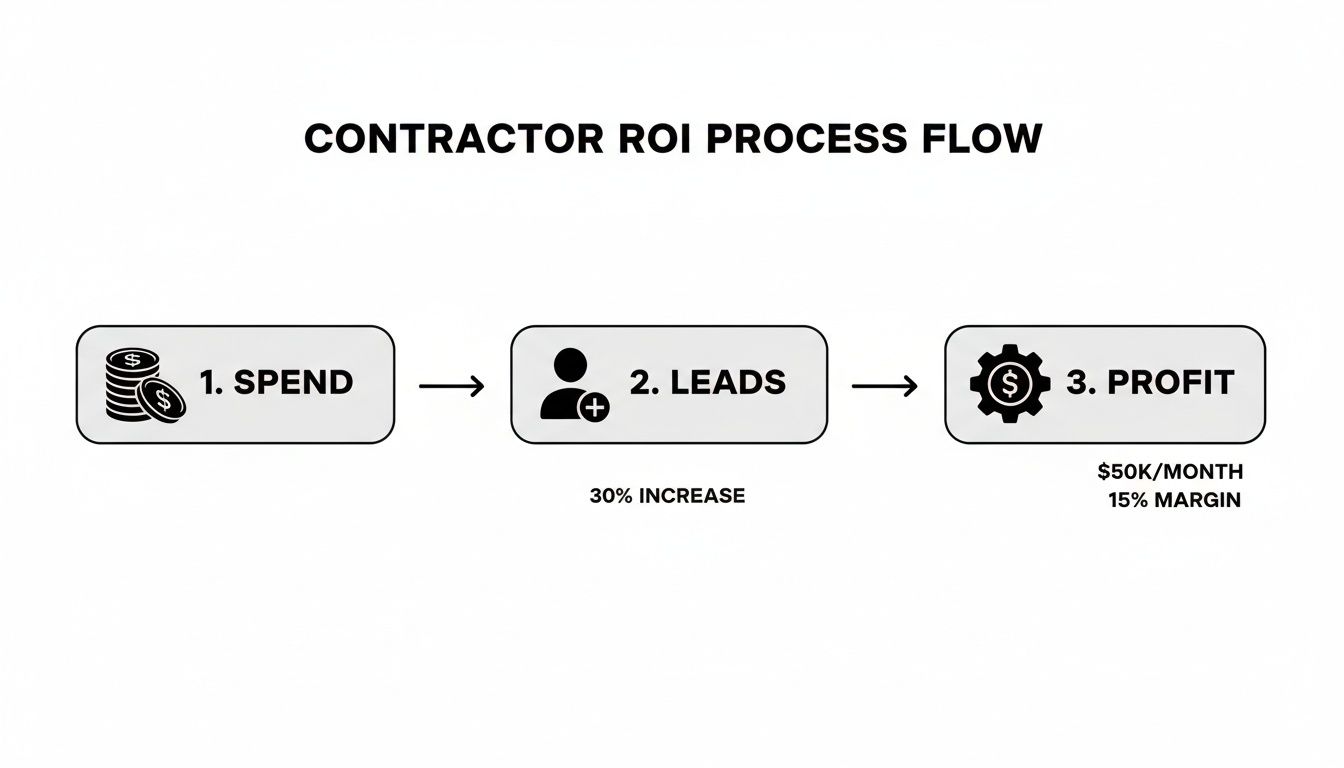
This process visualizes how a well-optimized system connects ad spend directly to business growth, turning your marketing into a predictable engine for profit.
Here’s an actionable example: At the end of each month, you export a list of all new customers who signed a contract. You create a simple CSV file with their first name, last name, email, phone number, and the value of their job (e.g., "$15,000"). You upload this "Offline Event Set" into Facebook Ads Manager.
This simple action is incredibly powerful. It teaches the algorithm what a high-quality lead actually looks like in the real world—one that turns into a signed contract. As a result, Facebook stops optimizing for cheap leads and starts optimizing for lead quality. It's the single best way to make sure your ad budget is working to find your next best job.
Common Questions from Contractors About Facebook Ads
If you're a contractor, you're rightfully careful about where you put your marketing dollars. When it comes to Facebook ads, we’ve heard all the tough questions from contractors over the years. You're not just curious—you need to know that your investment will actually bring in jobs, not just clicks.
Let's dive into the most common concerns we hear and give you the straight answers you need.
Will I Just Get a Bunch of Bad Leads?
This is always the first question, and for good reason. Nothing is more frustrating than a phone full of leads from tire-kickers and price-shoppers. The honest answer is that the quality of your leads comes down to the quality of your campaign strategy—your targeting, your offer, and your ad itself.
A weak, generic ad will absolutely attract weak, generic leads. But you can filter out the wrong people before they even click.
- Be Specific and Upfront in Your Ad: Don't just say, "Kitchen Remodels." Instead, try "Custom kitchen remodels for Fort Myers homeowners, starting at $25,000." This simple line pre-qualifies your audience and sets a clear budget expectation.
- Ask a Qualifying Question: Your Facebook Lead Form is a powerful tool. Add a custom multiple-choice question like, "What is your approximate budget for this project?" with options like "$5k-$10k," "$10k-$20k," and "$20k+." Someone who selects a higher tier is a more serious prospect.
- Let Your Work Do the Talking: Your ad creative is your best filter. If you want high-end jobs, showcase your most impressive, complex projects. An actionable example is to run a video ad that walks through a luxury bathroom remodel, highlighting the double vanity, freestanding tub, and custom tile work. This will attract clients who can afford that level of craftsmanship.
How Much Do I Really Need to Spend to See Results?
There's no single magic number, but a budget of $5-$10 per day is throwing money away. It's simply not enough data for Facebook's algorithm to learn who your ideal customer is, and you'll never reach enough people to get meaningful traction.
For a serious effort, plan on starting with $25 to $50 per day.
Think of your first month's budget as an investment in data, not just leads. At this level, you give the platform enough runway to test your ads, identify the homeowners who are responding, and learn what drives conversions. It's about finding the pattern that leads to profitable jobs.
For instance, a roofer spending $30/day (which is $900/month) might generate 20 leads at an average cost of $45 each. If they close just one of those leads into a $15,000 roof replacement, the entire campaign was a massive win, generating a 16x return. You have to spend enough to give yourself a shot at landing that one job.
Can I Just Boost Posts from My Page?
Boosting a post is incredibly easy, and that's precisely why it's a trap for serious lead generation. The "Boost Post" button is Facebook's simplified tool, designed for engagement—likes, shares, and comments. It strips away all the powerful targeting and optimization controls that are available in the full Ads Manager.
When you boost a post, you're paying for popularity. When you run a real campaign through Ads Manager, you're paying for conversions.
Here’s a practical example:
Let's say you're an HVAC contractor and you post a great video of a new system installation.
- Boosting it will show it to a broad, vague audience like "people aged 25-65 in your city." You'll get some likes and views, but almost no one will call you for a quote.
- Using Ads Manager, you can build a Lead Generation campaign with that same video. You can target homeowners aged 40+, who live in homes built before 2000, and whose income is in the top 25% of their zip code. You then tell Facebook to optimize for "Leads." This focuses every dollar on reaching people most likely to actually need a new AC unit, not just people who think your video is neat.
How Do I Know if It’s Actually Working?
Success isn't measured in leads; it's measured in profitable jobs. To know if your ads are truly working, you have to connect your ad spend to your final sales numbers and track your return on ad spend (ROAS).
First, get clear on your key performance indicators (KPIs). For contractors, it boils down to three things:
- Cost Per Lead (CPL): Total Ad Spend ÷ Number of Leads
- Cost Per Acquisition (CPA): Total Ad Spend ÷ Number of New Jobs Booked
- Return on Ad Spend (ROAS): Total Revenue from Ad-Generated Jobs ÷ Total Ad Spend
Let's see it in action:
A paving contractor spends $1,500 on Facebook ads in a single month.
- The campaign brings in 30 leads. Their CPL is $50.
- Out of those 30 leads, their team books 3 new driveway jobs. Their CPA is $500.
- Those 3 jobs bring in a total of $24,000 in revenue. This means their ROAS is 16x ($24,000 ÷ $1,500).
With this simple math, the contractor knows for a fact that every dollar they put into Facebook turned into $16 back. You can't get that kind of clarity by just counting form submissions. You have to follow the money from the ad all the way to the bank.
At Polaris Marketing Solutions, we help contractors in Fort Myers and Southwest Florida answer these questions with real data every day. Our team builds customized strategies that focus on generating a clear, measurable return on your investment. If you're ready to stop guessing and start growing, request your complimentary online analysis and competitor report today.