
You're probably weighing the same question many Southwest Florida owners ask when operations start feeling patched together. The phones ring, office staff juggle scheduling, technicians text updates from the field, and customers still call back asking when someone will arrive. At that point, “we need an app” sounds appealing, but the main issue is whether an app will fix a business bottleneck or just add another expense.
That question matters more in Florida than many generic guides admit. A Fort Myers contractor, Naples clinic, or Cape Coral service company isn't operating in a vacuum. You're dealing with seasonal swings, mobile-first customers, uneven connectivity in some areas, and in some industries, state-specific privacy or licensing requirements that can slow a launch if nobody plans for them early.
Florida is also a serious development market. The broader U.S. app economy has generated approximately 466,000 jobs since 2007 and contributes an estimated $20 billion in annual revenue nationally, while Florida continues to attract firms because of its business-friendly environment, skilled workforce, and lower tax burden, according to Florida Trend's look at the state's app economy. That's good news for local businesses. You have options. The harder part is choosing the right app, the right build approach, and the right team.
Is an App Right for Your Florida Business
A roofing contractor in Cape Coral usually doesn't wake up wanting a mobile app. They want fewer missed appointments, fewer dispatch mistakes, and faster approvals from homeowners. The app only matters if it solves those problems.

A healthcare practice in Naples faces a different version of the same issue. Front desk staff answer the same questions all day, intake forms move too slowly, and patients expect a smoother digital experience than phone tag and clipboards. In both cases, the business owner isn't buying software for status. They're buying fewer delays and a cleaner customer journey.
Problems an app can actually solve
The strongest app projects usually start with one operational pain point, not a wish list. Common examples include:
- Booking friction: A boat tour company in Naples may need customers to reserve spots without calling during business hours.
- Dispatch confusion: An HVAC company in Fort Myers may need technicians, office staff, and customers looking at the same schedule.
- Slow field communication: A paving or cleaning crew may need photo uploads, checklist completion, and signed approvals from the job site.
- Repeat customer retention: A legal, medical, or professional service firm may want secure reminders, document access, or follow-up workflows.
If your team is still mostly solving one of those issues through calls, texts, spreadsheets, and scattered notes, an app may be justified.
Signs you should wait
Not every business needs a native mobile app first. In practice, owners should slow down when they're in one of these situations:
- Your process is still changing weekly: If nobody can describe the workflow clearly, coding it now will lock in confusion.
- Your customers don't need frequent repeat use: A one-time service may benefit more from a better website, scheduling system, or web portal.
- You can't define success in operational terms: “We want something modern” isn't enough. “We want fewer scheduling callbacks” is.
Practical rule: Build an app when it removes recurring friction for customers or staff. Don't build one just because competitors have one.
A quick decision filter
Ask three questions before you move forward with app development in Florida:
| Question | If the answer is yes | If the answer is no |
|---|---|---|
| Do customers or staff repeat the same actions often? | An app may improve speed and consistency | A website or portal may be enough |
| Does mobile use happen in the field? | Mobile workflows are likely worth building | Desktop-first tools may fit better |
| Can you name the business problem in one sentence? | You're ready for discovery | You need process mapping first |
An app is right when the ROI is operational before it's promotional. If it shortens response time, reduces admin work, or makes repeat business easier, then the project has a real foundation.
The App Development Journey From Idea to Launch
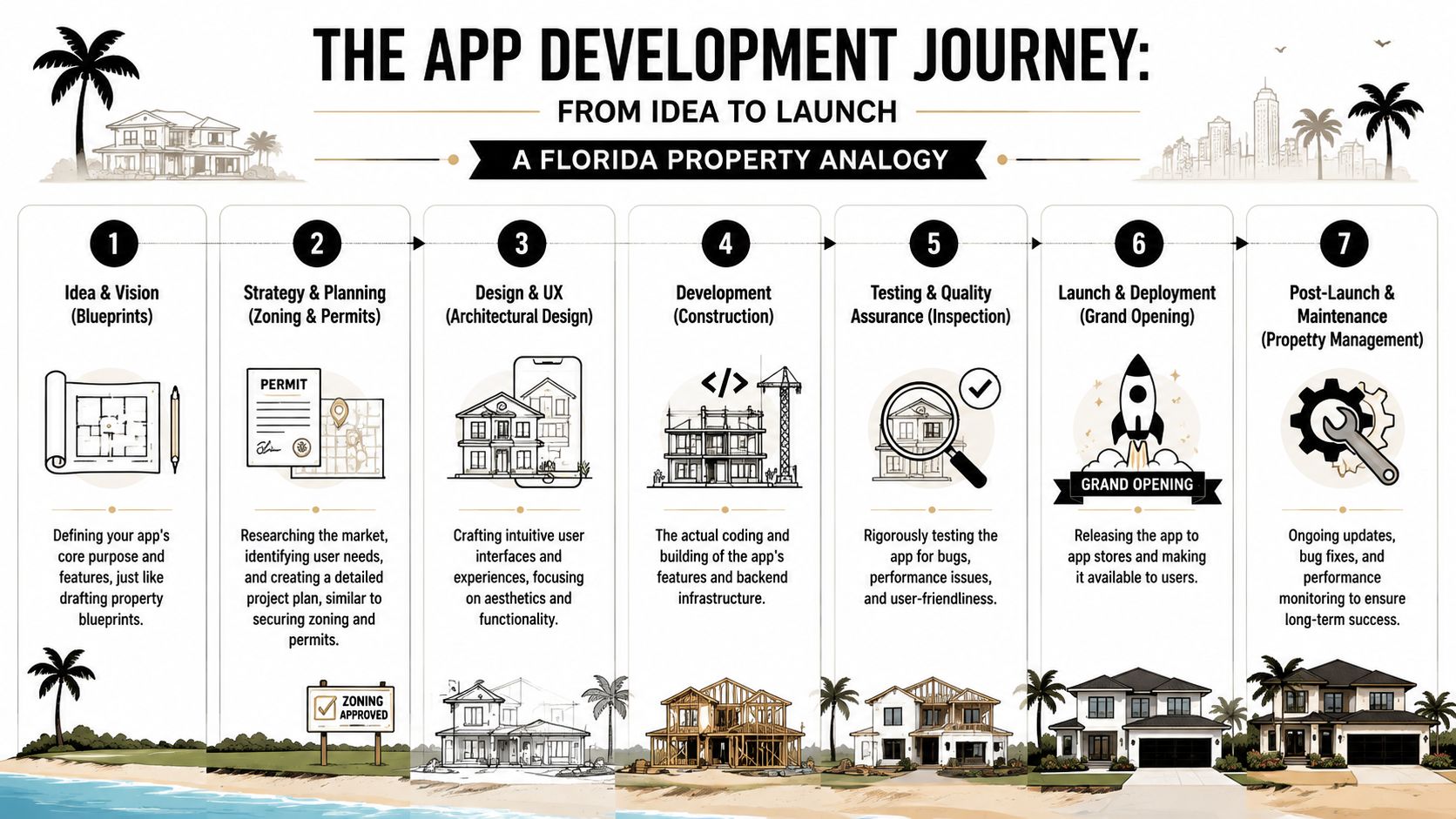
Most Florida owners understand construction better than software. That's the easiest way to think about app development. If you'd never pour a slab before reviewing plans, you shouldn't start coding before defining the app's structure, constraints, and standards.
Start with blueprints, not features
The first phase is discovery, during which the team decides what the app is for, who uses it, and what must happen on day one versus what can wait. For a home service company, that might mean customer booking, dispatch, job status updates, and payment collection. For a clinic, it might mean intake, appointment reminders, and secure messaging.
A rigorous mobile app technical specification should define platform choice, backend architecture, and database type, and it should include detailed acceptance criteria for every launch-critical feature, according to Appfyl's technical specification guidance. That matters because vague requirements create expensive rework later.
A simple example helps. If you say, “customers should get notifications,” that sounds clear but it isn't. A usable requirement is more specific: when a technician is assigned, the customer receives a push notification; if delivery fails, the system logs the failure and shows an alert in the admin panel.
Design the flow before the code
UI and UX design is the equivalent of choosing layout, entry points, and how people move through the property. A polished screen means nothing if users can't complete the job quickly.
For local businesses, good design usually means less, not more. A Fort Myers cleaning company doesn't need ten menu layers. It needs customers to book, reschedule, pay, and contact support without confusion. An internal staff screen should show only the tasks that matter during a shift.
One practical way to validate early demand is to test your intake process before the app is built. A strong landing page with working forms can show whether customers will complete the actions you plan to put inside the app. If you need ideas for structuring those lead capture points, this guide to Orbit AI landing page forms is a useful reference.
Build the shortest path to the most valuable action. Everything else is decoration until proven otherwise.
Development is construction, not improvisation
Once the plans are approved, development starts. During this phase, teams build the frontend, backend, integrations, databases, and admin controls. The key trade-off here is usually native versus cross-platform.
Native iOS or Android can make sense when performance, device access, or platform-specific experience matters. Cross-platform options such as Flutter or React Native may fit businesses that need one codebase and tighter budget control. Neither is “best” in every case. The right choice depends on the workflow and how heavily the app relies on device-specific functions.
Testing is your final inspection
Testing shouldn't happen only at the end. It should verify every launch-critical flow against the acceptance criteria set earlier. Can a customer book? Can staff update status? What happens when a connection drops? What happens if payment fails?
For Southwest Florida businesses, QA should include local realities. A dispatch workflow that works perfectly on office Wi-Fi may fail for a field team moving between jobs. If your app depends on timing, location, or uploaded media, those conditions need real-world testing before launch.
Launch is the beginning of operations
Going live is more like opening the property than finishing construction. The app needs monitoring, updates, store submission management, bug fixes, and support. Owners who treat launch as the finish line usually end up scrambling when users start behaving in ways nobody anticipated.
The most successful app development Florida projects aren't the ones with the flashiest feature lists. They're the ones built in the right order, with fewer assumptions and a tighter connection to daily operations.
Estimating App Development Costs and Timelines in Florida
Cost is usually the first question, but it shouldn't be the first decision. Before you ask for a quote, figure out what kind of product you're building. A simple customer booking tool, a staff-facing workflow app, and a regulated healthcare platform are not in the same pricing category.
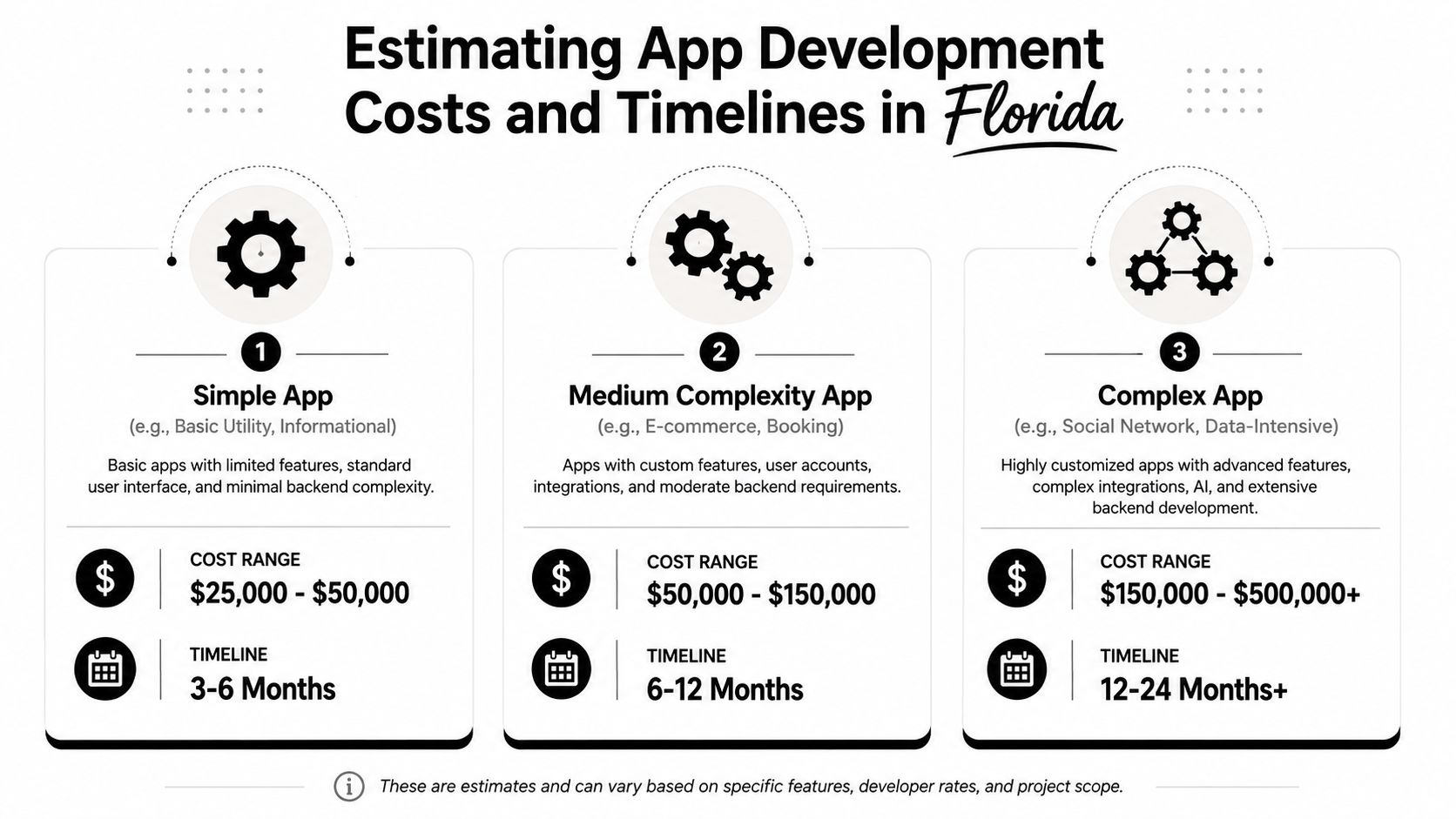
In Florida, basic mobile app development typically ranges from $5,000 to $20,000, medium-complexity projects range from $25,000 to $60,000, and enterprise-level apps range from $75,000 to $120,000 or more. Developer hourly rates generally fall between $75 and $200, based on GMTA Software's Florida pricing overview.
For a broader Miami-specific view, a simple booking app ranges from $25,000 to $60,000, a marketplace app costs $100,000 to $200,000, and fintech or healthcare apps requiring Florida-specific compliance can reach $150,000 to $400,000+, according to TekRevol's Miami app cost breakdown.
A quick explainer helps frame the ranges:
What drives the budget up or down
The biggest cost drivers are usually straightforward:
- Platform choice: Building for iOS and Android separately can increase scope compared with a cross-platform build.
- Feature depth: Booking is one thing. Real-time dispatch, role-based access, secure messaging, and payment flows add complexity quickly.
- Integrations: Stripe, QuickBooks, CRMs, EHR systems, and map tools all require planning and testing.
- Compliance needs: Healthcare and financial apps usually require tighter controls, documentation, and review.
- Admin tools: Owners often focus on the customer-facing app, but internal dashboards, permissions, and reporting are where a lot of value lives.
Practical examples for Southwest Florida businesses
Here's how that plays out in real terms:
| Business type | Likely first version | Budget reality |
|---|---|---|
| Naples boat tour operator | Booking, calendar sync, payment, confirmation messages | Often fits simple to medium scope |
| Fort Myers retailer | Inventory lookup, customer account, push alerts, purchase flow | Usually medium scope |
| Estero medical clinic | Secure patient actions, intake, reminders, regulated data handling | Often moves into higher-cost regulated scope |
| Cape Coral home service company | Customer booking, technician routing, status updates, photos, invoices | Medium or higher depending on dispatch complexity |
A basic scheduling app for a cleaning service may not need a large custom backend if the company can lean on existing systems. A healthcare app usually can't take that shortcut because privacy, data handling, and user permissions become central to the build.
Timelines are shaped by more than coding
Owners often underestimate how much time goes into decisions, approvals, and revisions. The coding phase is only part of the calendar.
A realistic timeline usually stretches when:
- Stakeholders keep changing features mid-build
- You haven't finalized content, workflows, or integration access
- Store requirements or compliance reviews surface late
- Testing reveals field-use issues that office demos missed
Budget guardrail: Ask every vendor to separate “must launch with” features from “phase two” features. That one move protects both budget and timeline better than most negotiations.
The Florida market is competitive enough that speed matters, but rushing the wrong scope is how owners end up paying twice. A smaller first release with clean priorities almost always beats a bloated build that launches late and still misses the core use case.
Florida Market and Legal Considerations for Your App
A Florida app project can fail long before users complain about design. It usually fails in planning, when nobody asks what data is being collected, who processes it, what state rules apply, or whether a regulated launch depends on approvals outside the development team's control.
Privacy obligations that affect your build
Under the Florida Data Privacy Law (FLDBOR), app developers acting as controllers must provide consumers a written notice confirming compliance after a request, and if a request is denied, they must offer a conspicuously available right of appeal. The law also requires written contracts with processors that define processing instructions, duration, nature, purpose, and obligations, while processors must use reasonable safeguards to protect personal data, as outlined in Clifford Chance's Florida privacy law overview.
In plain English, that means your app can't treat privacy as a footer-page afterthought. If customer data touches another vendor, such as hosting, analytics, messaging, payments, or support tools, those relationships need documentation. If you're sorting out the basics first, a good starting point is this guide on whether you need a privacy policy for your website, because many of the same practical issues carry over to apps.
Florida-specific compliance can affect timing
The other mistake I see is assuming the launch date depends only on design and development. In some industries, it doesn't.
For fintech apps, Florida MSB and OFR licensing can create a 90 to 180 day processing timeline, according to TekRevol's Miami fintech app guide. If you plan your marketing, hiring, or partner rollout around a technical go-live date and ignore that window, you can miss your actual market entry target.
Florida businesses serving children should also pay attention to Florida Senate Bill 1438, filed in 2025. It requires developers to determine whether an application is likely to be accessed by children and provide explicit notice to the app store. It also requires app stores to obtain parental consent before allowing a known child under 16 to download a covered app, and states that starting July 1, 2026, operating systems and app store versions for devices sold after that date must include device-based age verification requirements by default, according to the filed bill text for S 1438.
Security expectations should be assigned, not assumed
The FTC's guidance for app developers is practical and worth following even if your business is small. The agency says developers should assign at least one specific team member responsible for security at every stage, audit data collection so unnecessary personal data isn't gathered, and review third-party libraries for known vulnerabilities before integrating them, especially for apps involving children's, health, or financial data, based on the FTC's app security guidance.
If your vendor can explain features but can't explain data handling, processor responsibilities, and review steps, the project isn't ready.
For Florida businesses, legal planning isn't a separate lane from app development. It changes architecture, workflow, vendor selection, launch timing, and post-launch operations.
Alternatives to Native Apps PWAs and No-Code Platforms
A native app isn't always the smartest first move. Sometimes it is. Sometimes a PWA is faster and more practical. Sometimes a no-code tool is enough to fix an internal process without funding a full custom build.
When native apps make sense
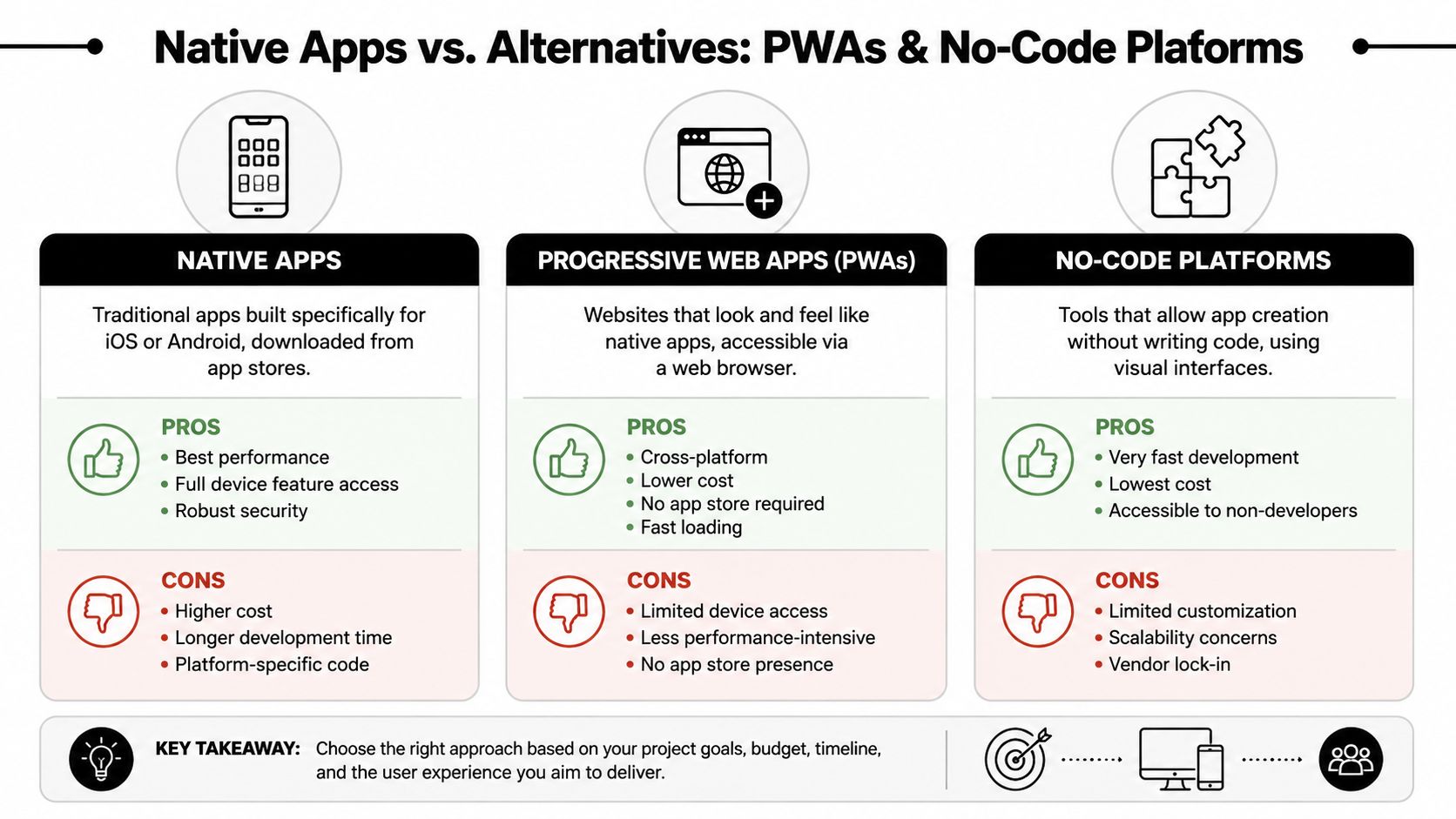
A native app is still the strongest fit when performance, device features, and reliability are central to the service. Think real-time dispatch, camera use, push notifications, geolocation, secure account actions, or workflows that must feel fast under pressure.
That's especially relevant in Southwest Florida, where generic advice often misses local operating conditions. Spiky demand can break weak backends if nobody stress-tests them, and signal loss zones can affect app performance for home service and healthcare teams, as noted in DianApps' discussion of Florida on-demand app realities.
When a PWA is the better first step
A Progressive Web App works well when the core goal is access, speed, and broad compatibility without requiring an App Store install. Restaurants, retail shops, event businesses, and some service companies can use a PWA for menus, ordering, appointment booking, or account access.
A PWA is often a good fit if:
- You need one experience across phones and desktops
- Your customers are unlikely to download another app
- You want faster deployment with lower platform overhead
- The workflow doesn't rely heavily on advanced device functions
If you're weighing performance trade-offs in web app delivery, this article on PWA and FMP removal is useful background on how performance measurement has evolved.
When no-code is enough
No-code and low-code tools can solve real business problems if you stay honest about limitations. For internal workflows, they can be a smart move. A Fort Myers retailer might build a lightweight inventory tracker. A service company might create a job checklist app for supervisors. A legal office might use a simple intake workflow internally before investing in a client-facing product.
Here's the practical comparison:
| Option | Best for | Main trade-off |
|---|---|---|
| Native app | High-performance customer or field workflows | Highest build and maintenance commitment |
| PWA | Broad access and simpler user journeys | Less device-level capability |
| No-code platform | Internal tools and quick validation | Limited customization and scaling flexibility |
What usually doesn't work
The worst outcome is choosing the cheapest route for a workflow that clearly needs something more powerful. A no-code tool may look fine in a demo but struggle once multiple user roles, permissions, integrations, and heavier usage hit at the same time. A PWA may handle booking well but disappoint if the business really needs deeper device access or more advanced offline behavior.
Choose the product type that fits the job your staff and customers need to complete. Don't force the business into the limitations of the tool.
For many app development Florida projects, the smartest sequence is not “build everything now.” It's validate the process, choose the lightest tool that can do the job well, and upgrade only when usage justifies it.
How to Hire the Right Florida App Development Team
The team you choose will shape your budget, timeline, and stress level more than the framework they use. A polished proposal doesn't mean much if the vendor can't translate your day-to-day operations into a build plan that works in Florida conditions.
Questions that expose real fit
Most owners ask about price first. Ask about process first. You want to know how the team thinks.
Good questions include:
How do you handle discovery for service-based or regulated businesses?
You want a clear process for gathering workflows, exceptions, approvals, and edge cases.How do you write requirements for launch-critical features?
Teams that can't explain acceptance criteria usually leave too much to assumption.How do you test for field conditions, weak signal areas, and peak demand periods?
That matters for Southwest Florida businesses more than it does in a generic pitch deck.Who owns project communication, and how often do we review progress?
You need one accountable lead, not a rotating inbox.What happens after launch?
Ask about bug fixes, monitoring, update cycles, and store submission support.
If you're already evaluating broader digital partners locally, reviewing what a Fort Myers web design agency should bring to strategy and execution can help sharpen your standards for app vendors too.
What strong teams do differently
Expert benchmarks show that including clear performance, security, and scalability expectations in the initial requirements document can reduce post-launch defects by up to 40% and accelerate MVP delivery by 2 to 3 weeks, according to Mind Studios' requirements document benchmarks. That's not just a technical detail. It tells you what disciplined teams prioritize before development begins.
Look for teams that:
- Clarify launch scope early: They separate must-have features from future phases.
- Document decisions well: They don't rely on memory during a long build.
- Speak in workflows, not buzzwords: They ask what staff, customers, and admins do.
- Treat QA as part of the process: They don't frame testing as something that happens only at the end.
Red flags that should slow you down
Some warning signs are easy to miss during sales calls:
- They jump to design before discovery
- They promise a launch date before defining scope
- They can't explain how change requests are handled
- They avoid discussing compliance, privacy, or security ownership
- They show pretty screens but no evidence of operational thinking
Hiring rule: If a team sounds like they're selling an app package instead of diagnosing a business workflow, keep looking.
A simple shortlist scorecard
| Evaluation area | What you want to hear |
|---|---|
| Discovery process | Questions about users, operations, and edge cases |
| Documentation | Specs, acceptance criteria, architecture, milestones |
| QA approach | Real-world testing, bug tracking, release readiness |
| Communication | Named project lead, review rhythm, escalation path |
| Post-launch support | Maintenance plan, updates, issue response process |
A strong Florida app team should feel like a problem-solving partner. If they only talk about code, they're missing the hard part of the job.
Launching Your App and Driving Growth in Florida
A launch without a growth plan is just a quiet release. The build matters, but the business outcome comes from adoption. If customers don't find the app, download it, trust it, and keep using it, the project won't produce much return.
Connect the app to channels you already control
The strongest launches usually tie the app into existing marketing assets. That means your website, Google Business Profile, email list, service pages, customer follow-up process, and paid campaigns should all support the app's main action. If the app helps with booking, billing, account access, or repeat ordering, those benefits need to appear everywhere customers already interact with your brand.
For local Florida businesses, that often looks like this:
- Service pages mention the app benefit clearly
- Email confirmations encourage repeat use through the app
- Office staff mention the app during scheduling and follow-up
- Google Business Profile posts and updates support the launch
- Paid search and social traffic point to a focused landing page, not a generic homepage
Don't separate ASO from local SEO
App Store Optimization matters, but many local businesses overestimate it and underestimate their own local presence. If someone searches your business name, a service category, or a location-specific phrase and lands on a weak web presence, the app won't fix that.
A better approach is to make the app part of the overall customer journey. A Naples clinic might use the app for reminders and intake after a patient first finds the business through search. A Fort Myers contractor might use the app to improve communication after a lead comes in through the website or Google Business Profile.
Measure behavior, not vanity
The first questions after launch should be practical. Are customers completing the intended action? Are staff using the workflow correctly? Are support requests dropping in the areas the app was supposed to improve?
If you want the app to generate real business growth, it has to fit into a lead and conversion system. A useful place to start is this guide on how to get more leads, because app adoption usually improves when the rest of the digital funnel is doing its job.
A good Florida app launch is coordinated. Operations, marketing, customer communication, and analytics all need to line up. Otherwise, you end up with a functional product that too few people use.
If you're trying to decide whether an app makes sense, what kind of build fits your business, or how to connect a launch to actual lead generation, Polaris Marketing Solutions offers a complimentary online analysis and competitor report for Southwest Florida businesses. It's a practical way to map out where your app, website, local SEO, and lead strategy should work together before you commit to the wrong build.