
Picking an ecommerce platform is one of the most important decisions you'll make for your online store. The right choice can feel like hiring your best employee, while the wrong one can cause constant headaches and lost sales. For most small business owners just starting, Shopify is the go-to all-in-one solution for its pure simplicity. But for those who already live and breathe WordPress and crave total control, WooCommerce is a powerhouse.
Choosing The Right Ecommerce Platform For Your Business

The platform you choose is the foundation of your digital storefront. It directly affects your daily operations, your sales process, and your ability to grow down the road. Whether you're a local retailer in Naples or a service provider in Fort Myers, this guide will help you navigate the choice with confidence.
We’re going to compare the top contenders on the market: Shopify, WooCommerce, BigCommerce, and Wix. Our analysis gets straight to what actually matters for a small business owner's time and money.
Key Evaluation Criteria
To find the right fit, we'll measure each platform against the core factors that impact your bottom line and how you spend your day. This isn't just about the monthly price—it's about the real cost and value.
Here's what we'll be looking at:
- Total Cost of Ownership: This goes beyond the subscription. We’re talking about transaction fees, must-have apps, and other hidden costs. For example, a free platform might require a paid app for customer reviews, adding an unexpected monthly expense.
- Ease of Use: How fast can you actually get your store online and running? We'll consider everything from adding products to processing your first order. For instance, can you create a 10% off coupon for a holiday sale in just a few clicks?
- SEO & Marketing Tools: What features are built-in to help customers find you on Google? A beautiful store no one can find isn't a business. Actionable example: Can you easily customize the URL of a product page to include important keywords, like changing
www.mystore.com/p-12345towww.mystore.com/products/organic-lavender-soap? - Scalability: Can the platform grow with you? Or will you be forced into a complicated and expensive migration in a few years? For example, if your sales triple next year, can you upgrade your plan to handle more traffic without the site crashing?
Your ecommerce platform isn't just a piece of software; it's the engine for your entire online business. The right choice simplifies your life and fuels growth. The wrong one becomes a technical nightmare that holds you back.
Before you make a final decision, it’s worth taking a moment to understand how these systems really operate behind the scenes. For instance, getting a feel for how Shopify works can help you picture your day-to-day workflow and see if it truly clicks with your business model.
To give you a quick starting point, the table below gives a high-level snapshot of our top picks, matching each platform to its ideal user.
Quick Guide to Top Ecommerce Platforms
This table gives a high-level overview to quickly match a platform to your primary business need.
| Platform | Best For | Starting Price | Key Strength |
|---|---|---|---|
| Shopify | Beginners & All-In-One Simplicity | $29/month | Ease of Use |
| WooCommerce | Maximum Customization & Control | Free (Requires Hosting) | Flexibility |
| BigCommerce | Businesses Planning to Scale | $29/month | Built-in Features |
| Wix Ecommerce | Visually-Driven Brands | $27/month | Design Freedom |
This cheat sheet is great for initial direction, but now let's dig into the details to see which one is truly the best foundation for your business.
The Online Shift: Why Your Business Can't Afford to Wait
Before we get into the nuts and bolts of comparing platforms, let’s talk about the ground beneath our feet. The way people shop has completely changed. It’s not a passing trend; it’s a permanent move to buying online, and it has blown the doors wide open for small business owners who are ready to step up.
What used to be a frustrating, expensive headache is now more straightforward than ever. Thanks to modern, cloud-based ecommerce platforms, the old barriers—both technical and financial—that kept small businesses out of the game have been torn down. Launching a professional online store is something almost any business owner can do.
A New Chapter of Opportunity for Small Businesses
This isn't just a feeling; the numbers are staggering. The global ecommerce platform market was valued at an estimated USD 11.55 billion in 2025 and is on track to hit a massive USD 61.83 billion by 2034. That’s a compound annual growth rate of 20.49%, which tells us this isn't a bubble—it's the new standard for doing business. You can discover more insights on the explosive growth of the ecommerce platform market and see what it means for entrepreneurs like you.
And this isn't just a story about Amazon and the big-box retailers. The real engine behind this growth is the rise of flexible, affordable tools built for small businesses.
A full 69% of the ecommerce platform market now runs on cloud-based models. This is huge for small business owners. It means you get access to incredibly powerful and scalable tools without needing a server room in your back office or an IT department on payroll.
For any local business, this changes everything. An online store is no longer a "nice-to-have" add-on. It's a core part of your business.
- Go Beyond Your Zip Code: A local boutique in Cape Coral can suddenly sell unique finds to customers in California, not just the people walking down the street. For example, they can run a Facebook ad targeting users interested in "boho jewelry" across the entire US.
- Sell Around the Clock: Your business is open and making sales even when you're asleep, breaking free from the limits of a 9-to-5 storefront. A customer in a different time zone can purchase a product at 3 AM your time, and the order will be waiting for you in the morning.
- Get to Know Your Customers: These platforms give you real data. You can see what people are buying, what they’re searching for, and how they found you. For instance, you might notice your "handmade leather wallets" are your top-selling product, signaling you should stock more or create similar items.
From Local Shop to a Brand That Lasts
Whether you’re a service provider in Bonita Springs or run a retail shop in Naples, picking the right ecommerce platform is about so much more than just processing online payments. It’s about building a resilient brand that can weather any storm and connect with customers wherever they are.
This is your chance to build a direct line to your audience, tell your own story, and carve out a real advantage in a crowded market. Acting on this opportunity is the key to building a stronger, more profitable business for 2026 and beyond.
A Detailed Comparison Of Top Ecommerce Platforms
Picking the right ecommerce platform feels like choosing a business partner. It’s about more than just a list of features; it’s about finding the right foundation for your growth. We're going to cut through the marketing noise and get into a real, side-by-side comparison of the top contenders: Shopify, WooCommerce, BigCommerce, Wix, and Squarespace. We’ll look at what truly matters for your daily operations and your bottom line.
Total Cost Of Ownership Uncovered
The price you see upfront is almost never the full story. A "free" platform can bleed you dry with hidden costs, while a paid one can deliver incredible value. To understand the true cost, you have to look at the whole picture: subscriptions, transaction fees, and the essential apps you'll need.
Shopify's All-In-One Model
Shopify makes budgeting pretty straightforward with its tiered pricing. You pay a single monthly fee (starting around $29/month) that bundles your hosting, security, and the core platform. The real detail to watch, however, is the transaction fees.
- If you use Shopify Payments, their own payment processor, you won't pay any extra transaction fees—just the standard credit card rates (around 2.9% + 30¢).
- But, if you decide to use an outside gateway like PayPal or Stripe, Shopify will add its own fee on top of every sale, ranging from 0.5% to 2% depending on your plan.
And then there are the apps. While Shopify's app store is massive, many of the best tools for marketing, customer loyalty, or complex shipping rules come with their own monthly fees. A typical small business can easily spend an extra $50-$150 per month on just a few crucial apps. For example, adding a subscription service app like ReCharge might cost $99/month, and an email marketing app like Klaviyo could add another $45/month.
WooCommerce's A La Carte Approach
WooCommerce is a free plugin for WordPress, and that "free" tag is its biggest draw. But it's a bit misleading. You’re on the hook for sourcing and paying for all the individual pieces yourself. This includes:
- Hosting: Good, reliable hosting that can handle an online store will run you $25-$50 per month to get started.
- Domain Name: Figure on about $15-$20 per year.
- Premium Extensions: While there are free add-ons, key features like subscription billing, advanced shipping rules, or dynamic pricing almost always require paid extensions. These can cost $50-$300 per year for each one. For example, the official "WooCommerce Subscriptions" extension costs $239 per year.
- Security: You'll need an SSL certificate, though thankfully, most good hosting providers include this now.
The main financial advantage with WooCommerce is that there are no platform-level transaction fees. You only pay the processing rates from your chosen payment gateway, like Stripe or PayPal.
Key Takeaway: Shopify gives you predictable costs but can feel restrictive if you want to use your own payment processor. WooCommerce has a lower barrier to entry but requires you to be a smart shopper for hosting and extensions, as those costs can add up fast.
Ease Of Daily Management
How you spend your day is just as important as how you spend your money. Your platform should make running your store—adding products, fulfilling orders, creating sales—feel empowering, not like a chore.
A determined business owner can get a basic Shopify store up and running in a single weekend. The setup is guided, the dashboard is clean, and you can spend your time selling instead of wrestling with technology. Adding a product or creating a discount code is dead simple and takes zero technical expertise.
WooCommerce, built on top of WordPress, has a steeper learning curve. You're essentially managing two powerful systems at once. This gives you incredible flexibility but also means you’re in charge of updates, plugin conflicts, and troubleshooting. If you're already a WordPress pro, it feels like a natural fit. For a complete beginner, it can be a lot to handle.
Actionable Example (Shopify): A local Naples candle maker wants to drop a new "Limited Edition Summer Scent." In Shopify, they click 'Products,' then 'Add product,' fill in the details, upload a few photos, set the price, and click 'Save.' The whole thing takes five minutes, tops.
Actionable Example (WooCommerce): That same candle maker on WooCommerce would log into their WordPress dashboard, go to 'Products,' and click 'Add New.' The interface is busier, with tabs for inventory, shipping classes, and linked products. It's more powerful, for sure, but it demands more clicks and a deeper understanding of how the system works.
Built-In SEO And Marketing Tools
A stunning storefront is worthless if no one can find it. Strong Search Engine Optimization (SEO) features are non-negotiable for bringing in free, organic traffic from Google.
BigCommerce's SEO-First Approach
BigCommerce really shines here, giving you a powerful set of SEO tools right out of the box—no extra apps needed. You get full control over your URLs, meta descriptions, and title tags. It also handles technical SEO basics like generating a sitemap.xml and managing 301 redirects, which is critical for preserving your rankings when you update or move pages. For example, if you change a product's name, you can create a 301 redirect in the BigCommerce dashboard to send visitors from the old URL to the new one, preventing "404 Not Found" errors.
Shopify vs. WooCommerce on SEO
Shopify delivers solid, user-friendly SEO fundamentals. It makes the basics easy, so beginners can quickly edit page titles and descriptions. Its main drawback is a rigid URL structure; it forces /collections/ and /products/ into your URLs, which can be a small annoyance for SEO perfectionists who crave total control.
WooCommerce, being part of the WordPress ecosystem, can be an SEO beast in the right hands. Pair it with a plugin like Yoast SEO or Rank Math, and you get granular control over every single on-page element. This flexibility is incredible for advanced strategies, but it also puts the burden on you to get it right. For instance, with Yoast, you can set a "focus keyphrase" for a product, and the plugin will give you specific, actionable tips to improve its on-page SEO.
In the end, while many platforms can build a nice website, the ecommerce space is dominated by a few giants. WooCommerce leads the pack globally with 4.23 million active stores, with Shopify close behind at 2.80 million. Here in the United States, Shopify powers 28% of ecommerce sites, and Wix accounts for 21%.
Scalability And Future Growth
When you choose a platform, you’re not just choosing for today. You’re betting on where your business will be in three to five years. Moving an established online store is a nightmare—it's costly, time-consuming, and risky. You need a platform that can grow with you.
Shopify was designed for scale. Its plans let you upgrade seamlessly as your sales grow, unlocking lower transaction fees and more advanced features along the way. Their Shopify Plus plan is a genuine enterprise-level solution that powers some of the biggest brands in the world, proving the platform can handle just about anything you throw at it.
BigCommerce is also built with growth in mind, especially for stores with huge or complex catalogs. It charges no transaction fees on any plan and can handle up to 600 variations per product without needing workarounds or extra apps. One thing to watch for is its automatic plan upgrades. Once your annual sales cross a certain threshold, you're bumped to the next tier, which can be an unexpected expense if you aren't prepared. For example, crossing $50k in annual sales on the Standard plan automatically moves you to the $79/month Plus plan.
WooCommerce's ability to scale is tied directly to your hosting. With a powerful server and a well-optimized site, a WooCommerce store can handle massive traffic. But that scalability is completely manual. You’re the one who has to upgrade your hosting, set up a content delivery network (CDN), and make sure your site stays fast under pressure. For instance, if you get featured on a major blog, you'd need to contact your hosting provider to increase server resources to prevent your site from crashing.
To help narrow it down, you can explore a quick comparison of the best ecommerce platform for small business to see how these options perform in different situations. And if your primary goal is a visually impressive site for a smaller-scale operation, you might also want to look at our guide on the https://polarismarketingsolutions.com/best-website-builders-for-small-business/.
Platform Recommendations For Your Business Model
There's no single "best" ecommerce platform—the right choice isn't about finding a one-size-fits-all winner. It’s about matching the right tool to your specific business. The platform that works wonders for a local retailer selling physical goods will likely be a terrible fit for a consultant selling digital courses.
This is where we get practical. Let's break down which platforms really shine for different kinds of businesses, with real-world examples to show you how they work.
The flowchart below gives you a simple path to follow based on what you sell.
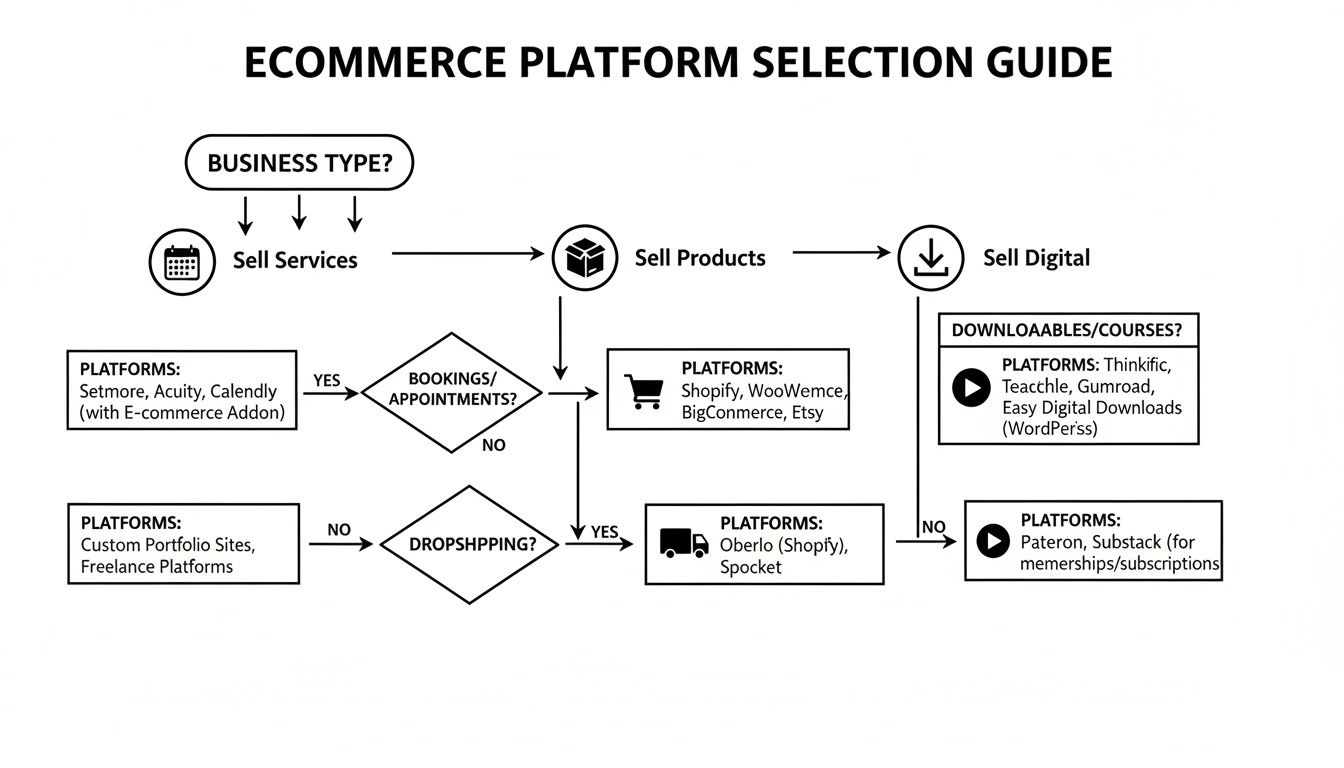
As you can see, your core offering—whether it’s a physical product, a scheduled appointment, or a downloadable file—is the single most important factor. Each path points you toward a platform built with the features you'll actually need to run your business smoothly.
For Local Retailers Selling Physical Products
If you run a local boutique here in Fort Myers, your world revolves around managing physical inventory and making it easy for customers to buy from you. You need a system that can handle both in-store sales and online orders with local pickup, all while keeping your stock levels in sync to avoid overselling.
Best Platforms: For this, Shopify and Square Online are the clear front-runners.
Shopify is a powerhouse, especially with its excellent Point of Sale (POS) system that bridges the gap between your physical and online stores. Its built-in local pickup and delivery tools are robust and simple to set up, letting you define pickup locations and automatically fire off notifications when an order is ready. It's a game-changer for day-to-day operations.
- How It Works: A Naples gift shop uses Shopify POS. When a customer walks in and buys a gift basket, the online inventory is updated instantly. A few minutes later, another customer orders online and chooses "in-store pickup." The system automatically flags the order for the staff and sends the customer a text once it's packed and waiting at the counter.
Square Online is a perfect fit for any business that already uses Square for in-person payments. Its greatest strength is the flawless sync between your physical and digital operations right out of the box. All your inventory, sales data, and customer information live in one dashboard, simplifying the management of a hybrid retail business.
For small businesses with a physical storefront, the key is a unified system. A platform that can't sync in-person and online inventory in real-time creates constant headaches and risks disappointing customers.
For Service-Based Businesses Selling Appointments
When your business sells time—think home services, consulting, or salon appointments—your platform needs to be a master of booking and scheduling. You need a system that can manage your calendar, sell appointment packages, and take payments upfront to secure bookings.
Best Platforms: Wix and Squarespace are designed from the ground up for service providers.
Wix comes with a powerful, built-in tool called Wix Bookings. It lets clients schedule appointments right on your website, syncs with your Google Calendar to prevent double-bookings, and even lets you sell service packages or memberships.
- How It Works: A home cleaning service in Cape Coral uses Wix Bookings to sell packages of three cleaning sessions. A customer can go online, buy the package, pick three available dates from the live calendar, and pay for everything at once. No phone calls needed.
Squarespace also has a fantastic scheduling tool, Acuity Scheduling, that’s deeply woven into the platform. It's known for its clean, professional interface and powerful features, like intake forms that collect client details during booking and automated reminders via email and text to cut down on no-shows.
For Creators Selling Digital Products
If you’re a consultant, artist, or author selling digital goods like e-books, guides, or software, your needs are completely different. Your platform has to handle secure file delivery, manage who gets access, and protect your hard work from being shared without permission.
Best Platforms: WooCommerce and Shopify (with apps) are both excellent here.
WooCommerce gives you incredible control over selling digital products. You can offer files of any size, limit the number of downloads, and set expiration dates on access. Because it’s open-source, you have the freedom to customize the entire delivery process without being locked into a third-party app for basic functions.
Shopify also does a great job with digital products, relying on free and paid apps from its marketplace. Apps like "Digital Downloads" (made by Shopify) or "SendOwl" create secure, unique links that expire after a certain time or number of clicks, ensuring your files stay protected.
- How It Works: A business coach sells a PDF workbook using Shopify and the Digital Downloads app. Every time someone buys it, they instantly get an email with a unique, time-sensitive download link. The whole process is automated, saving the coach hours of manual work and keeping the file secure.
Winning With Mobile And Social Commerce
Let's be blunt: if your online store doesn't work flawlessly on a smartphone, it might as well not exist. The days of treating mobile as an afterthought are long gone. Your shop needs to fit into your customer's pocket, ready for them to browse and buy whenever the impulse strikes.
The numbers don't lie. Mobile commerce accounts for nearly 59% of all online retail sales across the globe. Here in the United States, that figure is 44.2%, with a staggering three out of four shoppers making purchases directly from their phones. If you want to see the full story, check out the dominance of mobile in current ecommerce statistics.
Ignoring mobile is like telling half your potential customers you’re not interested in their business. That makes a platform's mobile performance and social selling features a deal-breaker. It’s not enough for your site to just shrink on a small screen; the entire experience, from finding a product to checking out, has to feel effortless.
Mobile Responsive Design And Checkout
Every platform on our list—Shopify, WooCommerce, BigCommerce, and Wix—gives you mobile-responsive themes. But how they handle the mobile experience in practice is what really matters. A great mobile site is fast, intuitive, and makes buying stupidly simple.
- Shopify is the clear leader here. Its themes are built mobile-first, not as an adaptation. The checkout is legendary for a reason; it’s streamlined for small screens and supports one-click payments like Shop Pay, which is a huge conversion booster.
- WooCommerce puts the responsibility on you. Your mobile experience is only as good as the theme and hosting you choose. A well-built theme can be perfect, but a cheap or poorly coded one will create a slow, clunky site that hemorrhages sales.
- BigCommerce also delivers a strong, built-in mobile checkout. They’ve clearly focused on speed and minimizing the number of taps a customer needs to make to complete a purchase.
A slow or confusing mobile checkout is the number one killer of sales. If a customer has to pinch-and-zoom just to type in their credit card number, you’ve almost certainly lost them. The best platforms make this feel as easy as sending a text.
Social Commerce Integrations
Your customers are discovering new products on Instagram and Facebook, not just Google. The ability to sell directly on these platforms—a practice called social commerce—is a game-changer for small businesses because it closes the gap between seeing something cool and buying it.
While all the top platforms offer social selling tools, the quality and ease of use are worlds apart.
Picture this with Shopify: A jewelry artist in Naples syncs her product catalog to Instagram Shopping. She posts a photo of a new necklace and tags the product. A follower taps the tag, sees the price, and clicks "View on Website" to go straight to the product page. The sale is made in seconds, without ever feeling like a clunky shopping process.
Or consider this with Wix: A personal trainer sells fitness plans through his Wix site. He connects his store to his Facebook Business Page, creating a "Shop" tab. His followers can now browse and purchase his workout plans without leaving the Facebook app.
These kinds of direct integrations turn casual browsing into impulse buys. To get a better handle on this world, check out our guide on effective social media management tools for small businesses. When you're choosing your platform, pay close attention to how well it works with the social media channels where your customers are already spending their time.
Implementing Your Ecommerce Growth Strategy
So, you've picked your ecommerce platform. That's a huge decision, but the truth is, the real work is just getting started. Now it's time to bridge the gap between having the software and actually running a profitable online store. This means moving from the initial setup to getting that first wave of paying customers through the door.
Your immediate focus will be on the fundamentals: configuring your store’s core settings, uploading your products with fantastic photos and descriptions, and getting your payment and shipping options dialed in. Getting this foundation right is non-negotiable for a smooth customer experience. But in a crowded market, just having a store online isn't enough to make the sales start rolling in.
From Launch to Local Leader
This is where having a dedicated partner can completely change the game. While you're busy running your business, Polaris Marketing Solutions gets to work turning your new online store into a genuine sales machine. We provide professional website design and expert configuration for the best ecommerce platforms for small business, making sure your site is built to convert from day one. You can see how we build stores that actually perform with our approach to custom ecommerce web design.
An online store without traffic is just a digital warehouse. True growth comes from a targeted strategy that connects your products with the right customers, consistently and profitably.
Our job doesn't stop at launch. We connect your new platform to real, measurable outcomes by driving qualified traffic straight to your products.
- Local SEO: We get your site dominating search results right here in the Fort Myers area, ensuring local shoppers find your business before they find your competitors.
- Targeted PPC Advertising: We build and run ad campaigns that zero in on high-intent buyers, delivering immediate traffic and sales to your bottom line.
Think about it: a boutique in Naples could use our local SEO to pop up first on Google when someone searches "gift shops near me." At the same time, we could run a targeted ad campaign showing off their newest products to Instagram users within a 10-mile radius.
This integrated approach is designed to make sure your investment generates a tangible return, transforming your new ecommerce store into a cornerstone of your long-term success.
Frequently Asked Questions About Ecommerce Platforms
As you weigh your options, a few key questions always come up. Getting straight answers is the only way to make a decision you won’t regret later on.
Let's cut through the noise and tackle the concerns we hear most often from small business owners.
How Much Does It Really Cost To Run An Ecommerce Store?
The sticker price of a platform is never the whole story. The monthly subscription is just the starting point, and smart business owners know to look at the total cost of ownership.
To get a true picture of your monthly investment, you have to account for the extras:
- Transaction Fees: Nearly every platform will take a cut of each sale for payment processing, usually around 2-3%.
- Premium Themes: A professional, trustworthy design isn't free. Expect to pay a one-time fee of $50-$200 for a quality template.
- Essential Apps: Your store will need tools for marketing, customer reviews, or advanced shipping. These can easily add $20-$100+ to your monthly bill.
Take a platform like WooCommerce, for instance. It boasts no monthly fee, which sounds great. But the reality is you have to pay for your own website hosting, which starts at $15-$30 per month for a service that can actually handle the demands of an online store.
Can I Switch Ecommerce Platforms Later?
Technically, yes, you can always switch. But I'll be direct: it's a nightmare you want to avoid. Migrating an online store is a complex, expensive, and incredibly time-consuming project.
You’re not just moving a few images around. You’re transferring your entire business—every product, every customer file, and all your past order data. Get it wrong, and you risk losing critical information or destroying your search engine rankings. For example, failing to redirect your old product URLs to the new ones can cause all your Google rankings to disappear overnight.
It's far more effective to choose the right platform from the start. Picking a platform that can grow with your business saves you from a massive headache down the road. A painful migration almost always requires technical experts to prevent data loss and SEO damage.
Which Ecommerce Platform Is Best For SEO?
There’s no magic button here. The best platform for SEO is the one you’ll actually use to its full potential. Your rankings depend entirely on your strategy, not just the software.
If you have the technical skills and want absolute, granular control over every SEO element, WooCommerce is tough to beat. It’s built for advanced optimization. For example, using a plugin like Rank Math, you can edit your site's robots.txt file directly from your WordPress dashboard to control how search engines crawl your site.
On the other hand, Shopify offers powerful, user-friendly SEO tools right out of the box that are perfect for beginners. BigCommerce also earns high marks for its built-in SEO features that don't require a ton of tinkering. The "best" one is simply the one that empowers you to create great content and a seamless experience for your customers.
Ready to build an online store that drives traffic and sales? Polaris Marketing Solutions specializes in professional ecommerce web design, local SEO, and targeted advertising to ensure your new store delivers a clear return on investment. Let us help you grow your business in the Fort Myers market. Learn more at https://polarismarketingsolutions.com.